On this page
- Which QuickBooks You Run Decides Which AI You Get
- Categorizing Bank Transactions Is the Strongest Part, and It Still Needs a Reviewer
- Invoices Draft From the Documents You Hand It
- The Chat Answers Questions About the Books, Within a Monthly Allowance
- The Rest of the AI, One Line Each
- Turn It On for the Bookkeeping, and Keep a Person on What It Posts
- Where Billing Starts Outside QuickBooks, Qvery's Agents Take Over
- Frequently asked questions
When a company employs a few hundred people, its finance team is often a controller and a handful of clerks, and their month splits in two.
One half is keeping the books right inside QuickBooks: categorizing every bank transaction, matching deposits to invoices, entering supplier bills, closing the month. The other half is getting into QuickBooks what happened somewhere else: the jobs finished, the shipments delivered and the hours approved that have to become customer invoices.
In our example, the second half is the larger bill: a company raising 1,500 invoice lines a month from its operations records spends about 75 hours of a billing clerk's month finding each record, matching the customer and the item, checking the price and typing it in: $31,563 a year at a clerk's pay with benefits.
Intuit's AI for that month is Intuit Intelligence, built into QuickBooks and released in beta with the Fall 2026 update, the latest form of the AI agents Intuit launched in 2025.
The owner's question is whether it covers the finance team's month or only part of it, so we weighed each AI feature against that month.
Inside the books, it is a useful first pass that a person still checks, and the plan you are on decides how much of it you get. It drafts invoices from documents someone hands it, so the billing that starts in your operations records still waits for a person.
At Qvery, we help growing companies cut what billing costs and put their clerks back on the accounts that need attention, with custom AI agents that collect your finished work where it is recorded, match every line to QuickBooks and prepare the invoices your billing lead releases.
Which QuickBooks You Run Decides Which AI You Get
The plans that fit a business with a few hundred staff are Advanced, the top QuickBooks Online plan and the only one with more than five users, and IES, the system Intuit sells above Advanced for larger companies and groups of companies.
The AI is spread across the plans below them, and each step up adds to it. Intuit shows each price at half off for the first three months.
| Plan: list price a month | Users | What its AI adds |
|---|---|---|
| Simple Start: $38 | 1 | The chat (beta), expense categories |
| Essentials: $85 | 3 | Ready-to-post bank lines, invoices from documents (beta), reminders |
| Plus: $140 | 5 | Continuous categorization, reconciliation, anomaly checks |
| Advanced: $340 | 25 | Finance and project AI, books checks, custom roles |
Two lines in Intuit's own help center matter more than the table. The chat, where most of the asking happens, is for admin users only, with a monthly allowance that resets each billing cycle; a $10 add-on raises it, and Intuit says no plan offers unlimited prompts.
And Intuit Intelligence is available on QuickBooks Online and on Intuit's suite for accountants only: on IES, the step up for a growing company, it is early access, and only for customers with a single company.
IES publishes no price; Intuit agrees one per customer after a call. Moving up keeps the books where they are, since every plan from the free one to IES runs on one platform.
Advanced's 25 users are room for the finance team itself. They get tight once the people who approve bills and raise jobs across the company each need a login.
Categorizing Bank Transactions Is the Strongest Part, and It Still Needs a Reviewer
On the bank page, QuickBooks suggests a match or a category for every transaction from the company's own history and the full bank description, and marks each suggestion green, blue or orange for how much evidence sits behind it.
It finds partial and combined matches, and warns when a line looks like one whose record has not arrived yet.
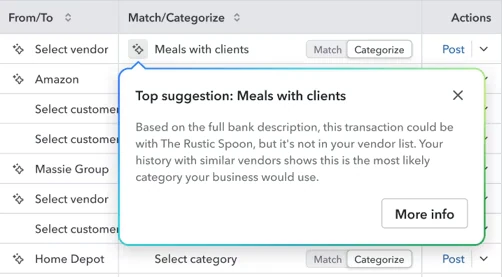
From Essentials up, the lines it is most sure of are grouped as ready to post, so a person can post them in one step after a look, and a line it cannot place can go as a question to whoever made the purchase.
From Plus up, categorizing runs on its own as transactions arrive, and the AI reconciles, matching the books to the bank and flagging what does not tie out.
This is where the AI earns its place.
The bookkeepers who describe their routine mostly describe it the same way: the confident matches are quick to check, the guesses on new vendors are not, and they still look at a line before it posts.
Intuit says much the same in its terms: its assistants may be wrong, and the customer answers for what they do.
What Reddit says
Bookkeepers and owners on QuickBooks' bank page and receipts
I first filter what is in the feed to "suggested matches." Reviewing those is fast because QBO often matches those correctly. I just need to eye them to be certain.
A year ago, QBO's mistakes were poor guesses about how a transaction from a new vendor should be categorized. Now QBO misapplies rules and fails to suggest correct and obvious matches.
Processing those is less than three seconds each once it’s in the system: verifying the amount, the vendor, the payment method, and account.
I don't let QBO automatically categorize anything. I review every transaction. Even if a rule is applied.
Verdict for this feature: worth turning on for a team whose transactions repeat, with a person posting what it suggests. A team with many new vendors each month gets more suggestions to correct.
Invoices Draft From the Documents You Hand It
A person uploads statements of work, sales orders or contracts, or points the chat at a Google Drive folder, and invoicing on autopilot, in beta from Essentials up, reads them, matches each to an existing customer and product, and lines up draft invoices for review. Nothing goes to a customer until someone selects send.
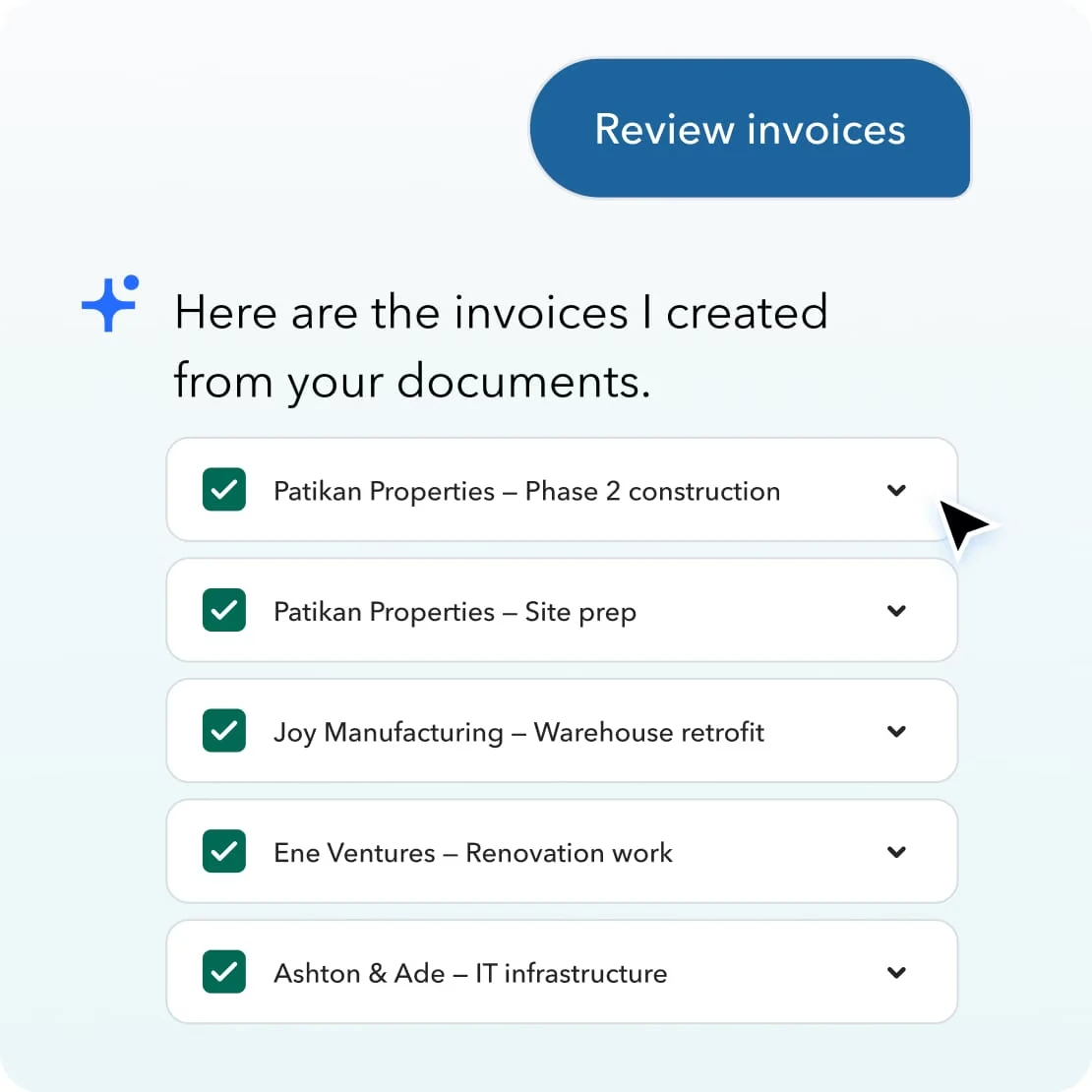
Intuit's own help article draws the edges. It takes five documents a message and works with Google Drive and no other cloud store, and its note on duplicates is the one to read before it bills anyone.
Reminders are the stronger half. A saved automation flags overdue invoices on the rules you set, a person picks which reminders go, and Intuit reports that customers using its AI-drafted reminders are paid 4 days sooner on average than customers sending standard ones, by its own comparison of US customers from March 2025 to March 2026.
Verdict for this feature: good for a company that bills from a statement of work or a sales order a few times a month. For one that raises hundreds of invoice lines from what its operations recorded, someone still gathers the documents, five at a time, and checks each draft against what was already billed.
The Chat Answers Questions About the Books, Within a Monthly Allowance
Ask it how the month went, which invoices are overdue or why a cost moved, and it answers from the company's own numbers. It builds reports on request, forecasts cash, and on Plus and Advanced runs what-if scenarios on a price change or a new hire. On Advanced it also writes the summary for a management report.
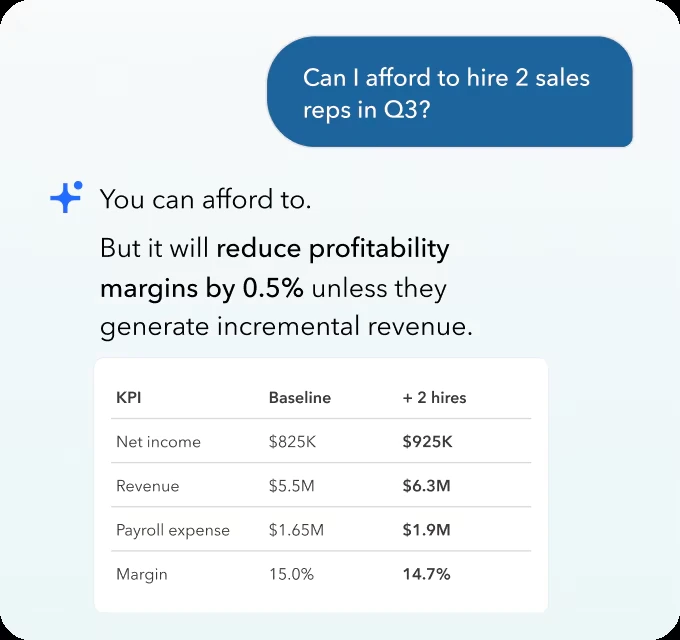
The limits are the ones above: admins only, a monthly allowance, and a beta that Intuit says can make mistakes. For a finance team where five people want to ask it things, the allowance and the admin rule decide more than the answers do.
The same answers now reach ChatGPT, Claude, Gemini, Perplexity and Meta's Muse through Intuit's own connectors, in beta, with invoicing in ChatGPT and Claude generally available. Nothing sends until a person approves it, and Intuit says the data stays in its systems and is not used to train its partners' models.
Read the terms before you let any assistant near the books. Intuit's terms say that what you give its assistants may be used to improve its products, and that you alone answer for what results from using them.
They also bar scraping and unauthorized access, so an outside agent belongs on Intuit's connectors or its API rather than on a person's login in a browser.
A tool that tells you it can make mistakes, and that you answer for what it does, has told you who keeps the review. That is a fair deal, as long as you count it. The reviewer's hours are part of what QuickBooks' AI costs you, and they belong in the comparison next to the hours it saves, before anyone decides the team can stay the size it is.
The Rest of the AI, One Line Each
- Bills from email: vendors send invoices to a QuickBooks address, and Bill Pay's AI turns them into bills ready to approve, then posts the payment
- Payroll: prepares a pay run from your phone, and runs it only when someone submits it (QuickBooks Workforce, sold separately)
- Sales tax: checks the return for errors before you file (Plus and up)
- Customers: sources leads and drafts follow-ups (Plus and up)
- Projects: creates projects and allocates their costs (Advanced)
- Agent Studio: a pilot, shown at Intuit's October conference, for accounting firms to build their own agents; not open to a company's own team
Turn It On for the Bookkeeping, and Keep a Person on What It Posts
Pros
- Suggests a match or a category for every bank transaction and shows how much evidence is behind it
- Groups its most confident lines so a person can post them in one step (Essentials and up)
- Turns vendor emails into bills ready to approve, then posts the payment
- Drafts invoices from the documents you upload, matched to your customers and products
- Waits for a person before it sends an invoice or a reminder, or runs payroll
Cons
- Its AI features cannot be turned off one by one, by Intuit's own help center
- The chat is for admins only, with a monthly allowance and no unlimited plan
- Drafts invoices five documents at a time and does not check them against invoices already raised
- Continuous categorization needs Plus or Advanced, and Finance AI needs Advanced
- Its newest AI is early access on IES, the step up for larger companies, and only for single-company customers
QuickBooks' AI is a capable assistant for the work already in your books. The work that never reached them is still yours.
Turn it on if your finance team's month is mostly bank transactions, supplier bills and a modest number of invoices. On Plus or Advanced it takes the first pass of categorizing and matching off your team, and the reviewer it needs is already on it.
Do not count on it to carry the month if your invoices come from an operations system, a project tracker or a shared sheet, or if you are moving to IES for several companies and expect the newest AI on day one. The first is outside its reach, and the second is early access.
Where Billing Starts Outside QuickBooks, Qvery's Agents Take Over
A field job closes in the service app, a delivery is confirmed in the warehouse system, a consultant's hours are approved in the time tracker, a milestone is signed off in a spreadsheet. None of it is in QuickBooks yet.
Someone finds each one, matches it to the right customer and item in QuickBooks, checks the price and the purchase order, makes sure it was not billed last week, and types it.
In our example that is 1,500 invoice lines a month at about 3 minutes each, 75 hours of a billing clerk's month. Federal wage data put billing clerks at a mean $24.55 an hour in May 2025 (Bureau of Labor Statistics), and pay is about 70% of what a private employer spends on an hour of work, so the hour costs $35.07 and the job costs $31,563 a year.
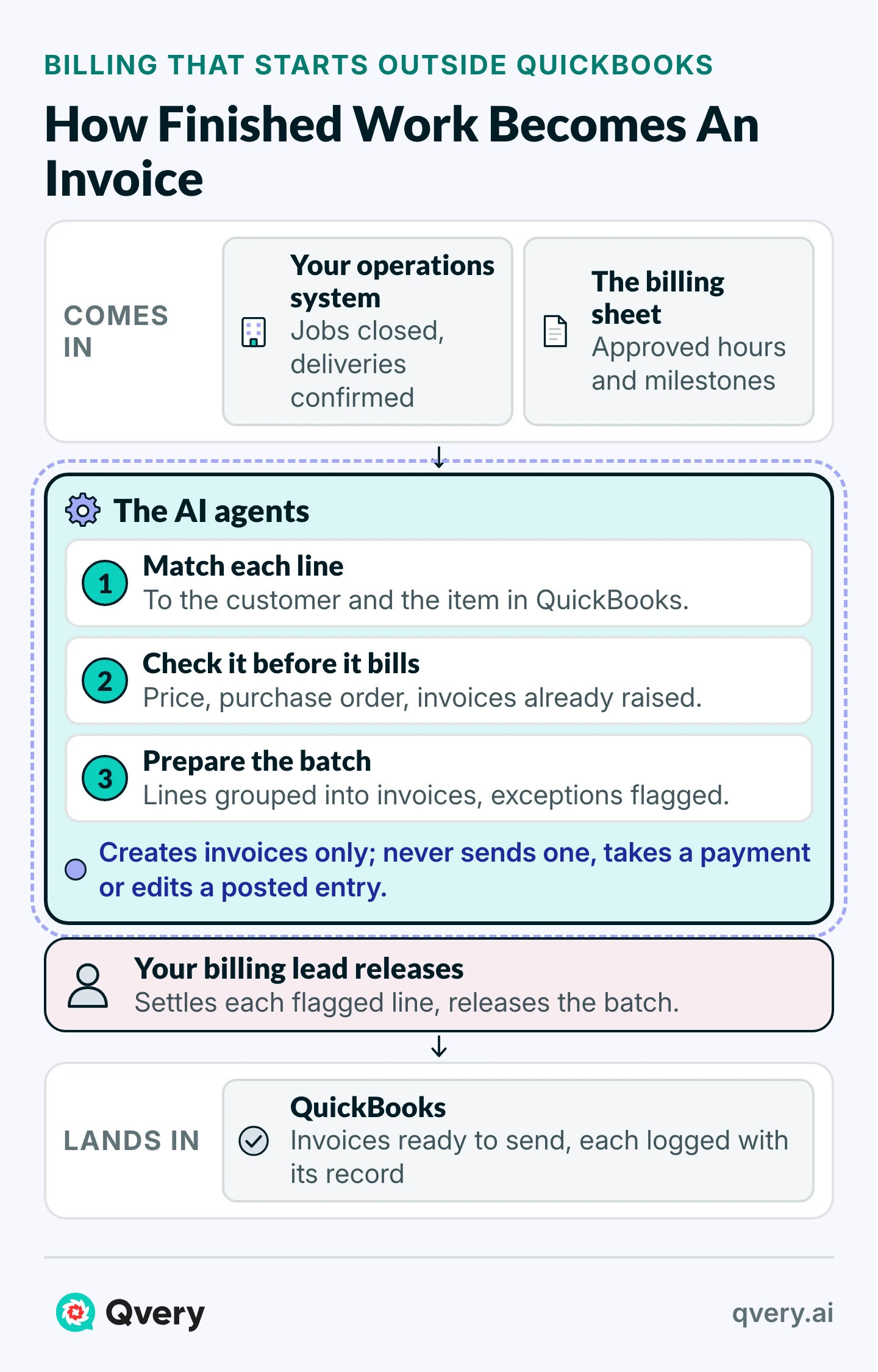
The agents we build for this job read each finished job, delivery or approved timesheet as it closes, wherever your company records it. They match the customer and the item to your QuickBooks lists, check each line against the customer's price, the purchase order and every invoice already raised, and group the lines into invoices.
A line they cannot settle, a new customer, a price that differs, a job that looks billed already, goes to your billing lead with the reason beside it. The rest wait as one batch for a person to release, and once it is released the agents write the invoices into QuickBooks through Intuit's own API, ready to send.
What Reddit says
Owners on billing into QuickBooks by hand
Currently I track my sales on Google Sheets (staff complete a form that fills out google sheets) and at the end of each month I manually input each line item onto Quickbooks Online invoices. It is around 200-250 items split across 20-25 customers usually.
We do progress billing and the way I have always done them is copying the previous invoice and updating the details for the current one. I know QBO has progress billing features but like most things with QBO it falls short.
With the agents finding, matching and checking, the billing lead reads the batch and settles what was flagged, about half a minute a line in our example: 12.5 hours a month instead of 75, or 750 hours a year handed back.
The agents' running cost is an estimated $400 a month at this volume, so each line costs $0.56 to bill instead of $1.75, the job costs $21,503 a year less, and a $10,000 build pays for itself in 5.6 months.
The hours are not the whole cost. A line typed twice bills a customer twice, and a finished job nobody types is never billed. The check against every invoice already raised is the one Intuit's own note leaves to you.
Put in your own volume and your clerk's pay to see your number.
Customer Billing ROI Calculator
What Each Invoice Line Costs You To Bill, And With The Agents
Saved Per Year
$21,503
750 hours handed back, after $4,800 a year to run it
- Hours Handed Back
- 750 hours a year
- Agent Running Cost (Estimate)
- $400 a month
- Payback Per $10,000 Of Build
- 5.6 months
On these numbers, each invoice line costs $0.56 instead of $1.75, the agent saves $21,503 a year after its own running cost, and every $10,000 of the build is earned back in 5.6 months.
The agents touch customer invoices, so they start narrow.
Before they connect to anything, the scope is put in writing, with where their data is processed: they read the records your invoices come from and your customer, product and invoice lists in QuickBooks, and they create invoices; they never send one, take a payment or change a posted entry.
At first nothing reaches a customer until your billing lead releases it, every line is logged with the record it came from, and you decide later which routine invoices go out on their own. The contract includes a data processing agreement signed by Qvery AI OÜ, which is registered in the EU.
Working with us on this starts with your billing clerk's month. We learn how the clerk bills today, connect the agents to your operations system and to QuickBooks, and within two weeks of having access they are preparing your invoices, with a weekly count of the hours handed back and the lines caught before they went out wrong.
Frequently asked questions
Is Intuit Intelligence included in every QuickBooks plan?
Some of it is. Every QuickBooks Online plan has the chat, with a monthly prompt allowance that varies by plan and a $10 add-on for more. Ready-to-post bank lines and invoices drafted from documents start on Essentials, continuous categorization and reconciliation on Plus, and Finance AI and custom roles on Advanced. Most of it is still beta, and on IES it is early access for single-company customers.
How accurate is QuickBooks' AI categorization?
Intuit publishes no accuracy rate. It marks each suggestion green, blue or orange for how strong the pattern behind it is, and groups only its most confident lines as ready to post. Bookkeepers who use it find the confident matches quick to confirm and the guesses on new vendors the ones to correct, and several say the mistakes grew in 2026. It works best where vendors and amounts repeat.
Can QuickBooks' AI post transactions without anyone reviewing them?
Mostly it proposes and a person posts. Ready to post lets someone post a group of its most confident lines in one step, and Intuit says the account owner sets the guardrails for what runs on its own. Intuit's terms make the customer responsible for what its assistants do, so keep a person posting, and keep the one-step post for the lines with the strongest signal.
Can connecting ChatGPT or Claude get our QuickBooks account suspended?
Intuit's terms let it suspend an account at its discretion, so nobody can promise it never will. They bar scraping and unauthorized access, which is what an outside agent does when it logs in as a person and clicks through the app. Intuit's connectors for ChatGPT and Claude have the AI draft and a person approve. An agent that writes to your books belongs on those or on Intuit's API.
Does IES get the same AI as QuickBooks Online?
Not yet. IES has the agents Intuit launched in 2025 (accounting, payments, finance, payroll, customers and projects), and its release notes list the newer Intuit Intelligence chat as coming in beta. Intuit's help center says Intelligence is available on QuickBooks Online and its accountants' suite, with single-company IES customers able to join early access. Ask when it reaches your setup.
When should a company move from Advanced to IES?
When it runs several companies that need one consolidated set of books, or when the people who need logins outgrow Advanced's 25 users. IES adds consolidation across entities, intercompany entries and deeper inventory and project tools, and Intuit builds each IES contract around the business and its users after a call. The books move with you, since every plan runs on one platform.
Does QuickBooks' AI work with our other systems?
Partly. Advanced takes unlimited advanced app integrations, Essentials and Plus two each, Advanced also syncs with Excel, and invoices can be drafted from documents kept in Google Drive. None of Intuit's pages describes the AI watching an operations system and billing from it on its own. That work starts with a person handing QuickBooks the documents, or with agents built to read the system where the work is recorded.
Can QuickBooks' AI close the month for us?
Not on its own today. Advanced runs continuous checks on the books with quarterly insights, and Plus and up reconcile and flag anomalies, which shortens the close. A close agent that follows a firm's procedures and posts nothing without review is in a pilot for accounting firms, presented at Intuit's October conference as free during the pilot and a paid add-on after.
What does it cost to run Qvery's billing agents?
In our example, about $400 a month: an estimated $250 for hosting, monitoring and logs, and about 10 cents a line for the model's reading at 1,500 lines. The running cost follows your volume, and the calculator above works it out on yours. The build is priced up front, one fixed price for the result we agree on.
Do Qvery's billing agents work alongside QuickBooks' own AI?
Yes. The agents write invoices into QuickBooks through Intuit's API, and from there QuickBooks' own reminders, payment matching and reconciliation work on them as on any other invoice. The two cover different ground: Intuit's AI works on what is already in your books, and the agents bring in the billing that starts in your operations records.
What does Intuit do with the data its AI reads?
By its terms, what you give its assistants may be used to give more personal answers and to improve its products. For the connectors to ChatGPT, Claude, Gemini, Perplexity and Muse, Intuit says your financial data stays in its systems and is not used to train its partners' AI models. Check both against your own data rules before anyone connects an assistant to the books.