
On this page
A staffing firm pays its temporary workers every week, as its own employees, and bills each client for the hours that client approved. Payroll can only pay the hours it has in hand, and on the morning after a week ends, some of them aren’t in.
- Not sent. The worker never submitted a timesheet, so payroll has nothing to pay from.
- Sent, not approved. The timesheet waits for a supervisor at the client, in the client’s vendor management system (VMS, the portal a large client uses to approve its staffing suppliers’ hours) or on a paper sheet nobody signed, and the invoice can’t go out.
- Approved, but different. The client approved other hours than the worker entered, so the paycheck and the invoice disagree.
Your payroll and billing people spend the first days of the week chasing them before payroll locks. Many firms answer with a rule their workers hear on day one: no timesheet, no pay. A week that wasn’t sent gets paid in the next run.
On the example we work through below, a firm with about 350 workers out in a typical week has 225 of these gaps to chase a month, at about 15 minutes each. That is 675 hours of payroll time a year, close to $25,800.
The rule changes when a worker gets paid. It doesn’t change what the firm owes, and somebody still has to find the hours.
The Record of Hours Belongs to the Firm
The rule works on the worker who forgets, and payroll needs a cutoff it can hold. The federal texts, though, are written for the employer.
Under the Fair Labor Standards Act, the federal wage law, every employer keeps a record of each employee’s hours worked each day and each week. At a staffing firm that employer is the firm that pays the worker, not the worker filling in the timesheet and not the client’s supervisor.
The Labor Department’s overtime regulations say overtime earned in a week is paid on the regular payday for that period. When the amount can’t be worked out in time, it is paid as soon as practicable, and “in no event” later than the next payday after it can be.
That allowance is about computing the amount. The text doesn’t mention a timesheet the worker never sent.
For temporary workers, some states write clocks of their own, and two of them write the client into the rule.
| The law | What its text says | Current text since |
|---|---|---|
| California Labor Code 201.3 | Pay at least weekly, by the next week’s payday, “regardless of when the assignment ends” | January 1, 2018 |
| Illinois, 820 ILCS 175/12 | The client must send the hours within 7 days; its failure “shall not be a defense” | August 28, 2007 |
| New Jersey, N.J.S.A. 34:8D-4 | The same 7-day duty, up to $500 a violation, and still no defense for the firm | August 5, 2023 |
Illinois leaves out clerical and professional work; New Jersey’s rule covers placements such as production, warehousing, transport, cleaning and food service. These are the texts as written, quoted as examples and not as legal advice, and your counsel reads them for the states you staff in.
Read together, they describe the case “no timesheet, no pay” handles worst. The worker did the work and sent the timesheet, and the client’s supervisor hasn’t approved it.
Two states expect that client to send the hours within a week and still hold your firm to the record if it doesn’t. The rule, meanwhile, makes the worker wait on a manager at someone else’s company.
Payroll people argue about this every week. Some run strict next-cycle corrections and say workers learn fast. Others answer that a missing timesheet still means estimating the hours, and that the wages are owed whether or not the client ever pays for them. Both camps are on the phone chasing the same timesheets on Monday.
The rule decides who waits.
Only finding the gaps sooner makes the chase shorter, and that is work for the morning the week ends, not the hour before the lock.
What Reddit says
Payroll people on holding pay for a missing timesheet
we started enforcing STRICT next cycle corrections. No off cycles, no exceptions. I do not pay what I do not see on the time card period.
This doesn't work in all states....No timesheet still has to be estimated hours as we know the person worked some. And most payroll processing systems won't let you pay if there are blank in/outs.
because in the end no matter what you owe them for time worked even if you never get reimbursed by the client, etc.
Of course, supervisors aren't going to want to do that for employees who are otherwise good workers so you may find yourself stuck in an endless cycle. I spent three hours chasing people today so I could process payroll.
The Chase Is Where the Money Goes
Each gap is a small job for a payroll clerk. The clerk finds it by laying the firm’s export beside the client’s portal, writes to the worker or to the account manager who can reach the client’s supervisor, follows up, checks the answer against the portal and keys the correction.
In our example that takes about 15 minutes a gap, and a firm with 350 workers out carries dozens of gaps into most weeks.
Payroll and timekeeping clerks at staffing and other employment services firms earned a mean $26.76 an hour in May 2025, in the federal government’s wage survey. Wages make up 70% of what private employers spend on their people, so with benefits that clerk costs your firm about $38.23 an hour.
Behind each unapproved timesheet sits an invoice that can’t go out. In SAP Fieldglass, one of the portals large clients use, an invoice can only be created from a timesheet in Approved status.
A timesheet corrected after it was invoiced goes back to the client there as a revision to approve, if the client has turned revisions on at all.
A gap found after payroll locks turns into a correction in the next run and a call from a worker who was paid short. “No timesheet, no pay” takes none of that work away; the clerk still makes every call, a week later.
Qvery Moves the Chase to the Morning the Week Ends
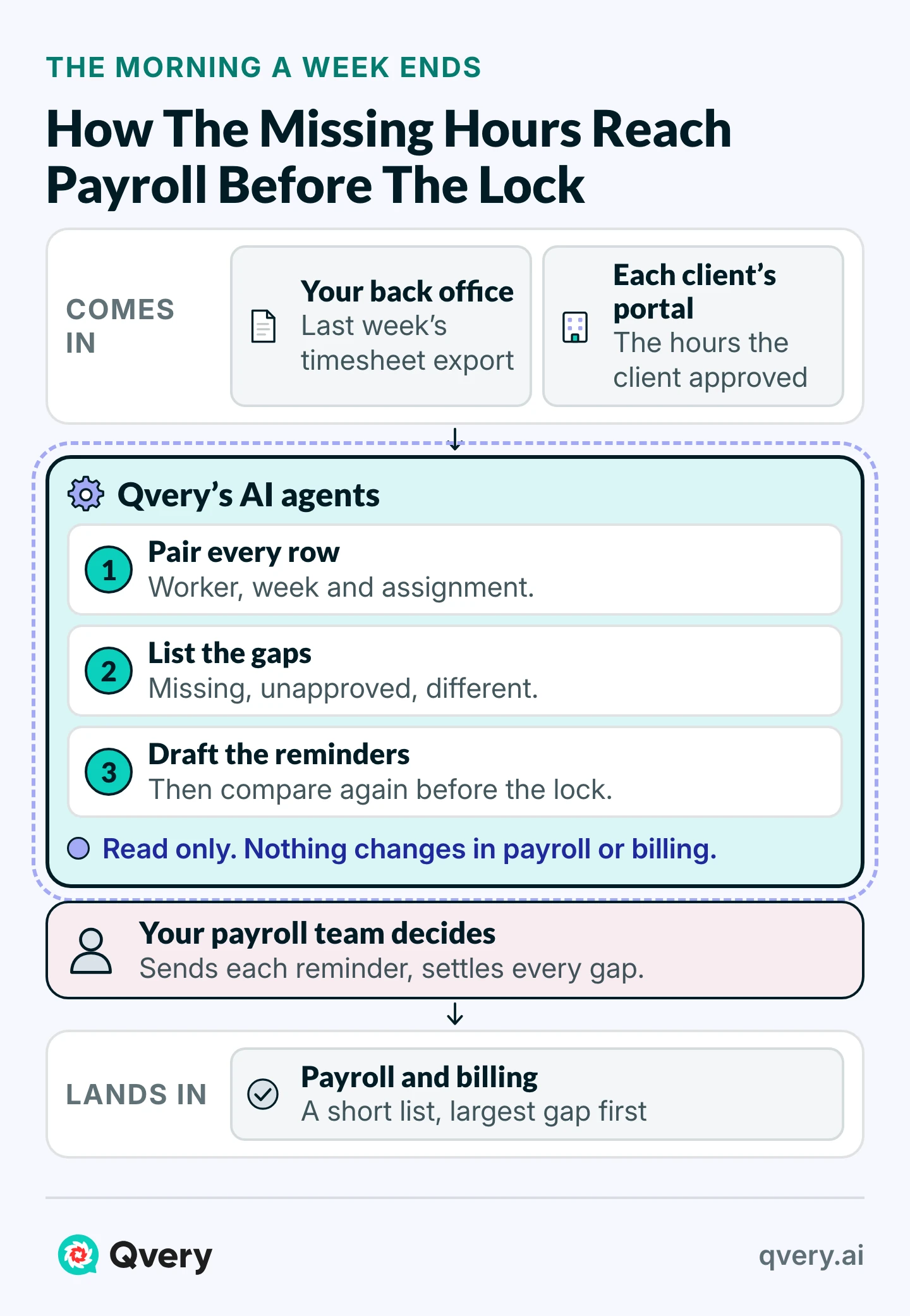
At Qvery, we build these agents around the files your payroll team already downloads. The morning after a week ends, the agents run on their own: they take your timesheet export from your back office system, the one that runs pay and billing, and each client’s approved hours from its portal or its email.
They pair every row on worker, week and assignment, apply your rounding rule first, and compare regular hours, overtime and the approval status. A difference in overtime shows up even when the weekly totals agree.
 Piotr BabelPartner @ Qvery
The comparison is only as good as the column map behind it. Every client’s export names the worker, the week and the assignment its own way, so we map each one once with your payroll lead and apply your rounding rule before anything is compared. A row that won’t pair goes on its own list, and the agents never guess whose hours it holds.
What comes back is three short lists, the largest gap first, each row with both sides beside it. Each list goes to the person who can close it.
Take a typical week at the example firm, not a client’s: 350 workers out across a dozen clients. By 7 on Monday the lists hold 52 gaps.
| The gap | How many | Who gets it |
|---|---|---|
| No timesheet from the worker | 21 | The worker, with a reminder the agents drafted for payroll to send |
| Waiting for the client’s approval | 24, at four clients | The account manager who owns that client |
| Approved with different overtime | 7 | Payroll, with the worker’s row and the client’s side by side |
Approvals go to the account manager because inside a client’s portal your firm often can’t write to the supervisor directly. The agents never message a client, and the reminders are out by 9.
Before payroll locks, at a time your payroll provider or your funding often sets for you, the agents compare again. What’s still open, 9 rows in this example, goes to the payroll manager, who decides each one.
Every approval in those exports carries its date, so the weekly record also shows which clients approve after the lock, week after week. That is a conversation for the account manager, not one more reminder from payroll.
To see the lists on your own hours, drop last week’s timesheet export and one client’s approved hours here, and the gaps come back to your work email.
What the Morning Lists Save
Put in your own numbers: the gaps your team chases in a month, the minutes each one takes now, and what an hour of a payroll clerk costs you.
Timesheet Chase ROI Calculator
What Chasing Timesheets Costs You, And With The Agents
Saved Per Year
$14,184
495 hours handed back, after $4,740 a year to run it
- Hours Handed Back
- 495 hours a year
- Agent Running Cost (Estimate)
- $395 a month
- Payback Per $10,000 Of Build
- 8.5 months
On these numbers, each timesheet gap costs $4.30 instead of $9.56, the agent saves $14,184 a year after its own running cost, and every $10,000 of the build is earned back in 8.5 months.
On the example, 225 gaps a month at 15 minutes each come to 675 hours a year: $25,805 at $38.23 an hour, or $9.56 a gap.
With the agents’ lists in front of them, the same gaps take about 4 minutes each: read the line, send the reminder, confirm the answer the agents checked again. That is 180 hours, $6,881, plus about $395 a month to run the agents.
The firm gets 495 hours back and saves $14,184 a year. Each gap costs $4.30 instead of $9.56, and every $10,000 spent building the agents comes back in about 8.5 months.
 Vlad ShvetsPartner @ Qvery
Holding pay for a missing timesheet tells your workers the paperwork matters more than their wages, and your payroll team still chases the same hours, a week later. Keep the cutoff, and move the chase to the morning the week ends, when there are days left to close a gap. By the time payroll locks, most of what the rule was meant to catch is already in.
The 225 gaps and both minute figures are our assumptions for a firm this size. The running cost is our estimate: about 20 cents of model usage a gap, plus $350 a month of hosting and upkeep.
The calculator counts payroll’s hours and nothing else. It leaves out the invoices that go out days sooner when approvals are chased on Monday morning instead of Tuesday afternoon, and the corrections that never reach a worker’s next paycheck.
The hours your payroll team gets back pay off most on work you would otherwise hire for as the firm adds clients.
If your payroll team spends its Mondays on lists like these, we start the agents on weeks it has already closed.
The Agents Read Two Exports and Change Nothing
Timesheet exports carry names, worker codes and sometimes pay rates, so what the agents may open is settled before they open anything.
Whether a late week is paid now or in the next run stays your payroll manager’s decision, with your counsel’s rules behind it. The agents make no judgment on what the law requires or whether a paycheck is complete.
How the Build Fits Around Your Payroll Calendar
We start from how your team closes a week today: who downloads what from which client’s portal, your rounding rule, your cutoff, and the clients that always approve late.
You send three weeks of exports payroll has already closed, each client’s approved hours for the same weeks, your payroll calendar, and a contact at each client for its export layout. We map every export once with your payroll manager.
Within two weeks of access, the first agents are running on those closed weeks, and their lists sit beside what payroll caught by hand. Where the two disagree, we fix the rule, and we show your payroll team how to read a list and when to overrule a row.
From the third week the agents run on the live week before each cutoff. Every week after that, we report the hours handed back and the gaps found before the lock.
Frequently asked questions
Can we still pay a late timesheet in the next payroll?
That’s a question for your counsel, state by state; we quote the texts above and don’t rule on them. What the agents change is the size of the question. Most gaps are found the morning a week ends, so far fewer are still open when payroll locks.
What if a client never approves the hours?
The row stays on the list every week with its date, and the record shows which clients approve late and by how much. Paying, invoicing or escalating stays with payroll, billing and the account manager. In Illinois and New Jersey, the texts quoted above give the client seven days to send the hours.
Does it work with our VMS and our payroll system?
It reads the files those systems already export: your back office’s timesheet export and each client’s approved hours, downloaded from its portal as a spreadsheet or CSV file. A client that sends approved hours by email or as a PDF can be read too.
What about clients that still sign paper timesheets?
If the signed sheet reaches you as a scan or a PDF, the agents read the hours from it and compare them like any other row. A page they can’t read goes on its own list for a person to check, never into a guess.
Do the agents text our workers?
No. They draft each reminder, and payroll sends it through whatever channel you already use, text, email or your workers’ app. The agents don’t contact a worker or a client on their own.
Do the agents decide what we pay?
No. They say where hours differ or are missing and show both sides. What to pay, what to bill and what to raise with the client stays with your payroll and billing team, and the agents make no judgment on whether pay is complete or lawful.
What if a worker disputes hours after the assignment ends?
The weekly record holds both sides of every week: what the worker entered, what the client approved and when, and what payroll did with the gap. Your team answers the dispute from that record instead of rebuilding it from old emails.
What if each client counts overtime its own way?
The agents compare each export under that client’s own rules. Overtime counted by the day on one side and by the week on the other shows up as a difference even when the totals agree, so payroll sees the gap before the paycheck goes out.
How many gaps should we expect each week?
Nobody publishes a count for staffing firms. Yours is quick to get: the first run, on three weeks payroll has already closed, shows how many gaps your firm carries into each payroll, client by client.
Do our clients have to change anything?
No. The agents work from the exports your team already downloads from each client’s portal, or the files a client already emails. Nobody at the client logs in to anything new, and the approval stays in the client’s own system.
What if a client changes the layout of its export?
A column the agents can’t map is listed as unmapped and left out of the comparison, so nothing is guessed. We map the new layout with your payroll lead, and that upkeep is part of the running cost. Adding a client means mapping one more export.
What if a worker is on two assignments in the same week?
Rows pair on worker, week and assignment, so each assignment is compared on its own. Hours keyed to the wrong assignment show up twice: missing on one and extra on the other, both on the same list, so payroll can see it is one mistake.
Will it catch the same shift entered twice?
Yes. A worker-week that appears twice in either file goes on its own list, with both rows. The agents keep the repeated rows together and never add them up or pick one, because which row is right is payroll’s call.
Can the lists show what each gap is worth in dollars?
The first build reads hours and approvals. Your rate cards can be added in a build: bill and pay rates, overtime multipliers and shift differentials. Each gap then shows what it is worth on the invoice and on the paycheck. That scope is priced before any work starts.
How much of our payroll manager’s time does the build take?
About three hours in the first week, to settle the rounding rule, the tolerance and the column maps. In the third and fourth weeks, when the agents run beside your team on the live week, about 30 minutes a day from a payroll specialist to review the lists before each cutoff.
We already use a time-tracking app. Isn’t that enough?
A time app collects hours from your workers and sends reminders about its own timesheets. It doesn’t see what each client approved in its portal. The agents compare the two sides, worker by worker, and that comparison is where the gaps payroll chases come from.
