
On this page
- New Products Bring the Duplicates Back
- Ask Every Route What Happens to the Next Supplier File
- The Strongest Case Is Software That Already Matches
- Our Agents Check Each New Item Before It Gets a Second Code
- A Few Hundred Items a Month Pay for the Agents in Months
- Put the Check Beside the Systems You Have
- Frequently asked questions
If your group sells several brands, you buy many of the same products from more than one place. Suppliers send their ranges with their own column names, a brand you took on brings its own item numbers, and a product you already stock arrives under a second SKU, the item code your systems count it by.
From then on its stock is split across two codes, a price change reaches one of them, its sales history is divided between them, and the reorder report stops adding up.
Your catalog team finds the pairs by comparing rows against the item master, the list of every product you stock with its code, every time a supplier file lands and for weeks before every move to a new platform.
- A supplier file whose columns match nobody else’s
- The same item under the old brand’s number and under yours
- A barcode that lost its first zero in a spreadsheet
- Stock at zero on one code while the other still shows units on the shelf
Nobody knows which new items are twins until someone looks, so every one gets checked. Say your group carries about 18,000 active products and adds 300 new supplier items a month. At 15 minutes an item, our assumption, and an order clerk’s pay with benefits, that is 900 hours and $28,539 a year.
At Qvery, we help retail groups spend less keeping their catalog clean, with custom AI agents that check each new supplier item and group the codes for one product.
It is tempting to judge a route by how clean the catalog looks on go-live day. That is the wrong test. About one product in five on a store shelf is new each year, so a clean file starts going stale with the next supplier file.
The route worth paying for remembers which codes your team decided are the same product, and checks every new item against those decisions before it becomes a second code.
Spreadsheets and a one-off matching service don’t remember, and a standard import into a product database matches on the code itself. Master data software and the newest duplicate finders do remember, for what sits inside them.
If your catalog sits across an ERP (the system that runs your orders, stock and accounts), two or three online stores and a supplier inbox, put that memory in custom AI agents beside the systems you already run.
A group whose every catalog already lives in one product or master data system, with its matching switched on and someone working the queue, should keep it. A group whose catalog has nearly stopped changing needs one careful clean-up and nothing after it.
New Products Bring the Duplicates Back
Those are US consumer goods a decade and more ago, so read them for the pace rather than the exact share. If your range moves at anything like that pace, every newcomer arrives as a code someone has to place.
The count is by barcode. GS1, which runs the barcode standard, requires a new number whenever the net content printed on the pack changes, so a smaller bottle of the same shampoo is a new product with a code of its own, as it should be.
It also looks almost exactly like the old one, so each new code needs a check: a new product, or one you already sell under another number?
The barcode is the one number everybody shares. Below it, every company numbers its stock its own way: by GS1’s own account, retailers selling the exact same item under the same barcode each give it a completely different SKU. Your supplier’s item number, the acquired brand’s and yours are three codes for one thing.
Only the barcode ties them, when the file carries it intact. Excel drops leading zeros from codes by default, Microsoft says, and formatting the column later does not restore them. Your team can import the column as text; the supplier who opened the file first may not have, and a barcode missing its first zero no longer matches its twin.
So the duplicates are not a backlog you clear once before the move. They come in with new items, in every supplier file and with every brand you add.
 Vlad ShvetsPartner @ Qvery
I’d stop asking how clean the catalog will be on go-live day and ask what happens to the supplier file that lands the week after. Every route on offer can produce one tidy spreadsheet. Very few remember that your team already decided the navy two-pack from one supplier is the same product as the one from the other, and keep that decision when the next file arrives.
Product codes are usually the first job we take on for a retailer. The Retail Playbook prices it beside supplier invoices and customer lists for a group of about 200 people.
Ask Every Route What Happens to the Next Supplier File
| Route | What it keeps after go-live | The next supplier file |
|---|---|---|
| Spreadsheets and scripts | the file, and what the person who built the script remembers | someone runs the comparison again |
| A matching service | a clean catalog and a report of what was merged | a new project, or a team you keep paying |
| A product database import | each product’s record, matched on its code | a known product under a new code comes in as new |
| Duplicate finders and master data software | the decisions made on records inside the system | checked, once every catalog lives inside it and the matching is tuned |
| Custom AI agents beside your systems | the codes your team tied together, across every system | checked against those decisions before it is set up |
Spreadsheets and scripts are quick on one sheet, and a person who knows the range can do careful work in them. What they keep afterwards is that person’s memory. When the next file lands, the comparison runs again from the start, usually by the same person, usually before a deadline.
A matching service quotes by catalog size. One outsourcing company puts a 5,000-product catalog at 1 to 2 weeks and anything above 100,000 products at 6 to 10 weeks, ending with a clean, deduplicated catalog delivered back. For a move, that can be a fair trade.
The supplier file that lands the week after is a new job, unless you keep a team on. Cleansing firms sell that too, as ongoing monitoring by their data specialists, so the comparing is still people’s hours, now outside your company.
A product information management system (PIM), the database that holds each product’s descriptions and attributes for your stores, is built to update what it already knows. In Plytix, for one, the SKU is each product’s unique identifier and the field updates match on, so the same product under a supplier’s different code goes in as a new one.
Your online store won’t catch it either. Shopify asks for a unique SKU on every variant and shows a warning when two share one; one product sitting under two different codes raises no warning at all.
If the plan for your ERP move is to clean the codes once they are inside the new system, this is how that plan sounds from people who have lived through it.
What Reddit says
We dont have time to clean the data before moving it, let’s clean it in the new system. It never happens.
I hate spreadsheets, disconnect them from the live business, work on them a few weeks and hope they just slot back in, the world has moved on. It proves you can import data but it doesn’t prove you can import live data.
The Strongest Case Is Software That Already Matches
The strongest objection is to buy software that already does the matching and stop paying anyone to compare rows. It deserves a straight answer, because that software exists.
If your group already runs one of these with every brand’s catalog inside it and the matching switched on, you have the memory. Keep it, and spend the money on something else.
Every catalog has to live inside the system before it can remember anything about it: the item master, each brand’s online store, every supplier file. And the matching is yours to set up: Stibo’s own documentation has your people determine the match criteria, choose what happens to a match and tune it before it runs.
For a group whose catalog team is three merchandisers, that is a software project and a new job on top of the one they have.
A shared mapping sheet could hold your team’s decisions too. What a sheet can’t do is read the next supplier file, write its sizes and colors your way and check every row against the sheet before anyone sets the item up. That reading is the work, and it is the part we hand to agents.
The other objection runs the opposite way: that a model let loose on a big catalog invents codes and creates more duplicates than it finds. It would, if you asked a chatbot to fill in the SKU column of a spreadsheet. That is not what our agents do.
Our Agents Check Each New Item Before It Gets a Second Code
We connect our agents to what you already run: the item master in your ERP or PIM, each brand’s online store, and the inbox or folder where supplier files land. They read all of it and change none of it, and the map of codes your team has tied together lives with the agents.
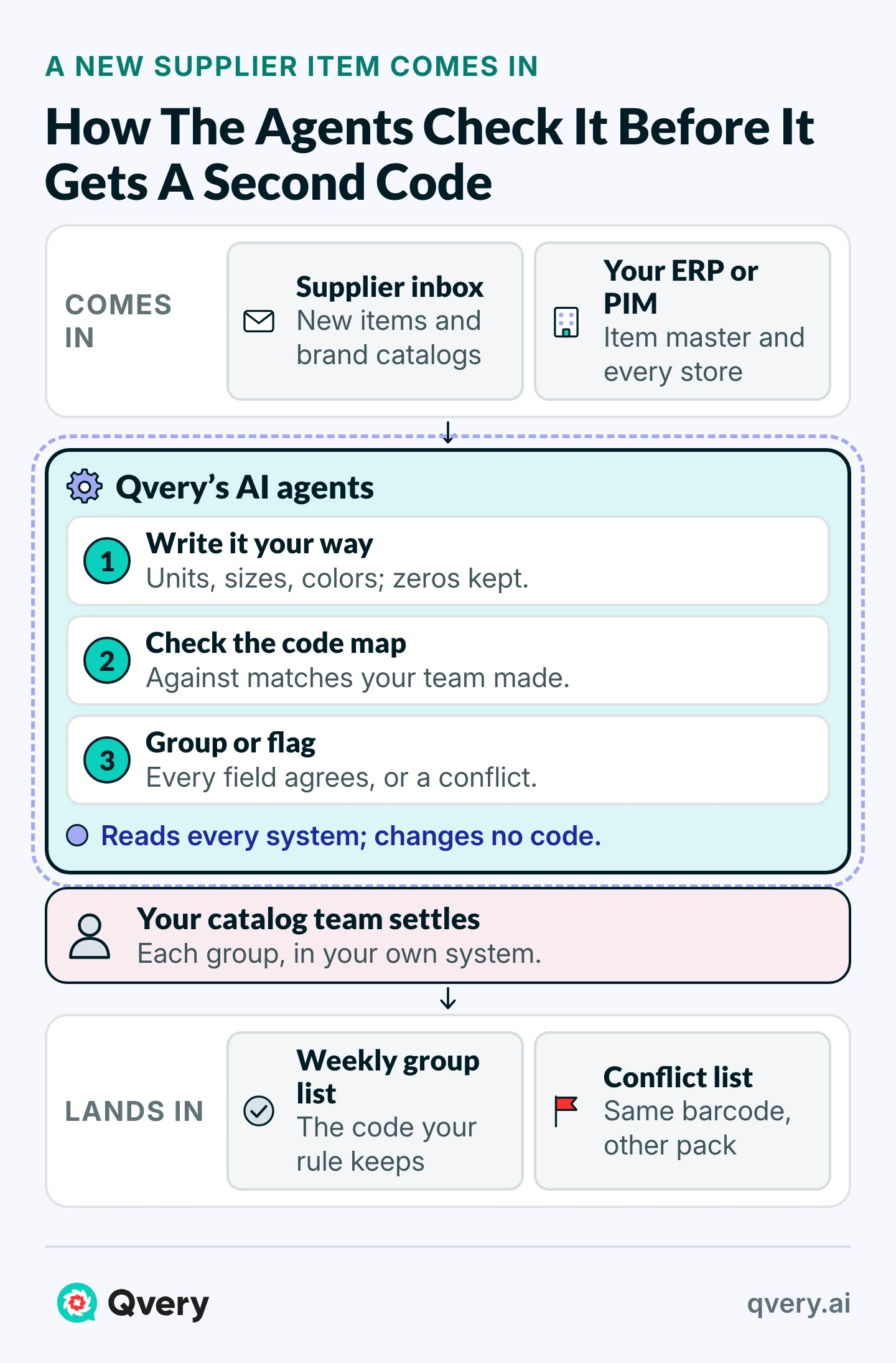
Each time a supplier item is set up or a brand’s catalog comes in, the agents check it against that map. A decision your team made in March still holds in October, and nobody makes it twice.
Before comparing anything, they write units, sizes and colors the same way, so “Nvy XL 2pk” and “navy, extra large, pack of 2” read as one description. Barcodes and supplier codes stay as text, leading zeros included, so a code a spreadsheet once mangled still finds its twin.
Two codes join a group only when every identity field both rows carry agrees: brand, model, size, color and pack count. A field one row lacks never counts as agreement, and a matching name on its own only marks a pair worth a look.
When the barcode agrees and the pack count doesn’t, the pair goes on a separate conflict list instead of into a group.
Each group arrives with the code your rule keeps, say the oldest active one, and the dates that decided it. Your catalog team settles each group in your own systems, a few minutes the calculator below counts, and the agents keep that decision for every file that follows.
 Piotr BabelPartner @ Qvery
The agents look first for what keeps two codes apart. A shared name proves nothing, and a shared barcode with a different pack count is a conflict, not a twin. So the agents group two codes only when brand, model, size, color and pack all agree. A row too thin to tell waits for the missing detail instead of joining the nearest lookalike.
To see what that looks like on your own range, send a catalog export and get your duplicate codes back, grouped.
A Few Hundred Items a Month Pay for the Agents in Months
Put your own team’s numbers in.
Supplier Item Matching ROI Calculator
What Checking New Supplier Items Costs You, And With The Agents
Saved Per Year
$18,271
720 hours handed back, after $4,560 a year to run it
- Hours Handed Back
- 720 hours a year
- Agent Running Cost (Estimate)
- $380 a month
- Payback Per $10,000 Of Build
- 6.6 months
On these numbers, each supplier item costs $2.85 instead of $7.93, the agent saves $18,271 a year after its own running cost, and every $10,000 of the build is earned back in 6.6 months.
On the example’s 300 new items a month, the agents hand back 720 hours a year. The hand check drops from 900 hours to 180, because a person reads each group and its evidence instead of searching for it.
After about $380 a month to run them, an estimate of model usage on every item plus hosting and upkeep, that is $18,271 a year, and each $10,000 of build pays back in 6.6 months.
On the same assumptions the agents stop paying for themselves below about 60 new items a month. Under that, a careful person with a spreadsheet is the better route.
Those hours are worth most when they go to the work you would otherwise hire for, such as the next brand or the next supplier you take on.
The calculator leaves out what a second code costs at the till, a price change that reaches one code of two or a promotion that covers one listing. We found no published price for that, so we put none in.
Put the Check Beside the Systems You Have
My verdict for a retail group of a few hundred people: use a service if you are moving once and the catalog is about to stop changing. Keep your master data system if it already holds everything and someone tunes it. Otherwise, put agents beside the systems you have, because the next supplier file is already on its way.
Working with us on this starts with read access to your item master, the files your suppliers send and about three hours of your catalog lead’s time in the first week.
| When | What happens |
|---|---|
| Week 1 | Your rules written down with your catalog lead: what makes one product, which code stays |
| Weeks 1 and 2 | The agents group your whole item master; your team works through the first groups with us |
| Weeks 3 and 4 | Each new supplier item checked before it is set up; a wrong group fixed that day |
| From week 5 | New groups in a weekly list, reviewed with your catalog lead each month |
Every week we report the hours the agents handed back and the groups your team turned down, so the case for them is made in your own numbers.
Frequently asked questions
What is SKU mapping?
SKU mapping is the record of which codes point to the same product: your own SKU, each supplier’s item number, an acquired brand’s old code and the barcode. With a current map, a supplier file updates the right product instead of creating a second one. It stays current only if every new item is checked against it, the job our agents take on.
Can one product have two SKUs?
It can, and that is the costly case. Shopify asks for a unique SKU on every variant and warns when two variants share one, so the same code twice is easy to catch. One product under two different codes passes the store’s own check, because each code looks valid on its own. Its stock, sales and price then live in two places until someone notices.
Should sizes and colors share a SKU?
No. Each size and color is its own product to your stock and your stores. Shopify’s own example is a shirt in 3 sizes and 4 colors, which needs 12 different SKUs. That is also why our agents never group two codes whose size, color or pack count differ, however alike the names are, and why a row with no size waits for the missing detail.
Is a SKU the same as a UPC or a GTIN?
No. The GTIN is the number behind the barcode, assigned by the brand owner and the same at every retailer; the UPC barcode scanned at North American checkouts carries a 12-digit one. A SKU is your own internal code, so the same item has a different SKU at every retailer. The barcode is the best link between codes, when a file carries it intact.
What if our supplier files have no barcodes?
Then the other fields both rows carry decide it: brand and model, or name, size and pack count once they are written the same way. Model numbers keep their punctuation, because a model with a hyphen and one without can be different items. Where a file holds only names and codes, the report says which extra columns would find more.
Should we clean the catalog before the move or after it?
Before, and then keep it clean. A pair found after go-live means fixing stock and sales history in two systems. Set up ahead of a move, the agents group the whole item master, starting with the products a new store’s launch depends on. After the move the same agents check every new item, so the next move needs no second clean-up.
Will the agents merge or delete products on their own?
No. They never merge, retire or write to a code, and they never join two products on a barcode alone. Each group arrives with what matches, what differs and the code your rule would keep, and your catalog team makes the change in the system it already trusts. Loading settled groups back into your PIM can be added later as its own step.
Are our supplier price lists safe with the agents?
Before we start, we agree in writing which exports and folders the agents may open, where they run and how long files are kept. Supplier cost and price columns play no part in matching and never appear in a group or report. Qvery is an EU company and signs a data processing agreement, so anything personal in the files, such as a sales rep’s name, is handled under the GDPR.
Do we need a PIM before the agents can start?
No. The agents read your item master wherever it lives today: your ERP, a PIM or a regular export. Each brand’s online store is read the same way, and supplier files come from the inbox or folder where they land now. If you add a PIM later, the agents read it instead, and the map of your team’s decisions comes with them.
What happens when the agents group two different products?
Your catalog team rejects the group and notes why, and nothing has changed in any system. Each rejection comes back to us, and we tighten the rule that produced it in your build. The doubtful cases sit on their own lists, the conflicts and the rows too thin to judge, so a weak match never hides inside a confident group.
What is the difference between a PIM and an ERP?
An ERP runs the business side of each product: orders, stock, costs and accounts. A PIM holds what you say about the product in your stores: descriptions, attributes and images. Both keep a code for every product, and either can end up holding two codes for one item, so the agents read both.
How big a catalog can the agents handle?
The whole item master, every brand’s catalog and every supplier file, with nothing sampled. We size the build to your row count before it goes live, and every run states how many rows it read, so your team can see nothing was skipped.
