
On this page
- Read Three Files as One Catalog
- Pair Codes on a Barcode or a Full Match, Never on a Name
- A Shared Barcode Is Not Proof of One Product
- Rows Too Thin to Judge Wait for the Missing Detail
- Your Keep-Code Rule Picks the Code That Survives
- Put a Price on the Twins Before the Move
- What the Agents Leave Alone
- What a Plain Model Pass Did With the Same 960 Rows
- Where Qvery's Agents Sit Between Your Suppliers and Your Item Master
- What Your Catalog Team Brings to the First Run
- Frequently asked questions
Buy a brand or add a supplier, and some products you already sell come in under a second code.
Fold in the acquired catalog, or set up the new supplier's items without checking, and an item you stock gets a second SKU (stock-keeping unit, your own item code), with its own price, stock count and web listing.
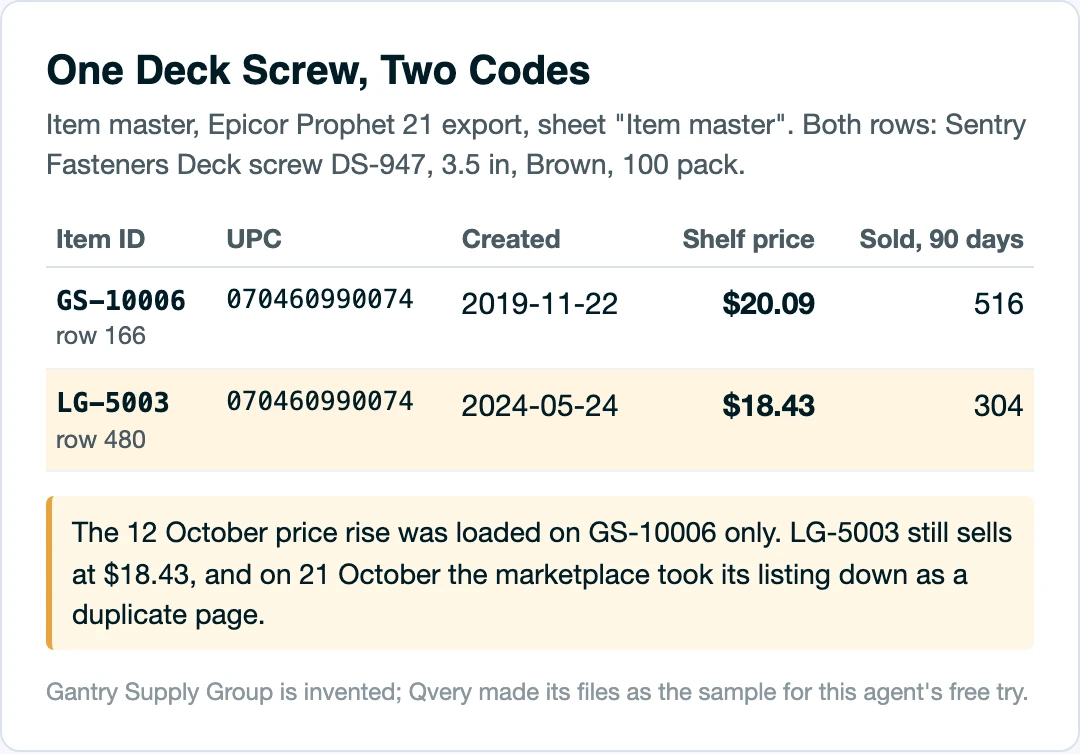
Nothing in the ERP, the system that runs your orders and stock, ties the two codes together.
A price rise loaded on one code misses the other, which keeps selling at the old price. Stock splits across both, so a reorder report reads each half on its own. A marketplace that allows one page per product can take the second listing down as a duplicate.
Finding the pairs is a person's job today. Two or three people on the catalog team compare rows by brand, model, size, color, pack count and barcode, mostly in the weeks before a catalog move.
Say 300 new supplier items arrive a month and each takes 15 minutes to check against the item master. That is 900 hours of a catalog clerk's year, about $28,539 at the federal median pay for order clerks with benefits added.
AI agents do that comparison now, on every row, every time a file comes in.
To show the work, we ran the job the way our agents run it, code for every comparison and a model for the reading, on sample files you can also run yourself from the box further down this page.
Everything in them is invented: Gantry Supply Group, a 215-person hardware and home supply retailer in Tulsa that does not exist. Its item master lives in Epicor Prophet 21; beside it sit the catalog of Alderpoint, a brand it bought in 2025, and the first feed from Bradford Supply, a new supplier.
That is 960 rows in three files. The answers were written down with the files, before anything read them.
The six steps below each carry the screen the run produced. After the step that puts a price on the twins, you can run the same check on your own export.
This matches codes inside your own catalog: the item master, the brands you own and your suppliers' files. It does not compare product photos, and it does not match your products against other stores for pricing, which is a different job.
Read Three Files as One Catalog
The three files describe the same products in three vocabularies. Before anything is compared, the agents map each file's columns onto the same fields and keep every row's file and row number, so any finding opens in the file it came from.
| Field | Item master | Alderpoint | Bradford feed |
|---|---|---|---|
| Code | Item ID | SKU | Supplier item |
| Model | Model | MPN | Model number |
| Color | Color | Colour | Colour |
| Pack count | Pack count | Pack size | Qty per pack |
| Barcode | UPC | Barcode | UPC |
| Read for planning, never as proof | On hand, Units sold | Inventory | none |
| Never read | none | none | Unit cost, Minimum order |
Reading headers and a notes sheet is the model's part of the job. We gave Sonnet and the smaller Haiku the three headers, three rows of each file and the merge notes.
Both mapped every field, found the three model numbers the notes treat as one, the three dates and the 40 hours, and noticed the blank where the notes should name who breaks a tie. Each took about 20 seconds.
Every one of the 903 barcodes in these files starts with a zero. Excel removes leading zeros from product codes as it reads them, Microsoft's own documentation says, and formatting the column afterwards does not bring them back.
A barcode that lost its zero no longer matches its twin, so the agents read every code and barcode as text.
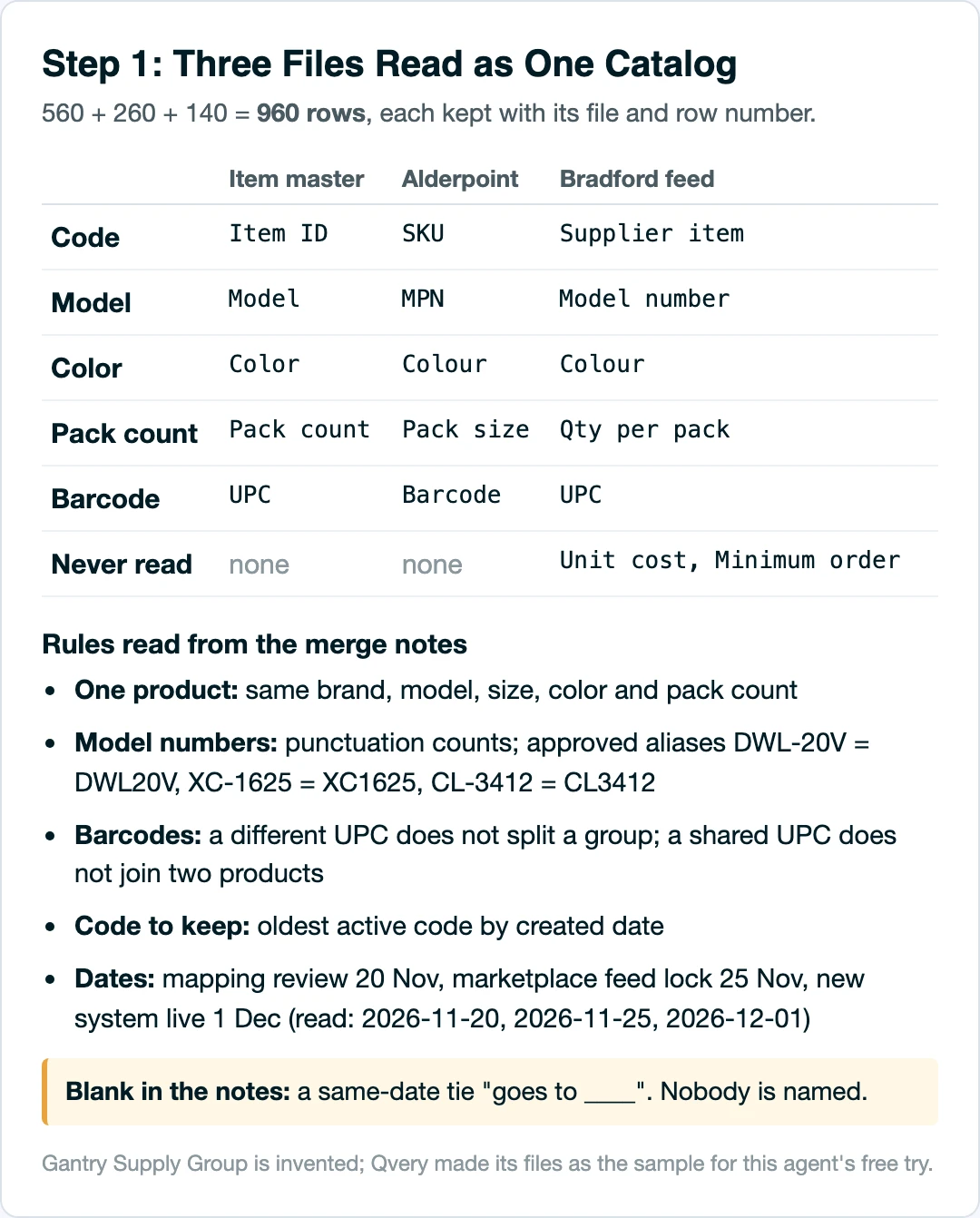
Check that it worked: the run counts 560, 260 and 140 rows, 960 in all, before it compares anything. A count that comes up short means a file was read in part.
Pair Codes on a Barcode or a Full Match, Never on a Name
With the fields lined up, code finds the candidate pairs: two rows with the same barcode, or with the same brand, model, size, color and pack count once case and spacing are ignored. On 960 rows that gives 87 candidate pairs.
Two names that look alike only put a pair on the list to read; they never make a group on their own.
Then every identity field both rows carry is compared: brand, model, size, color and pack count. A pair becomes a group only if none of them differ. The barcode is a clue, not an identity field. Sixty-one pairs hold: 39 inside the item master, 12 between the item master and the Bradford feed, and 10 with Alderpoint.
Twenty of the 61 have no shared barcode to lean on. In four, the two codes of one claw hammer, fitting or tape measure carry different barcodes; the notes say two suppliers often give one item two barcodes, so that does not split a group. In the rest, one side has no barcode at all.
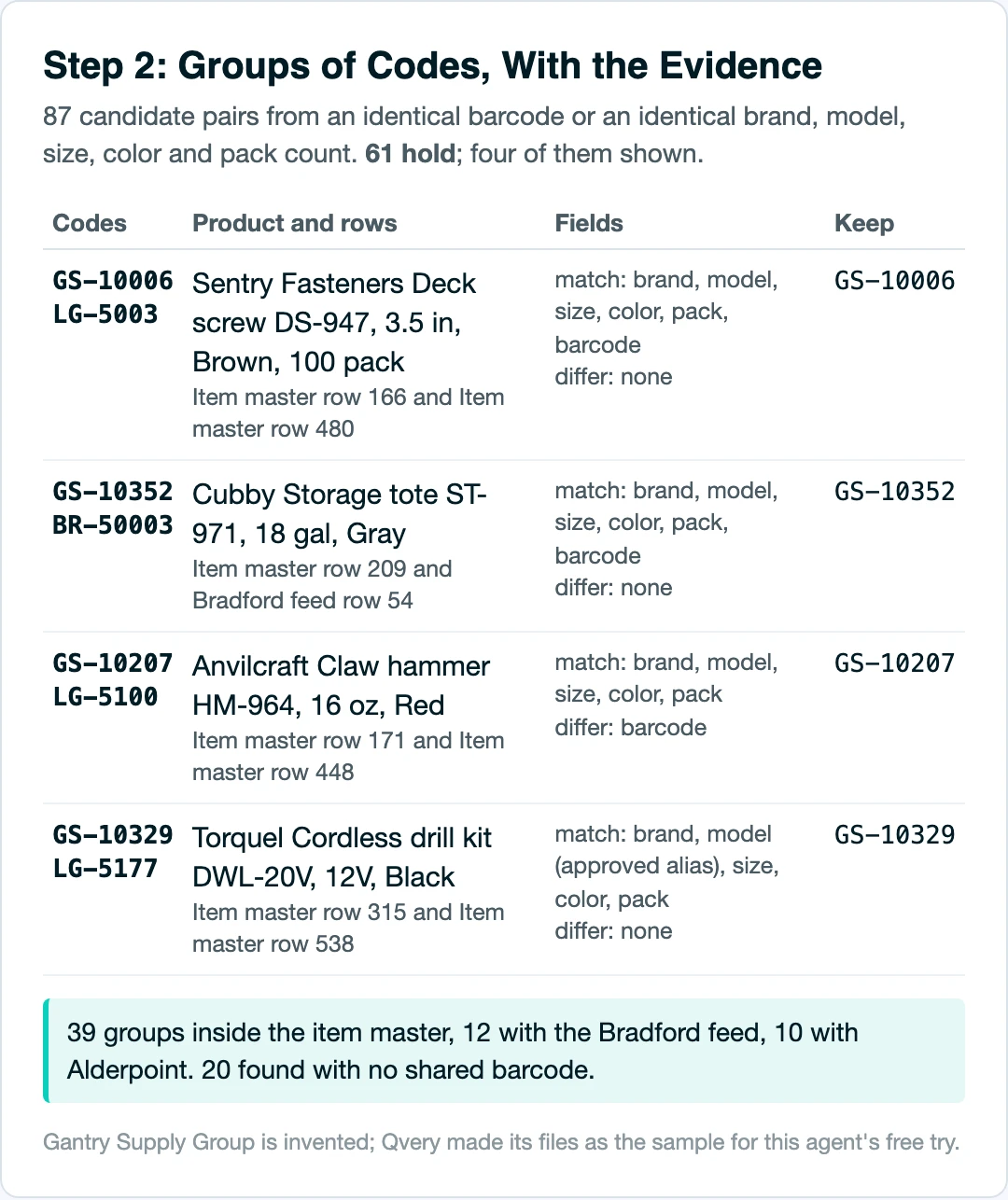
Check that it worked: every group names its two source rows. Open both in Prophet 21 and the two codes are there.
A Shared Barcode Is Not Proof of One Product
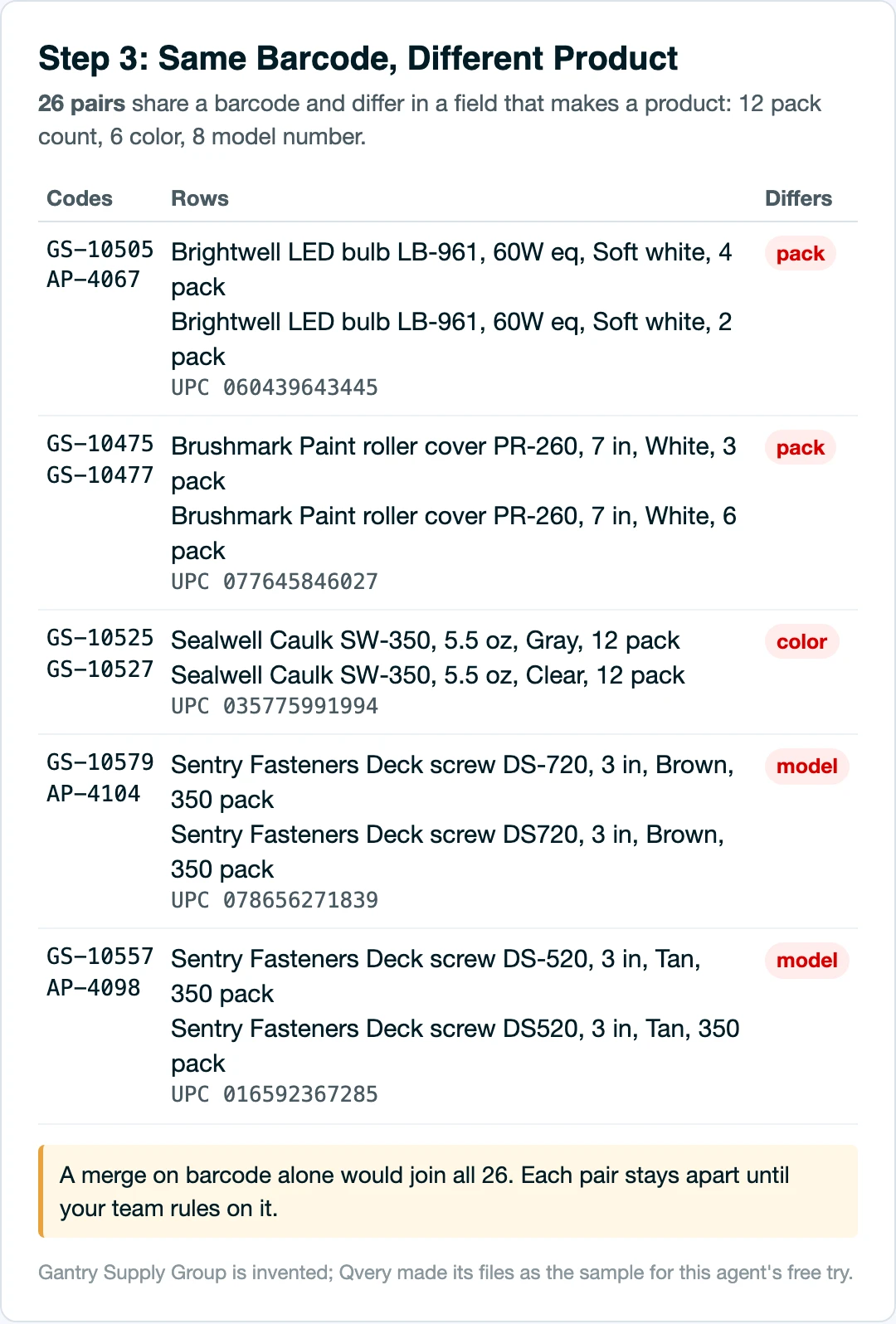
Twenty-six pairs share a barcode and, under the notes' rules, are different products: 12 differ in pack count, 6 in color and 8 in model punctuation the notes do not approve as an alias. A merge on barcode alone would have joined all 26.
The eight model-number pairs are the ones a person waves through: DS-720 in the item master and DS720 in Alderpoint, the same deck screw description, the same barcode.
The notes say punctuation counts and approve exactly three aliases, DWL-20V and DWL20V among them. The agents join those three and keep the eight apart. If the team decides DS720 is DS-720, one more line in the notes joins them on the next run.
People who match supplier files by hand have landed on the same habits: map each supplier once, treat a barcode as a clue to the variant, and keep the final call with a person.
Tips from Reddit
How people who match supplier files keep products apart
Have you considered creating a template for each brand/ manufacturer? This would enable you to download the new file, refresh, confirm, and import.
I'd search the existing UPC first, and make sure it doesn't come up, because usually if there is a unique UPC, there may be some nuance that makes it a different product or variation.
I will have to manually compare drawings, this is just a way for me to filter/sort what are the most likely matches to be interchangeable.
Rows Too Thin to Judge Wait for the Missing Detail
Forty-one rows lack a size, a color or a pack count: 30 of the 140 rows in the Bradford feed and 11 in Alderpoint. None of them joins a group, because a missing field is unknown, never agreement.
Three could be either of two products. AP-4145 in Alderpoint is a Terrabloom planter, model TB-487, 8 inches, with no color and no barcode, and the item master sells that planter in slate and in chalk.
Its price matches the chalk one to the cent, and so does its stock count. Neither is on the notes' list of what makes two rows one product, so the row waits for its color.
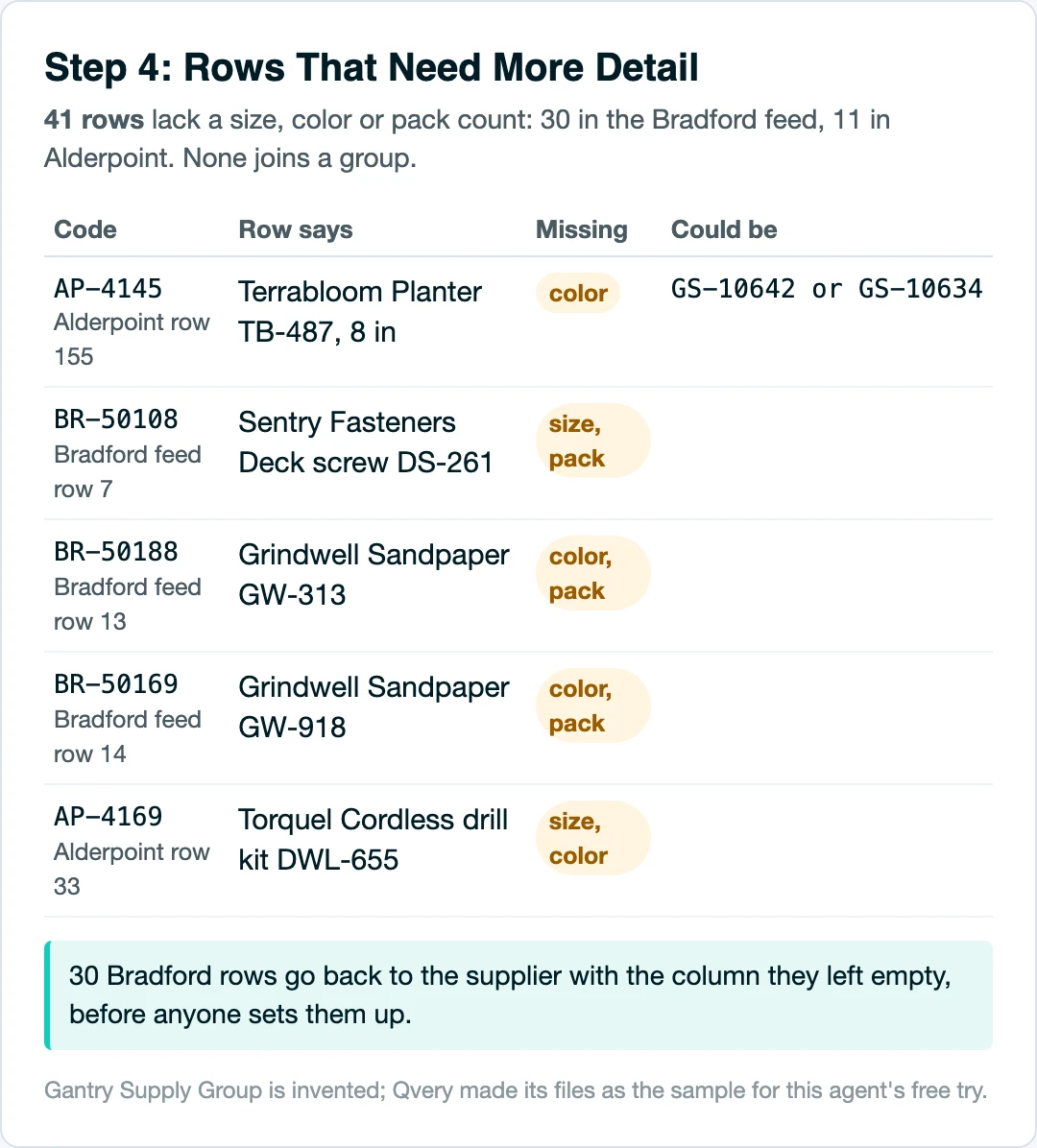
For the Bradford feed this is the most useful list in the run: 30 rows to send back to the supplier with the column they left empty, before anyone sets them up as new items.
Check that it worked: a row that comes back with its color either joins its twin on the next run or stays a product of its own.
Your Keep-Code Rule Picks the Code That Survives
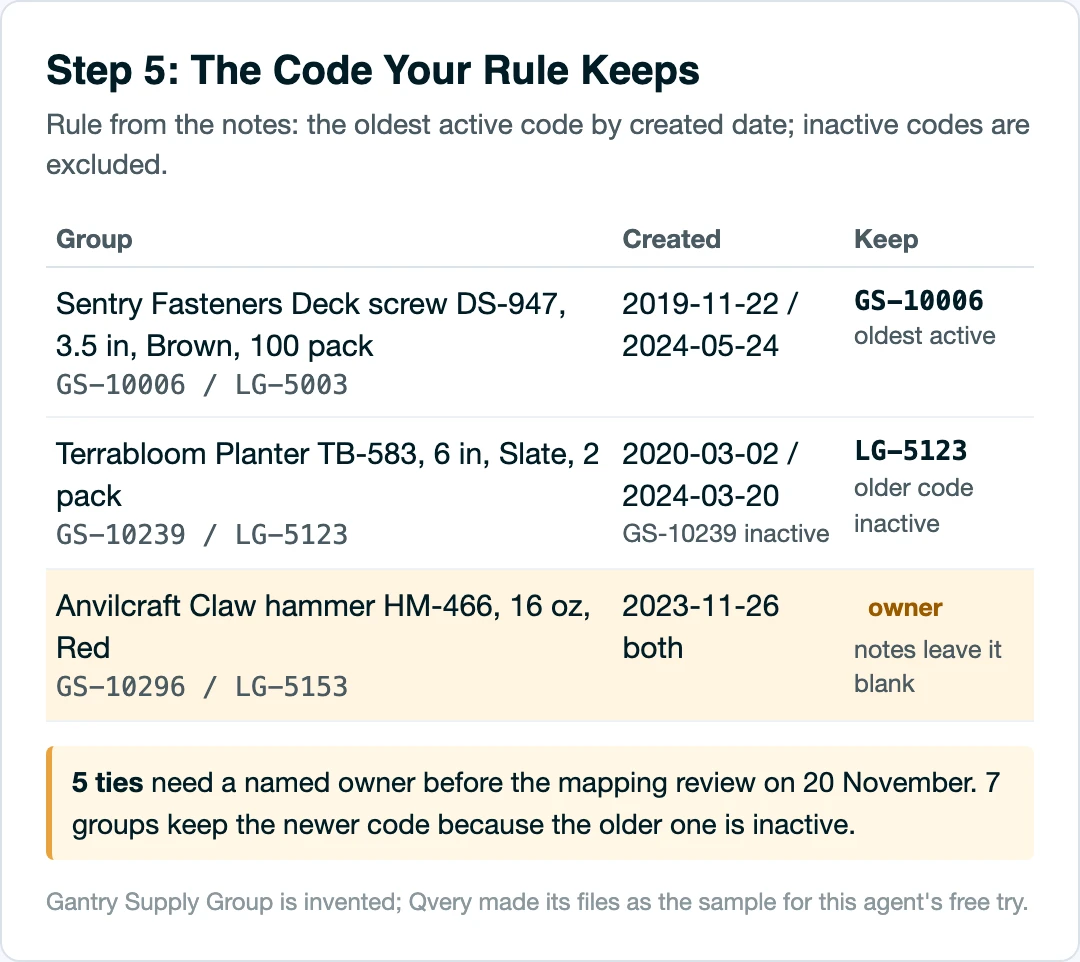
Each group needs one code to keep. The notes set the rule: the oldest active code by created date, inactive codes excluded. The agents apply it as written and show the dates that decided it.
Seven groups have an inactive older code, so the newer one survives. Five groups have two active codes created on the same day: the HM-466 claw hammer is GS-10296 and LG-5153, both created on 26 November 2023. The notes send a tie to an owner and leave the name blank.
That blank is the first decision the run hands the team, and it needs a name before the mapping review on 20 November.
The run also found four codes that each carry two different products. GS-10619, a paint roller cover, appears once as 4 inches and once as 10 feet. Those are questions, not groups: someone checks the shelf.
Put a Price on the Twins Before the Move
The price change file, the marketplace email and the migration plan put a number on the groups.
The 12 October price rise was loaded by item ID, once per ID. For 24 products it reached one code and missed the twin. Priced at the gap, the 4,690 units those twin codes sold in the last 90 days come to $12,848.73: what the old price gives away at that volume.
The deck screw at the top of this page is one of them: $20.09 on GS-10006, $18.43 on LG-5003.
The nine listings the marketplace took down on 21 October as duplicate pages are all the newer code of one of those 24 products. They sold $21,578.12 in the 30 days before they went down: the sales riding on those groups being settled.
The migration plan sets three dates: the mapping review on 20 November, the marketplace feed lock on 25 November and the new product information system going live on 1 December.
A group still open on 20 November moves as two items and is merged afterwards, when each code already has its own history, listing and stock.
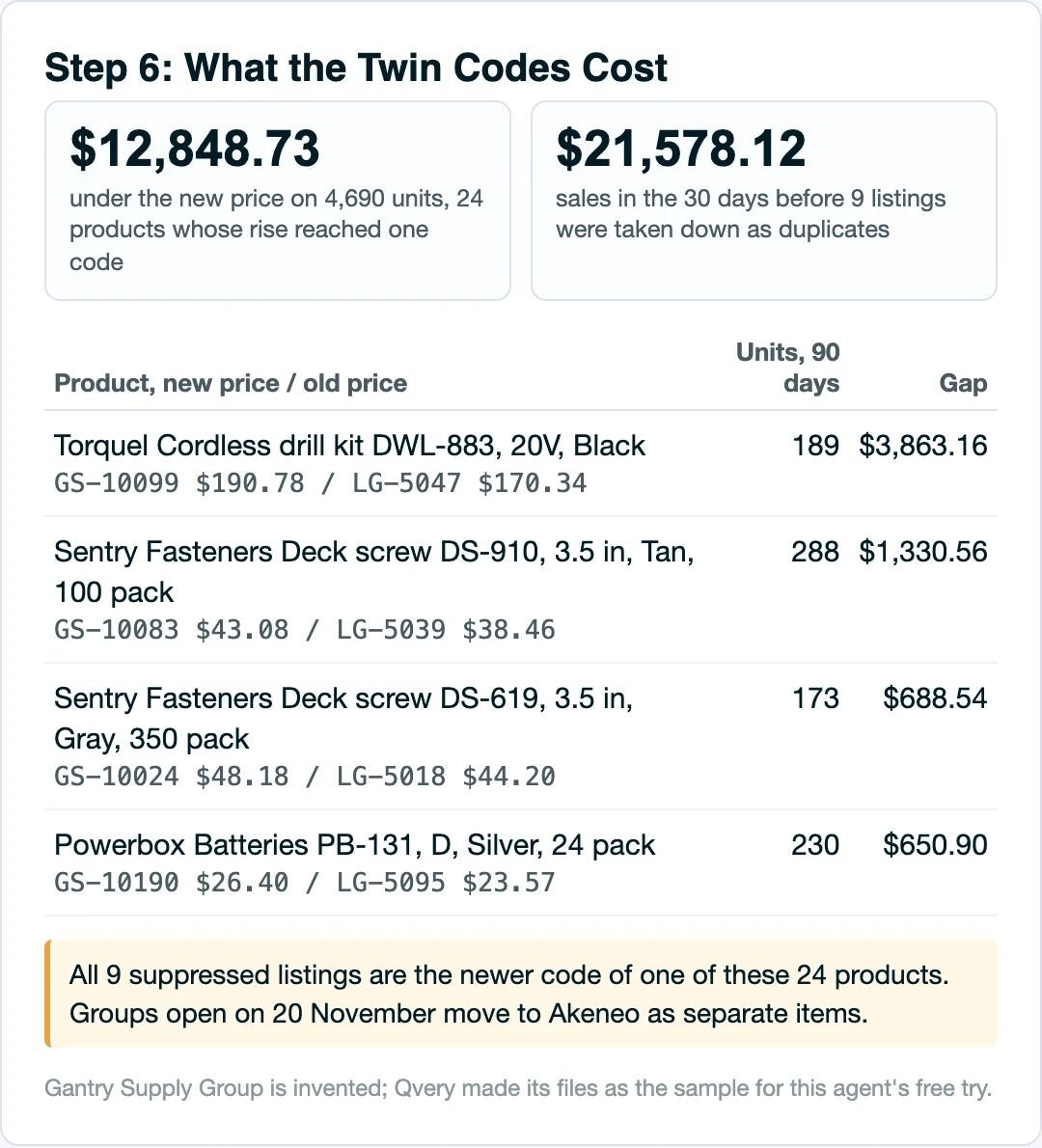
That is the page a catalog manager needs before the review. Try the same check on your own export.
What the Agents Leave Alone
The run also marks what is fine, so nobody files it as a fault:
A model's sizes, colors and pack counts
different products, so the TM-146 tape measure in 16, 25 and 30 feet stays three products.
Two barcodes for one item
four groups whose two codes carry different barcodes; the notes say that does not split a group.
Six repeated rows in Alderpoint
the same code twice with the same details, listed as copies rather than products under two codes.
Stock and sales
shown for planning, never as evidence that two codes are one product.
What a Plain Model Pass Did With the Same 960 Rows
The obvious shortcut is to paste the whole catalog and the notes into a chat and ask for the duplicates. People argue about it in forums, so we ran it.
| Measure | Code | Sonnet, first pass | Sonnet, second pass | Haiku |
|---|---|---|---|---|
| Groups found (61 in the key) | 61 | 61 | 61 | 61 |
| Different products joined | 0 | 0 | 0 | 0 |
| Lookalike pairs named (26 in the key) | 26 | 26 | 24 | 24 |
| Time | about a second | 119 seconds | 128 seconds | 350 seconds |
On this file the models did well: every group right, nothing fused.
They differed on the list of lookalikes. The second Sonnet pass named 24 of the 26 pairs where the first named all 26, and that list is what your team reads before deciding what not to merge. Code returns the same 26 every time.
Size is the other limit. The 960 rows we pasted came to 133,039 characters, and a 100,000-row catalog is more than a hundred times that. It has to be cut into pieces, and a pair whose two codes land in different pieces is only compared if something matches every piece against every other.
That something is code: it finds the candidate pairs across the whole catalog first, and the model reads only what needs reading.
 Piotr BabelPartner @ Qvery
We give code every comparison that has to come out the same way twice, and keep the model for what code cannot read: a new supplier's headers, a notes sheet, a row with half its details missing. That is why the list your catalog team works from on Monday matches the list it works from on Friday, and why a wrong pair can be traced to the rule that made it.
Where Qvery's Agents Sit Between Your Suppliers and Your Item Master
The run above is one catalog move. The agents we build for retail groups run the same checks every day, on their own, beside the catalog team, starting each time a supplier item is set up or a brand's catalog is added, plus a weekly sweep of the whole item master.
They read the item master straight from your ERP or product information system (PIM), read only, each brand's store catalog, and supplier files from the inbox or folder where they land today.
Each new item is checked against your rules and against the pairs your team has already settled, so when an old product turns up again in a new supplier's file, last spring's decision still applies.
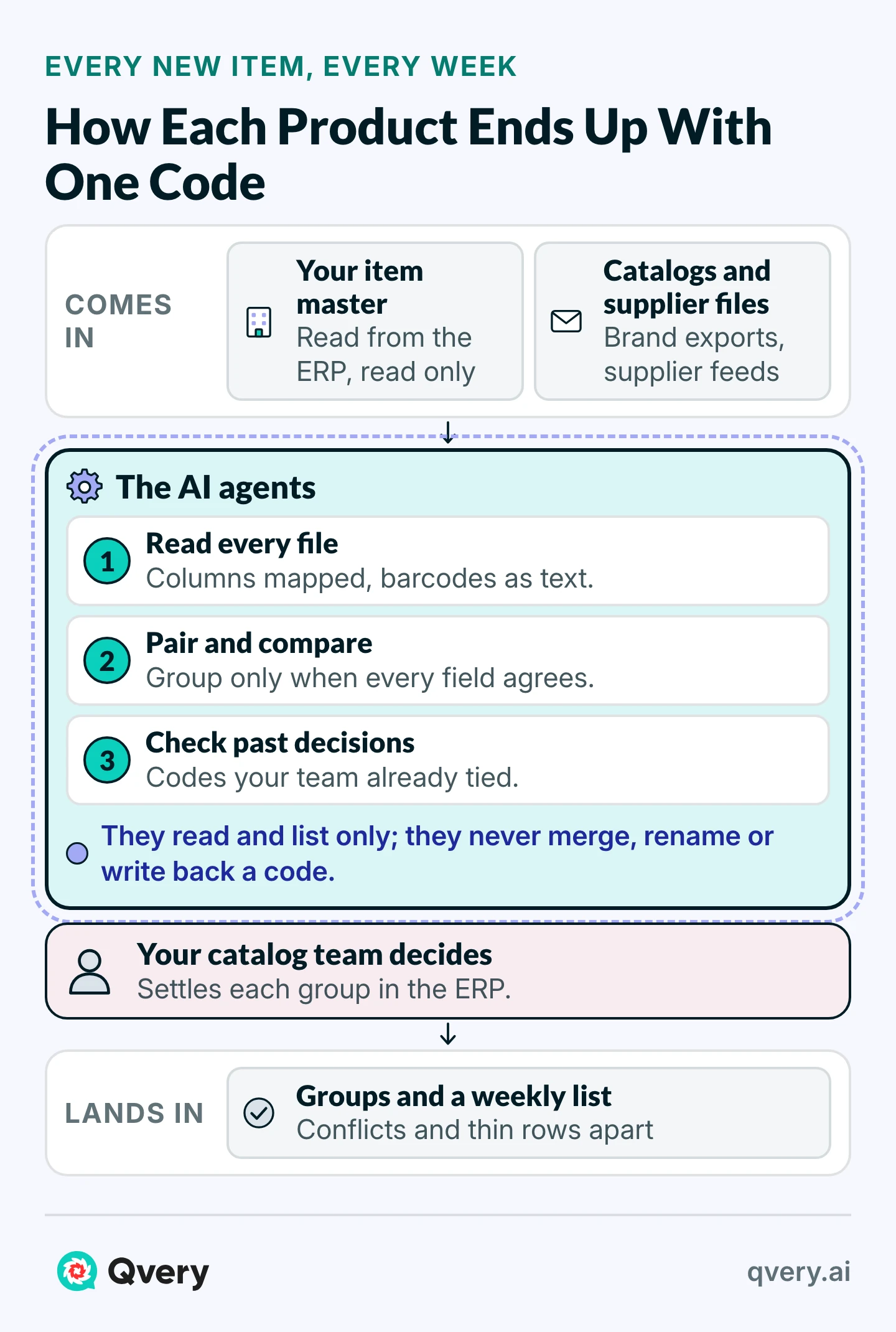
What comes out is the run you just read: groups with their evidence, conflicts, rows that need detail, and a weekly list for merchandising. Every merge stays with your team, in the system they already trust.
| The agents may | The agents never |
|---|---|
| Read the item master, every brand's catalog and each supplier file | Merge, retire or rename a code |
| List groups, conflicts and thin rows with their source rows | Write anything back to your ERP or PIM |
| Suggest the code to keep under your own rule | Read a supplier's cost or price columns |
| Flag a duplicate when a supplier item is set up | Treat stock, sales or a barcode alone as proof |
Before the agents open a single export, we agree in writing which files and folders they may read, where they run and how long files are kept. Every check they make is logged, so when your team rejects a group, we can see which rule produced it and tighten that rule.
The calculator prices the everyday half of the job: each new supplier item checked against the item master before it is set up.
Supplier Item Matching ROI Calculator
What Checking New Supplier Items Costs You, And With The Agents
Saved Per Year
$18,271
720 hours handed back, after $4,560 a year to run it
- Hours Handed Back
- 720 hours a year
- Agent Running Cost (Estimate)
- $380 a month
- Payback Per $10,000 Of Build
- 6.6 months
On these numbers, each supplier item costs $2.85 instead of $7.93, the agent saves $18,271 a year after its own running cost, and every $10,000 of the build is earned back in 6.6 months.
Its example is a group taking in 300 new supplier items a month at 15 minutes each, by a clerk who costs $31.71 an hour with benefits. That is 900 hours and $28,539 a year.
With the agents, the calculator assumes the clerk spends about 3 minutes on each item the agents hand over, 180 hours a year, and running the agents is about $380 a month at that volume, upkeep included. The year costs $10,267.80 instead, $18,271.20 less.
On that return, each $10,000 of build comes back in about six and a half months. These are the calculator's assumptions, not a result from Gantry's files; your own volume and minutes go in the boxes above.
The weeks before a migration come on top: Gantry's notes put them at 40 hours a week for three people.
 Vlad ShvetsPartner @ Qvery
Owners hear about duplicate codes and think of a cleanup before the next system change. In the sample the cost was already there: a price rise that reached only one code of 24 products, nine listings a marketplace took down, a supplier file that brings the twins back next month. So our agents check each supplier item on the day it is set up, not in the month before a migration.
What Your Catalog Team Brings to the First Run
The first run needs three things from you: the item master export, one brand's catalog or one supplier's file, and the merge notes, or the person who keeps those rules in their head. We connect the agents to where those files live and run them on your full item master.
The first batch of groups is worked through with your team, and that batch shows where your keep-code rule needs another line.
Two weeks after the files are open to us, the agents check each new supplier item as it is set up and send the weekly list. Every week we report the hours handed back and the groups your team rejected, with the rule behind each.
The Retail Playbook works out what duplicate product codes cost a retailer of about 200 people a year, beside supplier invoices checked by hand and the same shopper on several lists.
If a catalog move or a new brand is already on your calendar, that date is where the first run should land.
Frequently asked questions
What is SKU matching?
SKU matching finds the products your catalog carries under more than one item code, across the item master, the brands you own and your suppliers' files. Each group shows the fields that agree, the fields that differ and the code your rule keeps. Your catalog team then settles each group in its own system.
Can two products have the same SKU?
They should not, but it happens. In our sample, four item-master codes each carried two different products, such as a paint roller cover listed once as 4 inches and once as 10 feet. The agents list those as questions for someone to check on the shelf, never as a group.
Will the agents merge a product's sizes or colors?
No. A size, color or pack count that differs blocks a group, even when names and barcodes match: in our run, 26 pairs shared a barcode and were still different products. The TM-146 tape measure in 16, 25 and 30 feet stays three products, and your notes can add what else defines a variant in your range.
What if barcodes are missing or wrong?
Brand, model, size, color and pack count carry the match. Twenty of the 61 groups in our run were found with no shared barcode. Two suppliers often give one item two barcodes, so a different barcode alone does not split a group, a shared one never joins two products, and every barcode is read as text so its leading zero survives.
Do the agents change anything in our ERP or PIM?
No. They read your systems and write only their own lists. Merging, retiring or renaming a code stays with your catalog team, in the system they already use. Loading settled groups back into your product information system can be added as its own step, once your team trusts the groups.
How big a catalog can the agents handle?
They read the whole item master, every brand's catalog and each supplier file, never a sample. Code pairs candidates across all rows first, so a 100,000-row catalog is compared as one catalog. Every run states how many rows it read from each file, so you can see nothing was skipped.
How much do the agents cost each month?
An estimate: about 10 cents of model usage for each new item checked, plus about $350 a month for hosting, the weekly sweep and upkeep of your rules. At 300 new supplier items a month that is about $380. The calculator above sets that against your own volume and your clerks' pay.
We clean the catalog before every migration. Why run it every day?
The twins come back with the next supplier file. In our sample, 12 items in a new supplier's first feed were already in the item master under another code. A check at setup flags the twin to your team before the second code gets its own stock, price and listing.
Who decides which code to keep?
Your own rule decides, applied as written, and your team settles anything it leaves open. In our run the rule kept the oldest active code. Five groups had two codes created on the same day and the notes named nobody for a tie, so those five went to the team with both dates.
What happens when our team rejects a group?
Nothing changes anywhere, because the agents never merge. The rejection and its reason come back to us, and we tighten the rule that produced the pair in your build. Conflicts and thin rows sit on their own lists, so a doubtful pair never hides inside a confident group.
Does a matching price or stock count prove two rows are one product?
No. In our sample, a planter with no color matched the chalk version's price and stock to the unit, and it could still be the slate one. Price, stock and sales are shown for planning; only brand, model, size, color and pack count decide a group, with the barcode as a strong clue.
Are our supplier price lists safe with the agents?
Before we start, a written agreement fixes which exports and folders the agents may open, the region they run in and how long files stay. The column map drops supplier cost and price columns before any comparison or model read. Qvery is an EU company, and a data processing agreement covers anything personal in the files.
Does it work if our catalog lives in spreadsheets?
Yes. Our sample was a spreadsheet export and two CSV files, read exactly as they came. The agents map each file's columns once, keep every barcode as text, and record each row's file and row number, so every finding opens in the spreadsheet your team already uses.
