On this page
- Send the Payee and the Direction, Not the Statement
- Step 1: Load the Export and Name What May Never Leave
- Step 2: Scrub the Description Column, Where the Names Are
- Step 3: Read the List Before It Leaves
- Step 4: Ask for One Rule per Line, With UNKNOWN as an Answer
- Step 5: Bring the Rules Home With a Lookup, Then Tie the Totals
- Step 6: Sort What Came Back Before Anyone Codes It
- Step 7: Next Month, Send Only the New Lines and Check the Big Rows at Home
- Move the Rules Into the Books, and Keep a Person on the Posting
- The Agent Qvery Builds to Code Every Client's Month
- Tell Clients What Leaves, in Writing, Before the First List Goes Out
- Frequently asked questions
Every client's month reaches your firm as a bank export, and a bookkeeper codes it: each row to an account in that client's chart, for every client, every month.
Say your firm codes 200 client accounts at 150 rows a month: at 30 seconds a row, that is about 250 hours a month before anyone reviews a thing.
The hard rows come back every month: a Zelle payment that may be a subcontractor or the owner's draw, a Home Depot charge that turns out to be a $3,240 mower. Get one wrong and the money sits on the wrong line of the client's books.
The same export holds the client's legal name, their account numbers and balance, and the people they pay, much of it inside the description column where nobody looks. So the work tends to stay by hand, or someone pastes it into a chat window and nobody asks.
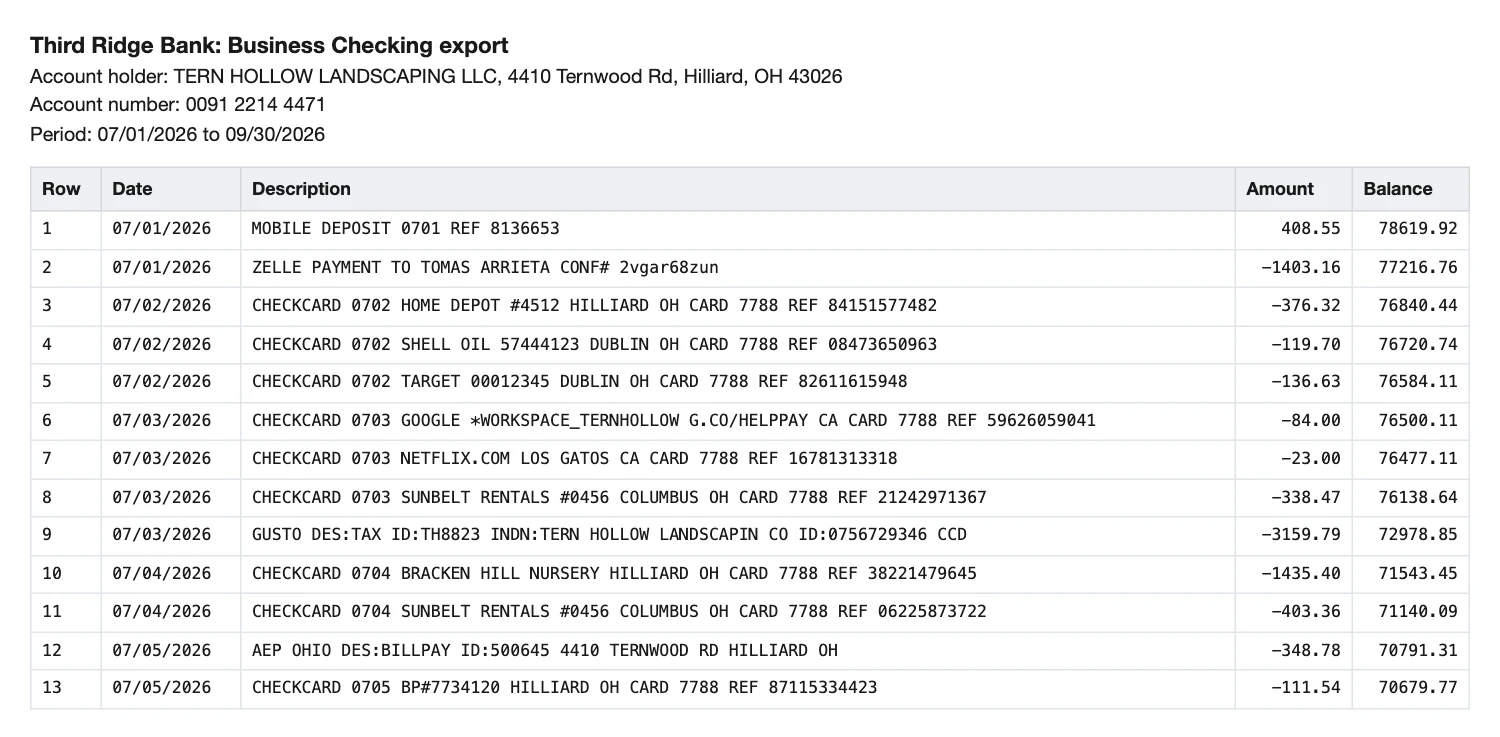
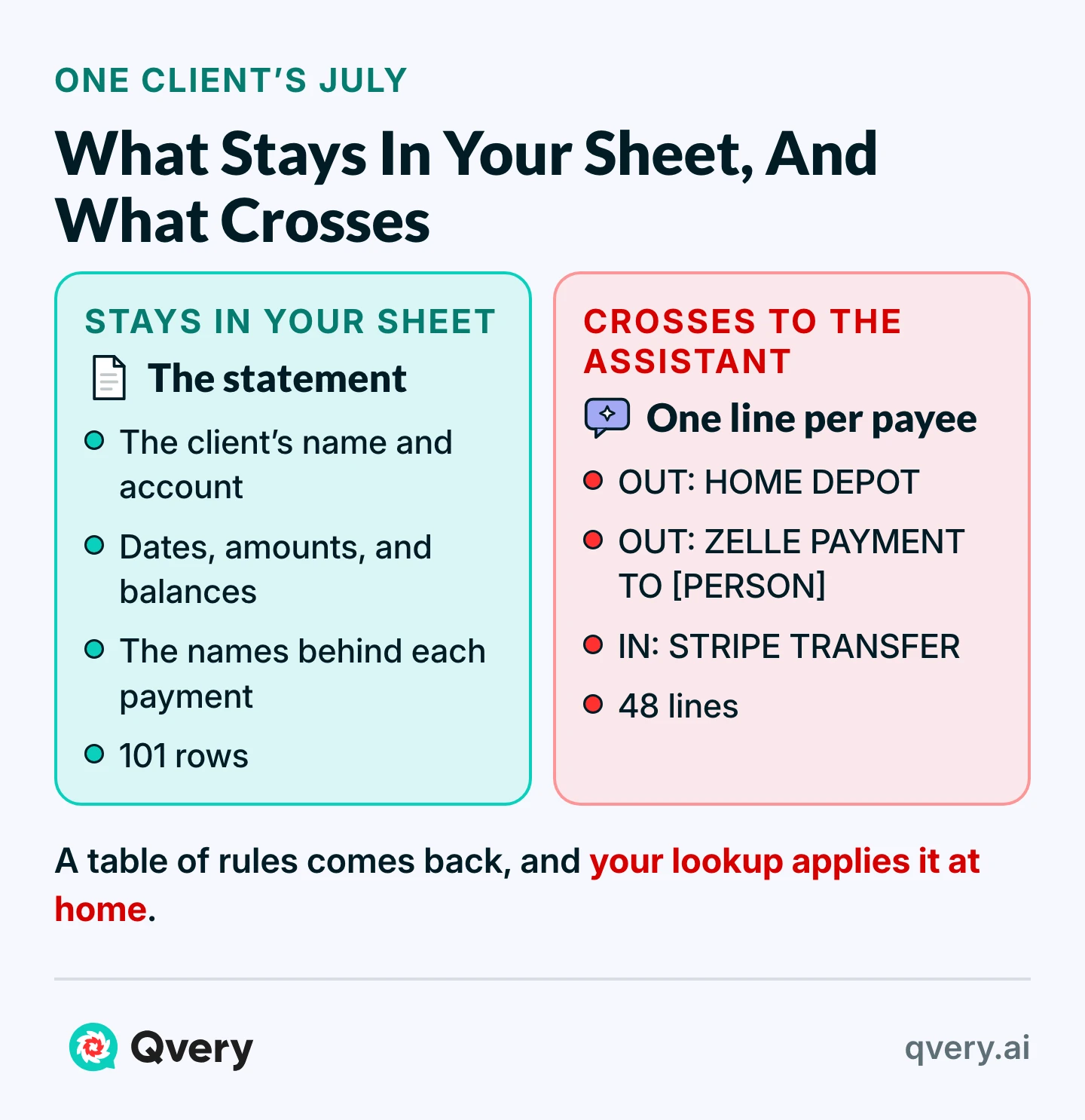
An AI assistant can do that coding now, and it doesn't need the statement. The account mostly depends on who was paid and which way the money moved, so the assistant can get one scrubbed line per payee while your own spreadsheet holds everything else.
We ran this on an invented statement: three months of Tern Hollow Landscaping, a made-up company at a made-up bank, with 24 identifiers planted in the descriptions and the right account written down for every row before the first run. Every name, account, and amount in this article is fictional.
The seven steps below are the hands-on way to try it on your own export. After them comes the agent Qvery builds to run the same month for every client by itself.
One limit before you start: this codes the month. It does not reconcile, post, or decide what you owe the client, and the last section says where that gets decided.
Send the Payee and the Direction, Not the Statement
Home Depot going out points to the same account on any date, from any bank account, at almost any amount. So the payee alone gets you a suggestion a person can check.
| In the export | Does the account depend on it? | Does it leave the firm? |
|---|---|---|
| Client's name, address, and account number | No | No |
| Date | Rarely | No |
| Balance | No | No |
| Amount | Sometimes, on the odd unusual row | No: that check runs at home (step 7) |
| Who was paid, as the bank wrote it | Yes | Yes, scrubbed |
| Money in or out | Yes | Yes |
| The chart of accounts and the kind of business | Yes | Yes |
We tested that by giving the assistants both inputs: the same prompt, the same July, 101 rows.
| What the assistant got | Assistant | Rows right | Left for a person | Rows wrong |
|---|---|---|---|---|
| The whole export, bank header included | Claude Sonnet 5.5 | 78 | 23 | 0 |
| The whole export, bank header included | OpenAI gpt-6-astra | 67 | 34 | 0 |
| Scrubbed rows, dates and amounts kept | Claude Sonnet 5.5 | 78 | 23 | 0 |
| The 48-line list | Claude Sonnet 5.5, twice | 76 and 78 | 25 and 23 | 0 |
| The 48-line list | OpenAI gpt-6-astra | 77 | 24 | 0 |
| The 48-line list | Gemini 3.8 Flash | 68 | 33 | 0 |
On this file the names bought nothing, and neither did the amounts. The whole statement got one assistant no more rows than its best list run and got the other fewer, and Claude scored the same with names gone and amounts kept.
Right here means the account on an answer key I wrote for one invented statement, not an error rate in general.
Paste the export and simply ask for categories, and the number looks better. One assistant got 96 of 101 that way, by guessing: it called a Zelle payment to Marisol Vantreese a draw and one to Tomas Arrieta a subcontractor.
Part of that score is my doing, since the sample's true answers are the likely ones. It also got 3 rows wrong, and nothing marks which 3, so a careful person rechecks all 101.
Step 1: Load the Export and Name What May Never Leave
Open a new spreadsheet with five tabs: Statement, Do Not Send, Scrub Steps, List, and Rules.
Build it where your firm already keeps client files, because the whole export sits in it. "Stays in the firm" on this page means that workspace, under whatever your firm has agreed with its provider.
Paste the export into Statement with headings in row 1 and these columns: A row number, B date, C description, D amount. Leave out the bank's header lines and the balance column. They stay in your original file.
In Do Not Send, put a heading in A1 and one name per row below it, taken from the client file.
Check that the row count in Statement matches the bank's. Ours was 101 for July.
Microsoft lists REGEXREPLACE for Excel for Microsoft 365 only, and XLOOKUP is not in Excel 2016 or 2019. On an older Excel, build this in a Google Sheet.
Step 2: Scrub the Description Column, Where the Names Are
Deleting the account number column feels like masking and leaves most of it in place.
Banks build a description by joining fields of the payment into one line, each bank in its own way. The NACHA file format gives an ACH payment an Individual Name field, and Tern Hollow's own name comes through it, cut off at the field's 22 characters.
| The bank's description | What is hiding in it | After the scrub |
|---|---|---|
| GUSTO DES:TAX ID:TH8823 INDN:TERN HOLLOW LANDSCAPIN CO ID:0756729346 CCD | The client's name and an ID | OUT: GUSTO TAX |
| ZELLE PAYMENT FROM HELEN MARCHETTI 614-555-0142 CONF# v5vkvh67dd | A customer's name and phone | IN: ZELLE PAYMENT FROM [PERSON] |
| CHECKCARD 0702 HOME DEPOT #4512 HILLIARD OH CARD 7788 REF 84151577482 | The date, the town, the card's last four | OUT: HOME DEPOT |
| AEP OHIO DES:BILLPAY ID:500645 4410 TERNWOOD RD HILLIARD OH | The client's street address | OUT: AEP OHIO BILLPAY |
| WIRE TYPE:WIRE IN DATE:611242 TRN:9548086766855082 SNDR REF:INV4042 ORIG:DUNMORE PROPERTY GROUP ID:473252921 | A customer and an invoice number | IN: WIRE IN |
Go to Scrub Steps and paste this at A1. Each row is one removal, and they run top to bottom, so the order matters. The replacement on the DES: row is a single space.
Pattern	Replace with	What it removes
(NAMES)	[REMOVED]	Every name on the Do Not Send tab, wherever it sits in the line
(?i)^WIRE TYPE:WIRE (IN|OUT).*$	WIRE $1	A wire's sender, reference numbers and invoice number
(?i)\s+(INDN|CO ID|ID):.*$		An ACH line's tail: the IDs, the name on the account, and anything after them
(?i)\s+DES:	 	The DES: label, keeping what the payment says it is for
(?i)^ZELLE PAYMENT (TO|FROM).*$	ZELLE PAYMENT $1 [PERSON]	The person, their phone or email, the memo and the confirmation code
(?i)^ONLINE BANKING TRANSFER (TO|FROM) (SAV|CHK).*$	ONLINE TRANSFER $1 $2	The other account's number and the confirmation number
(?i)^CHECKCARD( RETURN)? \d{4} 		The card prefix and the date
(?i)\s+CARD \d{4}.*$		The card's last four and the reference number
(?i)^CHECK \d+$	CHECK	The check number
(?i)^MOBILE DEPOSIT.*$	MOBILE DEPOSIT	The deposit date and reference
(?i)\s+CONF# .*$		A confirmation code
\S+@\S+	[EMAIL]	Any email address still left
\(?\d{3}\)?[-. ]\d{3}[-. ]\d{4}	[PHONE]	Any phone number still left
(?i)\b\d+ [A-Z0-9 ]+ (ST|AVE|RD|BLVD|DR|LN|WAY|CT|PIKE)\b	[ADDRESS]	A street address
\s*#\s*\d+		A store number
\d{4,}		Any other run of four or more digits
\*[A-Z0-9]{7,}\b		A long order ID or handle after an asterisk
\s*\[REMOVED\] [A-Z]{2}$		A removed town and its state at the end of a line
Then replace (NAMES) in A2 with this, which turns your Do Not Send tab into one pattern:
="(?i)("&TEXTJOIN("|",TRUE,'Do Not Send'!A2:A200)&")"In Statement, head column E Line, paste this in E2, and fill it down to the last row:
=IF(D2<0,"OUT","IN")&": "&TRIM(REDUCE(UPPER(C2),SEQUENCE(ROWS('Scrub Steps'!$A$2:$A$19)),LAMBDA(t,i,REGEXREPLACE(t,INDEX('Scrub Steps'!$A$2:$B$19,i,1),INDEX('Scrub Steps'!$A$2:$B$19,i,2)&""))))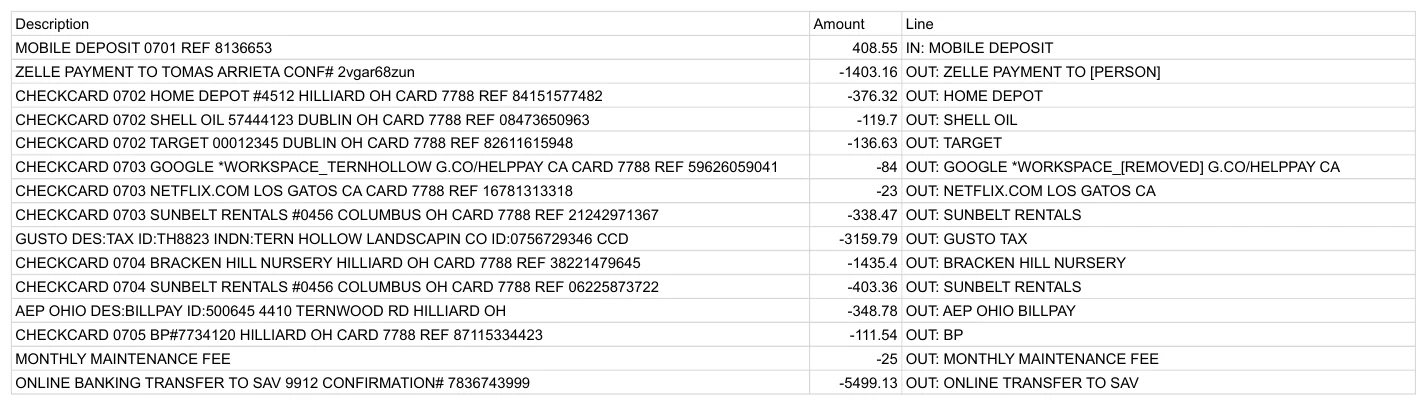
Column E should read like the right-hand column of the table above. A line still holding a long number or a name is not ready to send. If you add a step later, change each 19 in that formula to the table's new last row.
Those steps fit our invented bank, and yours writes these lines differently. An assistant can write the patterns for your bank from five or six lines you retype with every name and number changed: the same three columns, in syntax both Google Sheets and Excel accept.
We tried that, in code rather than a sheet, on seven made-up lines in another bank's format and four fresh ones. Every number, date, and person's name came out.
The company's own name came through on three lines and a town on one, because no pattern can know them. That is what Do Not Send and the next step's read are for.
Step 3: Read the List Before It Leaves
In List, paste this in A1:
=UNIQUE(FILTER(Statement!E2:E500,Statement!E2:E500<>""))Tern Hollow's 101 rows became 48 lines, short enough for one person to read every one.
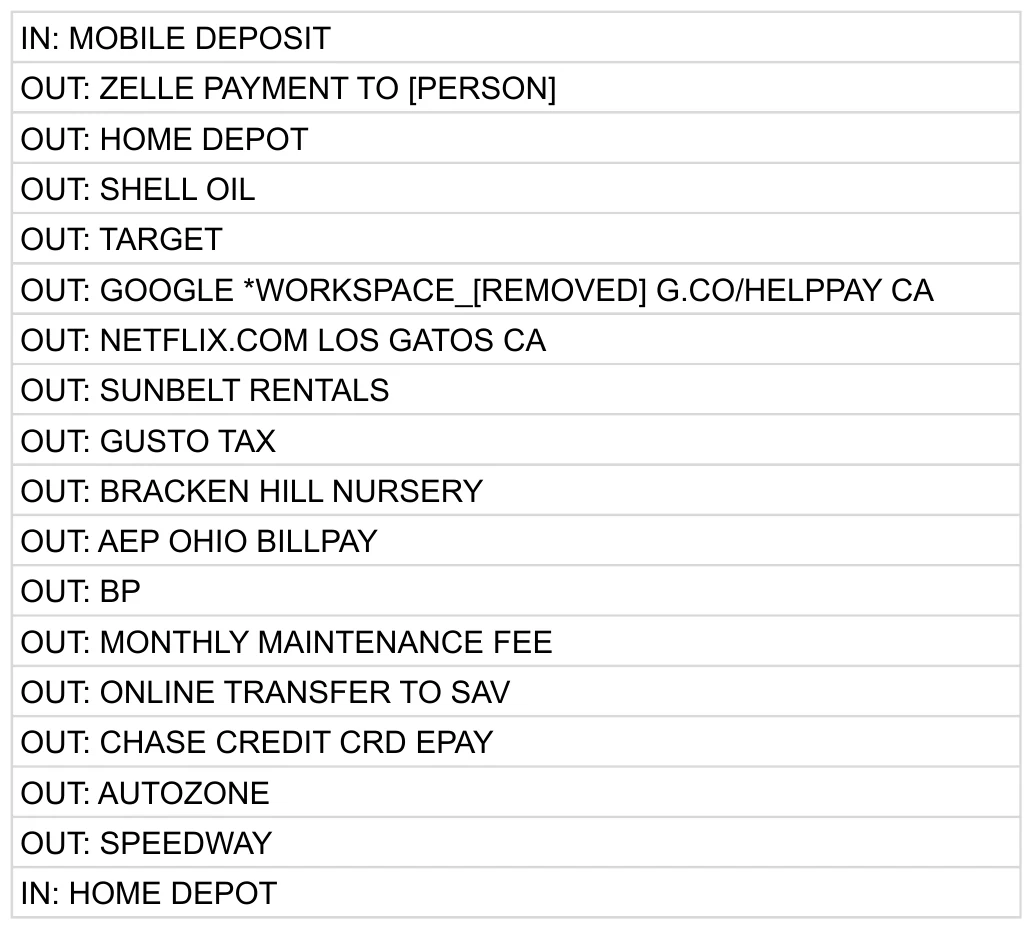
Before anything leaves, read every line for four things:
- A person's name, or the client's name in any spelling
- A street, a phone number, or an email
- A number that splits one payee into many lines
- A line you can no longer recognize, which means the scrub took too much
On our first pass the formulas had removed 22 of the 24 identifiers we planted. The read found the other two, and neither is a pattern a formula could catch: GOOGLE *WORKSPACE_TERNHOLLOW, the client's name run together, and ONLINE BILL PAY TO RENATA FOR BOOKS, a bookkeeper's first name in a memo.
Both went on Do Not Send and the sheet recomputed every line.
The read also finds what the scrub broke: our first step order cut Google Ads down to GOOGLE G.CO/HELPPAY CA. The table in step 2 is the order that survived two reads.
We planted those identifiers, so we knew where to look, and that makes ours a weak test of a stranger's read. Give the list to someone who knows the client, and treat their yes as what lets it leave.
A clean list still names payees. Ours kept Brindlewood Holdings, Tern Hollow's landlord, because the account depends on it. If a payee could point back at the client, as a landlord in a small town could, add it to Do Not Send and code that line by hand.
Step 4: Ask for One Rule per Line, With UNKNOWN as an Answer
My first prompt told the assistant to answer UNKNOWN when "the line does not tell you the account" and never to guess between business and personal spending.
| The words | What they did |
|---|---|
| "does not tell you the account" | No line tells you the account. A bank never writes "fuel". |
| "never guess between business and personal" | Any purchase could be personal, so a careful assistant can refuse them all |
One assistant coded 10 of 101 rows from the list and 17 from the whole export, where it marked a Shell purchase UNKNOWN because "Merchant alone proves neither fuel nor business use." Fair enough as logic, and useless as bookkeeping.
The rewrite tells it what a bookkeeper assumes and names the only cases where it should stop.
You are helping a bookkeeper code one client's bank activity. The client is <the kind of business, with no name> in <the country>.

Below are the client's chart of accounts and a list of lines from its bank export. Each line starts with the direction of the money (IN or OUT), then what the bank's description says. Names, account numbers, dates, and amounts were removed on purpose; [PERSON], [REMOVED], [EMAIL], and [PHONE] mark some of those places.

Return one table row for each line, in the same order, with these columns:
Line | Category | Confidence | Reason | What would settle it | Clean name

Rules:
1. Copy each line exactly as written, character for character.
2. Category is one account from the chart, written exactly, or UNKNOWN.
3. Give the account a bookkeeper would normally use for this kind of payee at this kind of business, even without a receipt: a gas station is fuel, an equipment rental company is equipment rental. Assume a purchase is for the business unless the payee sells mostly personal things.
4. Answer UNKNOWN when the line cannot tell you: a payment to or from a person, a check or deposit with no payee, a retailer that sells a bit of everything, or a charge that looks personal. Do not guess at those.
5. A card payment, a transfer between the client's own accounts, a loan payment, tax collected from customers, and an owner's withdrawal are not expenses. Do not force them into an expense account.
6. Confidence is high, medium, or low. Use low whenever you are inferring from the kind of payee and a person should glance at it.
7. Reason is under ten words. What would settle it stays blank unless the category is UNKNOWN or confidence is low.
8. Clean name is the payee as a person would write it on a report. Leave it blank if the line does not name one.
9. Add no lines, remove none, and write nothing outside the table.

Chart of accounts:
<your chart, one account per line>

Lines:
<your list>
Replace the four parts in angle brackets, and paste it into a new chat on the plan your firm approved.
| Assistant | First prompt: rows right | Rewritten: rows right | Rows wrong, either way |
|---|---|---|---|
| Claude Sonnet 5.5 | 63 and 64 | 76 and 78 | 0 |
| OpenAI gpt-6-astra | 10 | 77 | 0 |
| Gemini 3.8 Flash | 67 | 68 | 0 |
Here is part of what came back:
| Line | Category | Confidence | What would settle it |
|---|---|---|---|
| OUT: SHELL OIL | 6100 Fuel | high | |
| OUT: HOME DEPOT | 5000 Plants and Materials | low | Receipt showing materials versus tools |
| OUT: GUSTO FEE | 6020 Payroll Service Fees | high | |
| OUT: CHASE CREDIT CRD EPAY | 2000 Credit Card Payable | high | |
| OUT: OHIO DEPT TAXATION SALES TAX | 2100 Sales Tax Payable | high | |
| OUT: ZELLE PAYMENT TO [PERSON] | UNKNOWN | low | Who the person is and what the payment was for |
| OUT: AMZN MKTP US* AMZN.COM/BILL WA | UNKNOWN | low | Amazon order history or receipt |
The bank's text stays in column C and the clean name sits in its own column of the table, so the original record never gets reworded. Copy the table into Rules starting at A1, one column per heading.
Step 5: Bring the Rules Home With a Lookup, Then Tie the Totals
In Statement, head column F Category, paste this in F2, and fill it down:
=XLOOKUP(E2,Rules!$A:$A,Rules!$B:$B,"NO RULE")NO RULE means the assistant changed or dropped a line. None of our list runs did, and this column is how you would find out. Check too that no line appears twice in Rules, because the lookup takes the first.
Then total each category and compare the sum with the statement. Change 102 to your own last row.
| Cell | Paste this | What it gives you |
|---|---|---|
| I2 | =UNIQUE(FILTER(F2:F102,F2:F102<>"")) | Every category, once |
| J2, filled down to J40 | =SUMIF($F$2:$F$102,I2,$D$2:$D$102) | Each category's total |
| L2 | =SUM(D2:D102) | The statement's net |
| M2 | =SUM(J2:J40) | The sum of the totals |
| N2 | =ROUND(L2-M2,2) | The difference |
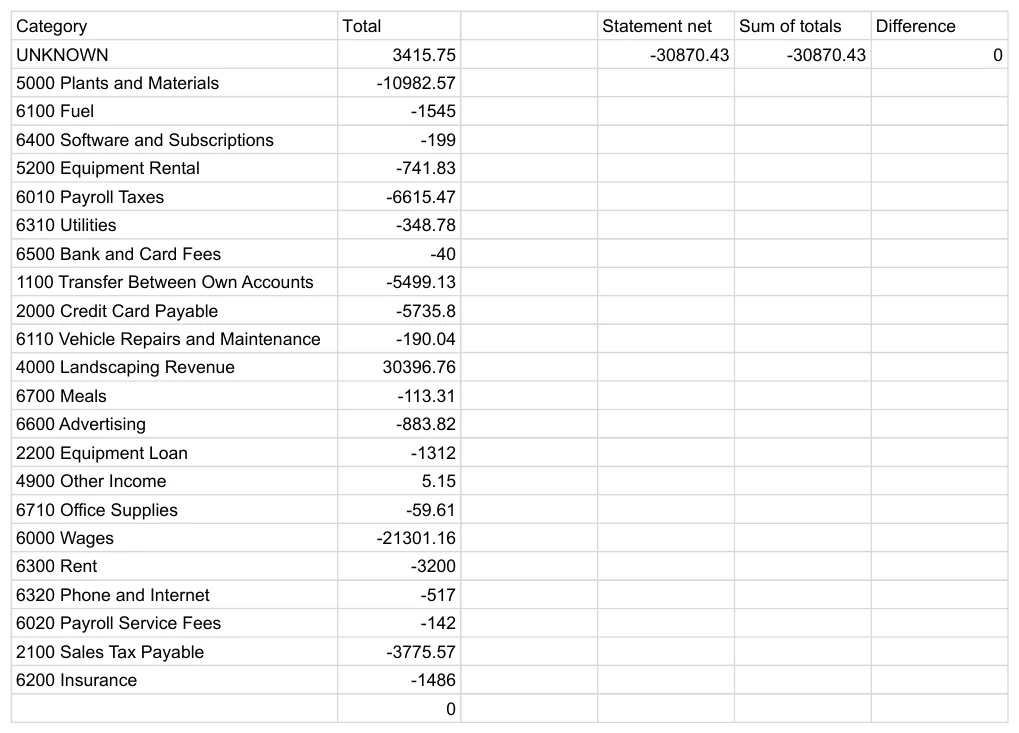
N2 has to read 0. Ours showed -30,870.43 on both sides. That is arithmetic only: every row landed in one bucket, UNKNOWN and NO RULE count as buckets, and nothing here says the bucket is right, which is the next step.
Step 6: Sort What Came Back Before Anyone Codes It
July came back with 76 rows coded and 25 marked UNKNOWN, on 13 lines. These are the ones to understand, because the same kinds will come back from your clients.
| What came back | Why it matters | The fix | How you know it held |
|---|---|---|---|
| Zelle to or from [PERSON]: UNKNOWN | One line was a subcontractor on 4 rows and the owner's draw on 2 | Code it from column C, where the name still is | The UNKNOWN total reaches 0 |
| Check, mobile deposit, wire in: UNKNOWN | No payee in the bank's text; the scrub took the wire's sender | Pull the check image or deposit record; read the sender in column C | Each row has a source you could show |
| Amazon, Costco, Target: UNKNOWN | One line, a different answer each row: tools, a crew lunch, the owner's shopping | The receipt or the order history | Personal rows sit in Owner's Draw |
| Netflix, Planet Fitness: UNKNOWN | They look personal; if they are, on a business account they are a draw | Ask the owner once, then write the answer into Rules | The line stops coming back UNKNOWN |
| Kubota loan payment: 2200, high | The right account and half an answer: one payment holds principal and interest | Split it from the lender's schedule | The loan balance ties to the lender's statement |
| Stripe and Square: Revenue, medium | A payout groups charges, refunds, and fees, so the deposit is less than the sales | Record sales and fees from the processor's report | Sales less refunds and fees tie to the deposit |
Low confidence means glance, not redo. Home Depot, Lowe's, Chick-fil-A, and Panera came back low because the assistant inferred from the kind of store, as the prompt told it to. Pull a receipt when the amount looks wrong for that store, which is what step 7 checks.
One blind spot the run cannot show: a personal trip to Home Depot gets the Home Depot rule, because the line looks the same. Our sample has none of those. Only someone who knows the client will catch one.
Step 7: Next Month, Send Only the New Lines and Check the Big Rows at Home
Keep Rules. Load August into a fresh Statement and run the lookup first: every row that shows NO RULE is a new line. Send only those, with the same prompt, and add the answers to the bottom of Rules.
| Month | Rows | Rows with a line already in the table | Coded by the table alone | New lines sent |
|---|---|---|---|---|
| August | 104 | 97 (93.3%) | 74 | 7 |
| September | 97 | 93 (95.9%) | 70 | 3 |
Repeat payees are why the list shrinks, and our invented months repeat more neatly than a real client might. The rows a person codes do not shrink the same way: 26 in August and 24 in September, because a Zelle payment needs a person every month.
July's rules went wrong on one row in two months. On August 13 Tern Hollow spent $3,240.00 at Home Depot on a mower, and the line reads exactly like every other Home Depot line, so the rule called it materials. The amount gives it away, and the amount never left your sheet.
=IF(AND(F2<>"UNKNOWN",ABS(D2)>3*MEDIAN(ARRAYFORMULA(ABS(FILTER(D$2:D$105,F$2:F$105=F2))))),"LOOK","")That flags any row over three times the usual size for its category. Change 105 to your own last row. It flagged the mower and nothing else in August, 6 rows in July, and 3 in September, all large nursery and supplier orders or HOA payments, and all fine.
We set that cutoff knowing the mower was there, so read it as a place to start. In Excel, delete ARRAYFORMULA( and its closing bracket; we have not run it there.

Here is the sum to redo with your own numbers, on the opening's assumptions of 200 accounts, 150 rows each, and 30 seconds a row: 250 hours a month by hand.
On our statement about a quarter of the rows stayed with a person: 25 of 101 in July. At that share, 7,500 rows take 62.5 hours. Reading 200 lists at, say, ten minutes each adds 33 hours, and that read gets shorter once only new lines go out.
Call it 96 hours against 250, and the difference at your bookkeeper's cost is what this is worth to you. That leaves out setup, keeping the scrub current, and splitting loans and processor deposits, so time all of it on one client's real month before you trust the number.
Move the Rules Into the Books, and Keep a Person on the Posting
A spreadsheet is a fine place to find out whether this works, and a poor place to leave it. The first fix to make is the smallest: put the rules you trust into the accounting software, so the next bank feed arrives already suggested.
QuickBooks Online imports rules from an Excel file, through the New rule dropdown and Import rules. We did not run it. Export one rule first to see the file's layout, copy your high-confidence rows into that layout, and import into a test company before a client's.
Three bounds hold wherever the rules run:
Connect it to a test company first
A rule that misfires on a live file misfires on every row it matches.
Let it suggest repetitive, reversible coding
Rules you have read, on payees that repeat.
A person keeps the rest
Every UNKNOWN, every LOOK, every posting, and anything sent outside the firm.
Tips from Reddit
Bookkeepers on rules that run on their own
That said, I don't trust QBO to auto-add anything. I always take at least a quick glance before clicking "add."
set up ‘auto add’ rules in QBO (if you’re using QB) and have a lot of stuff automatically sorted that way.
Coding one list is a much smaller job than closing a month, and the wider evidence is why a person stays on the posting. APEX-Accounting is a benchmark Mercor built with Ramp: 160 close tasks at 10 simulated companies.
58% of those tasks were never fully solved by any model on any run, and the most consistent model solved 2.6% in all eight of its runs. Ramp sells finance software, so read that with its interest in mind.
That is why every step that runs without a person needs a record of what it read, the rule it applied, and who confirmed it.
The Agent Qvery Builds to Code Every Client's Month
By hand, the seven steps wait each month for someone to open a client's sheet. The agent we build runs them on autopilot as each export arrives, and your bookkeepers keep every call that needs a person:
What it reads
each client's bank feed or export and client file, inside your own systems
What starts it
a new month's export arriving
The rule it checks
the scrub steps and the rules table; only new lines go out
What it produces
a coded month, the LOOK rows, and an UNKNOWN queue saying what would settle each
Who approves
the reader signs each new list before it leaves; a bookkeeper posts
It is made for your firm alone, so our first conversations are with whoever codes a month today. It works where your team already does: the bank feeds, the client files, and the accounting software you post to, such as QuickBooks Online.
Two weeks in, a first version codes one client's real month, and we train the reader who signs off each list and the bookkeeper who posts.
What we count, week by week, is the hours of hand coding it took off your bookkeepers and the errors it stopped: a name caught before a list left, an outsized row like the mower held back before posting.
One client's Do Not Send tab and rules table are enough for it to start on.
Tell Clients What Leaves, in Writing, Before the First List Goes Out
A scrubbed list is less client information. It is still client information, and the scrub leaves three questions open: whom you must tell, whose consent you need, and what the provider has agreed to.
This is what we read, for you to take to your own counsel. None of it is legal advice, and we found nothing that speaks directly to a scrubbed payee list or to an AI assistant.
| If your firm | What the text says | What it means for the list |
|---|---|---|
| Is an AICPA member in public practice | The AICPA Code: no disclosure without specific consent (1.700.001); for a provider, a confidentiality contract or that consent (1.700.040); tell the client first, preferably in writing, and drop the provider or the engagement if they object (1.150.040) | Do not assume a list falls outside confidential client information |
| Prepares the client's return from these books | 26 CFR 301.7216-1: tax return information covers what is furnished in connection with a return, and it reaches compilations "even in a form that cannot be associated with, or otherwise identify, directly or indirectly, a particular taxpayer" | Removing the name may not take it outside the rule. Ask before the first list |
| Completes income tax returns in the US | The FTC's Safeguards Rule makes an accountant in that business a financial institution (16 CFR 314.2) and requires service providers to hold safeguards by contract (16 CFR 314.4) | Expect to need a contract behind the assistant's plan |
| Holds data on people where GDPR applies | GDPR Recital 26: pseudonymised data that a key can trace back is still information on an identifiable person | Your sheet is that key, so a line about a person stays personal data |
Then check the plan itself. These are the assistants' own pages as we read them on October 30, 2026, and they change. Our runs went through developer tools rather than these plans, so read the page for the plan you use.
| Assistant | On a business plan | On an individual plan |
|---|---|---|
| ChatGPT | Business plans and the API are not used to improve models by default | Free, Plus, and Pro may be, unless you turn it off. A thumbs up or down can bring the whole conversation back in after you opt out |
| Claude | Commercial products are not used by default; reported feedback can be | Free, Pro, and Max are used if the person allows it |
| Gemini | In Workspace, not used to train models outside your domain without permission | Google asks you not to enter confidential information you would not want a reviewer to see |
Two people who do this work, on the same question:
Tips from Reddit
Practitioners on telling the client
This may be overkill, but anytime someone engages me, confidentiality is part of the agreement.
I think most bookkeepers probably don't do this but should.
Write the rule down before anyone sends a real list, in words like these:
Client bank data and AI assistants. Only a scrubbed payee list may go to an AI assistant: one line per payee and direction, with no names, account numbers, dates, amounts, or balances. A named person at the firm reads each list before it is sent. Only <the approved plan> may be used, with <a confidentiality contract with the provider, or each client's consent>, and nobody rates its answers with the feedback buttons. Clients are told in writing before their first list goes out, and a client who objects is coded by hand. Nothing is posted until a bookkeeper has reviewed it.Send that paragraph to whoever signs your engagement letters this week. It is a shorter conversation before the first list than after it.
Frequently asked questions
Is it safe to put client bank statements into ChatGPT?
It depends on the plan and on what you owe the client. OpenAI says its business plans and API are not used to improve models by default, while individual plans may be. A whole statement also sends the client's name, accounts, and everyone they pay, which the coding does not need.
Does AI need the whole bank statement to categorize transactions?
No. The account mostly depends on who was paid and which way the money moved, so one scrubbed line per payee is enough for a suggestion. On our invented statement, the names and amounts added no correct rows for either assistant we ran both ways.
How do I mask client data before using AI?
Delete the bank's header lines, then scrub the description column, where names, card numbers, and addresses sit. A tab of names from the client file plus a set of patterns does most of it; then cut the rows to one line per payee and have someone who knows the client read the list.
Where do client names hide in a bank export?
Mostly in the description column. An ACH line can carry the client's own name in its Individual Name field, a Zelle line a person's name and phone, a card line the town and the card's last four, a bill payment the street address.
Can formulas remove every identifier on their own?
Not on our test. They removed 22 of the 24 identifiers we planted; the read caught the client's name run together in one line and a bookkeeper's first name in a memo. A person who knows the client reads every list before it leaves.
Is AI transaction categorization accurate enough to trust?
Enough to draft, on what we saw, and not enough to post unread. Our four list runs coded 68 to 78 of 101 rows correctly and none wrongly, handing the rest to a person, but that is one invented statement against an answer key we wrote.
Why not paste the export and ask for categories?
The score looks better and is harder to check. One assistant got 96 of 101 that way by guessing what only someone who knows the client can know, and it got 3 rows wrong with nothing marking which, so a careful person rechecks all 101.
Why does the assistant answer UNKNOWN so often?
Because the prompt tells it to stop where the bank's text cannot decide: a payment to or from a person, a check with no payee, a retailer that sells a bit of everything, a charge that looks personal. In July that was 25 of 101 rows, each with a note on what would settle it.
Which bookkeeping tasks should stay with a person?
Anything the bank's text cannot settle, such as what a person was paid for or a loan's split into principal and interest, and every posting. In a benchmark of 160 close tasks from Mercor and Ramp, 58% were never fully solved by any model on any run.
Do the rules carry over to the next month?
Yes. Keep the rules table and run the lookup on the new export first; only lines with no rule go out. Ours sent 7 new lines in August and 3 in September, though a person still coded 26 and 24 rows, because a Zelle payment needs someone every month.
How do you catch a large purchase a rule miscoded?
With the amount, which never leaves your sheet. A formula flags any row over three times the usual size for its category; in August it flagged one row, a $3,240.00 Home Depot purchase that was a mower, not materials.
Can I load the rules into QuickBooks Online?
QuickBooks Online imports bank rules from an Excel file, through the New rule dropdown and Import rules. We did not run it: export one rule to see the layout, copy only your high-confidence rows into it, and import into a test company first.
Does removing names take bank data outside client confidentiality?
Not necessarily. The AICPA Code bars disclosure without specific consent, the US rule on tax return information reaches compilations that identify no taxpayer, and under GDPR pseudonymised data a key can trace back is still personal. Take it to your counsel before the first list.
Do I need to tell clients before using AI on their bank data?
For an AICPA member, the Code says to inform the client before using a third-party service provider, preferably in writing, and to drop the provider or the engagement if they object. Write your rule down and tell clients before their first list goes out.
How much time can AI save on coding bank transactions?
On assumptions to replace with yours: 200 clients at 150 rows a month and 30 seconds a row is 250 hours by hand. If a quarter of the rows stay with a person and each list takes ten minutes, it is about 96 hours, before setup and upkeep.
What does Qvery build for bank transaction coding?
A custom agent for your firm that scrubs each client's export as it arrives, sends out only the new lines, and queues the UNKNOWN and outsized rows for a person. A first version codes one client's month within two weeks, and each week we count the hours it saves and the errors it stops.