
On this page
- Find the Message That Places the Order
- Rebuild the Order a Thread Placed
- Tie Each Order to the Quote Revision That Holds
- Turn Their Part Numbers Into Yours
- Clear the Account and the Order Log Before Anyone Keys It
- Hand the Desk a Held Draft With the Questions Written
- How Qvery's Agents Run Your Order Inbox
- What We Need From Your Order Desk
- Frequently asked questions
At a manufacturer of a few hundred people, customer orders land in one shared inbox, in whatever form each customer likes.
Someone on the order desk finds the order, pulls up the quote it answers, checks every line, and keys it into the ERP, the system that runs production and billing.
The keying is the short part. The time goes on everything before it, and so do the mistakes:
- a purchase order (PO) priced at a quote revision you have since replaced
- a "please enter" on a quote from two months ago
- "go ahead with the quantities we discussed", with no purchase order attached
- a customer part number that matches two of yours
- the same purchase order, sent again because nobody acknowledged it
Take a desk that handles 400 orders a month at 20 minutes each, the example on the calculator further down. That is about 133 hours a month, most of one person's working month, or $50,736 a year of an order clerk's time.
To show the work, we ran the agents on one week of an order inbox at a company that does not exist: Alderwood Flow Controls, a 190-person valve maker in Minneapolis. Every file is invented, the same sample you can run yourself further down, and the answer key was written before anything ran.
The week holds five customer threads, the quotes behind them, the price book with its list of customer part numbers, the customer accounts, the log of orders already entered and the order desk's written procedure. Each thread, what it asked for and what the agents found is in the table.
| Customer | What the email said | What the agents found |
|---|---|---|
| Wexler Industrial Supply | Enter PO WX-52091 against our quote of 2 September | The quote was 57 days old; at today's prices the lines cost $2,830.00 more |
| Marchetti Packaging Machinery | Go ahead on Q-7214, PO attached | The PO uses revision A prices; revision B replaced them, $6,250.00 higher |
| Stanhope Dairy Systems | Go ahead with the quantities we discussed | No PO attached; 180 blocks, not 240; a different coil; a promise past the quote's date |
| Thackeray Process Systems | PO on quote Q-7240 | One part number fits two parts; the account would go $17,359.00 over its limit |
| Quillen Hydraulics Distribution | Sending the PO again, no acknowledgement | Already entered on 30 October as SO-50411 |
Every order in the week had something to settle before it could go in.
The six steps below are what the agents did to these five threads, and your own inbox runs through the same six.
This drafts orders and the questions around them. It releases no order, sends nothing to a customer and changes no price, and orders that already arrive through EDI, a direct system link, or a customer portal stay as they are.
Find the Message That Places the Order
Stanhope's thread holds seven messages: our quote, two changes from Stanhope's engineers, our sales engineer's reply to one of them, a question about a different delivery and our answer to it, and on top, the buyer's go-ahead with no purchase order attached.
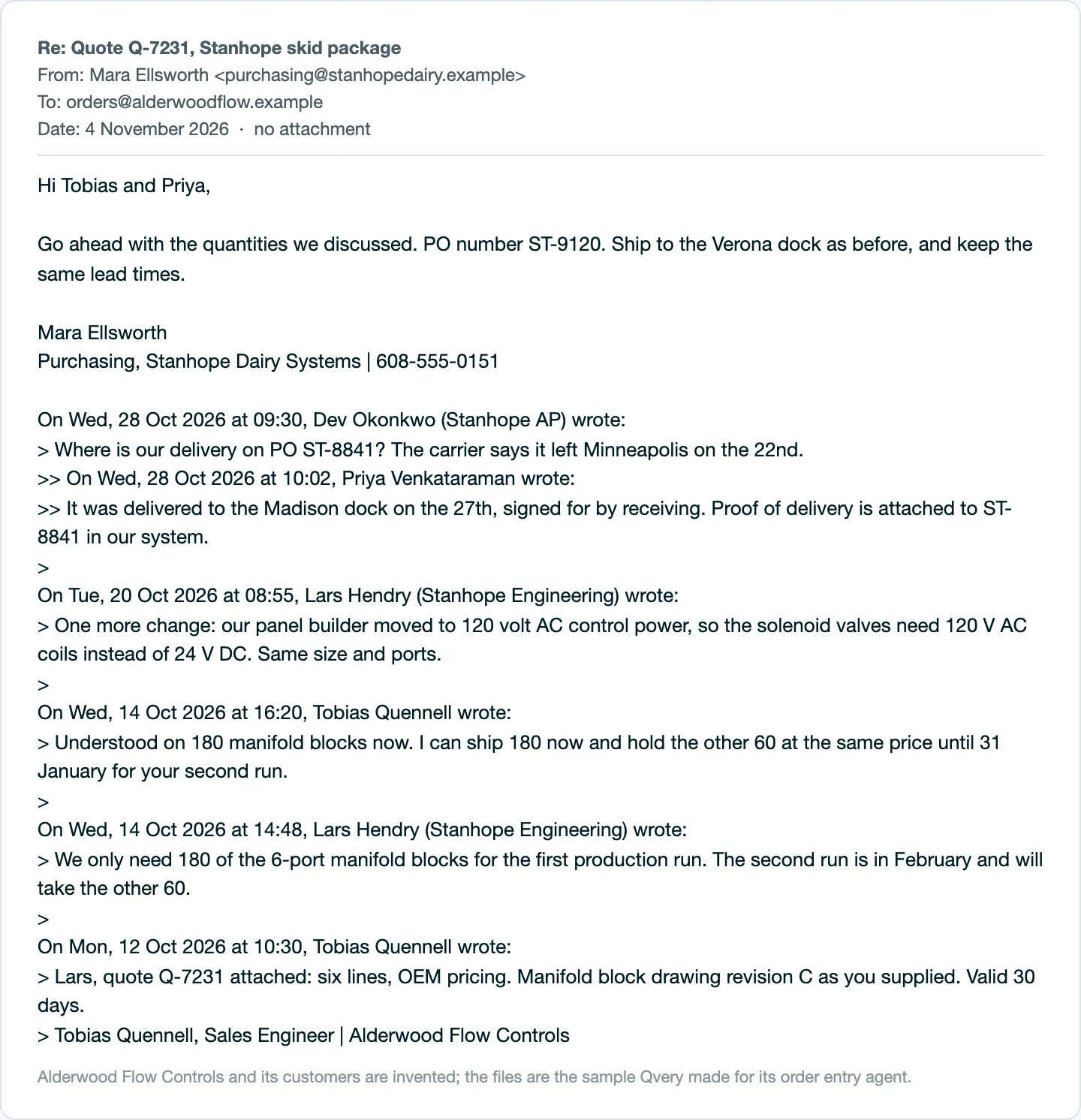
The agents read each thread with the definition the desk already follows. Alderwood's procedure counts a customer purchase order as an order, and so is an email that says go ahead, please enter or proceed against a quote. A delivery question or an invoice question is not.
A model reads each thread against those words and returns the sentence that places the order, in the customer's words, plus every other message, labeled. The delivery chase about an earlier order on 28 October stays out of the order; so do the quote cover notes.
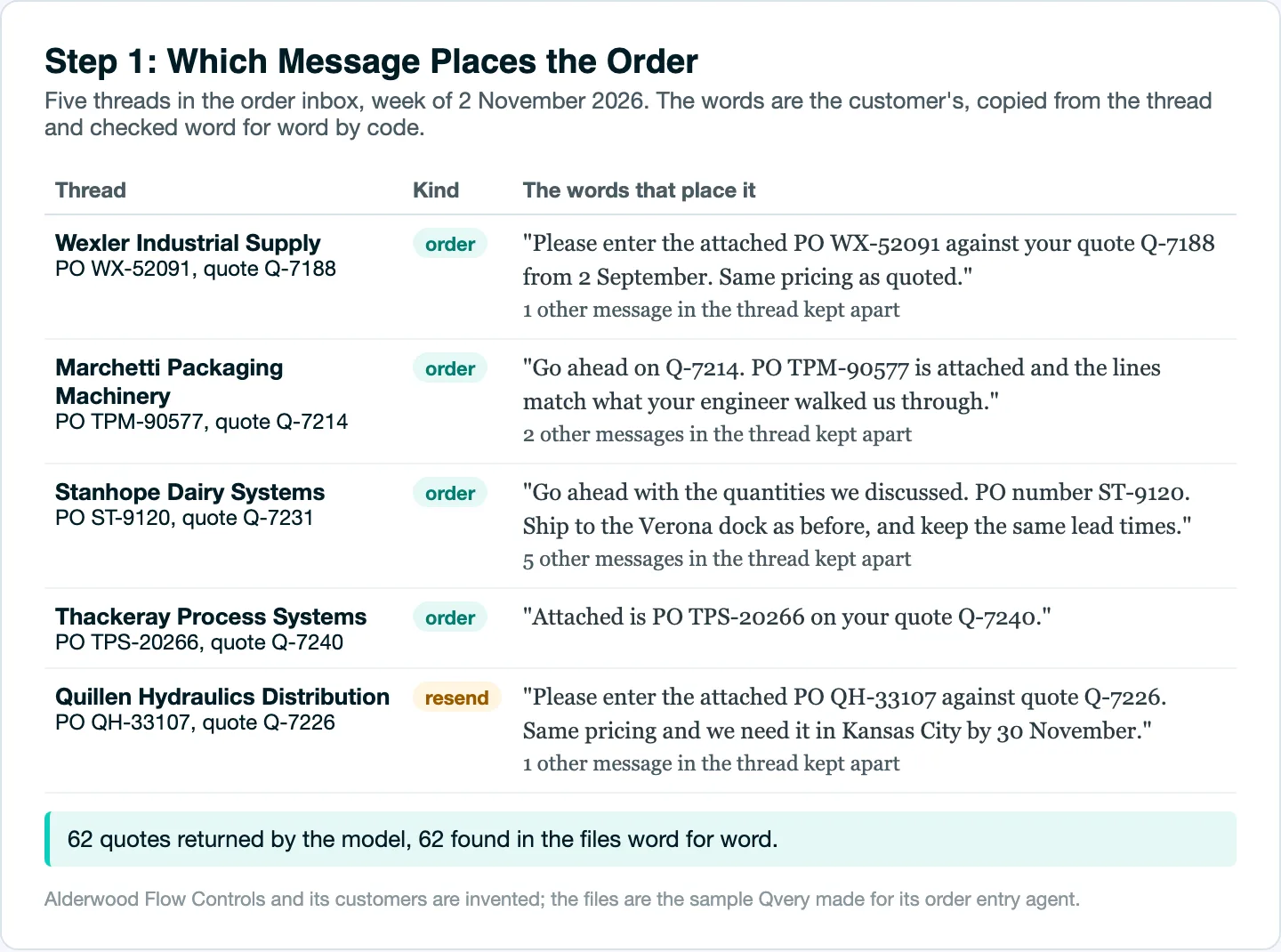
What success looks like: every quoted sentence is found in the thread, word for word. Code checks that before anything else uses it, and every passage the models quoted this week was there.
One that is not goes to the top of the draft as a warning, because a model that paraphrases a customer can also invent a quantity.
People working on this in their own companies describe the same limits: a shortcut that holds for one customer, a quote that changes before the order, customers who will not move to a portal.
Tips from Reddit
Order desks on shortcuts that skip the thread
One thing we tried years ago was to load quotes into our system as a pre-SO and then you could roll the quotes into an SO if you got an order, but it was clunky and if their were any changes between PO date and order date you were basically reentering anyway.
I pretty much have a working proof of concept that will work for exactly 1 customer so far.
Ha.. convincing 20K customers, that just let their ERP push out a pdf purchase order; to logon to our online store and place an order.. that is not easy guys.
Rebuild the Order a Thread Placed
Stanhope's is the hardest order in the week, because no purchase order came with it, only a number, ST-9120. Its buyer wrote "Go ahead with the quantities we discussed." Nobody can key that sentence without reading the thread under it.
So the model rebuilds the order: the quote's lines, changed by what the thread says later, each line carrying the words that set it. These are four of its instructions, word for word:
- If a PO is attached, the lines are the PO's lines exactly as printed, in the customer's own part numbers.
- If no PO is attached, build the lines from the quote the thread names, changed by what the thread later says.
  Each line's "words" are the words that set its quantity: the quote line, or the message that changed it.
- Never compare prices with anything, never say whether a price, a quote or a revision is right, and never decide
  which revision applies. Code and the desk do that.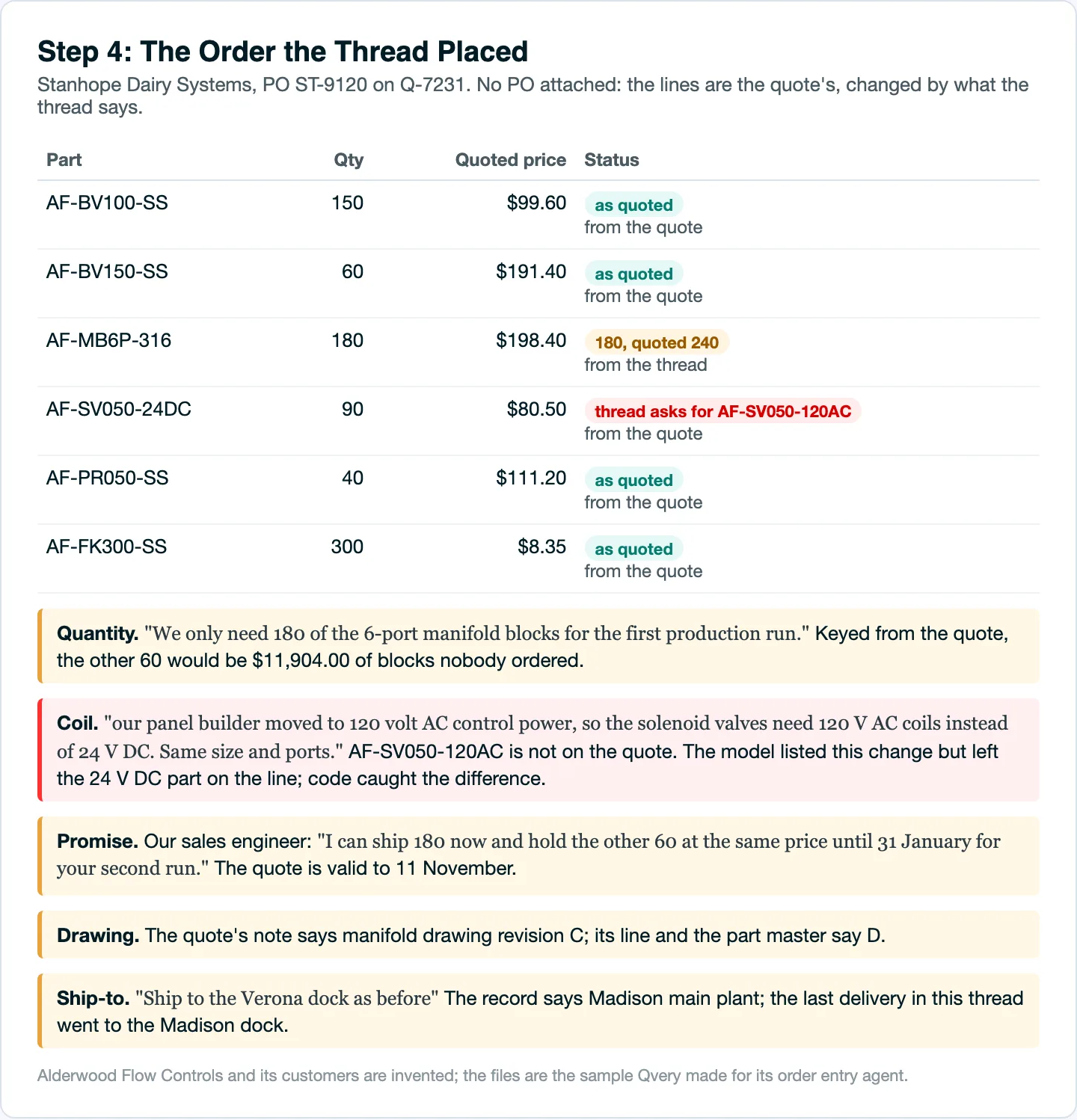
The rebuilt order differs from the quote in four places.
- Quantity. Stanhope's engineer asked for 180 of the 6-port manifold blocks, not the 240 quoted. Keyed from the quote, the other 60 are $11,904.00 of blocks nobody ordered.
- Coil. A later message moved the solenoid valves to 120 V AC coils. That is a different part, and it is not on the quote.
- Promise. Our own sales engineer wrote that he could hold the other 60 blocks at the same price until 31 January. The quote is valid to 11 November.
- Drawing. The quote's note says manifold drawing revision C, while its own line and the part master say D. The agents show both and swap neither.
One more line says "Ship to the Verona dock as before." The customer record says Madison, and the last delivery in this same thread went to the Madison dock.
Where it failed: both models we ran, Claude Sonnet 5.5 and Claude Haiku 5.5, listed the coil change and still left the 24 V DC part on the line. Code caught it, because it compares every change the model lists with the lines the model returns.
The model reads what customers and engineers wrote; code checks every line it returns against the files, and that split runs through the whole build.
 Piotr BabelPartner @ Qvery
An agent that reads email will misread some of it, so the build assumes it does. The model only reads people: which message places the order, and what the quantities we discussed means. Code then checks every line it returns against your quote and your price book. In our sample week, that check caught the coil change both models left on the wrong line.
Tie Each Order to the Quote Revision That Holds
Marchetti wrote "Go ahead on Q-7214" and named no revision. Code read every revision on file and the procedure's rule for this case: "If the customer gives no revision, use the latest revision issued before the order date."
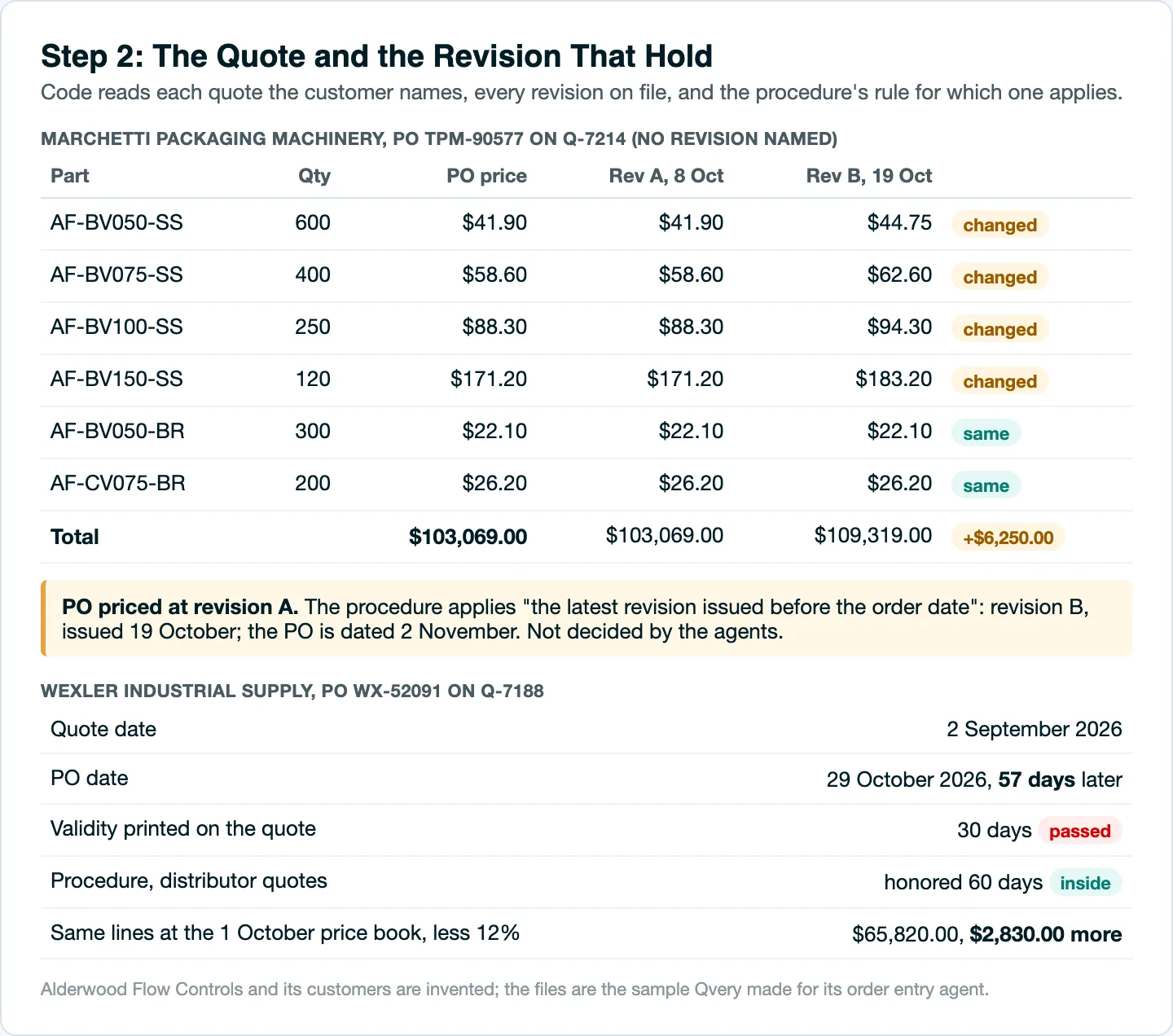
Wexler is the other way around. The quote is right, and old: dated 2 September, cited by a PO dated 29 October, 57 days later.
The quote says it is valid for 30 days, the procedure says distributor quotes are honored for 60, and at the 1 October price book, less Wexler's 12% discount, the same four lines come to $65,820.00 instead of $62,990.00.
The agents do the dates and the arithmetic. They do not decide whether Alderwood honors the old price: the procedure gives two answers, and that call belongs to someone at the company.
To see this step on your own orders, send one customer thread and the quote it answers.
Turn Their Part Numbers Into Yours
Customers order in their own part numbers. Quillen's four lines read QH-2210, QH-2215, QH-2230 and QH-2260, and the list of customer part numbers in the price book maps each to exactly one Alderwood part. Those need no question.
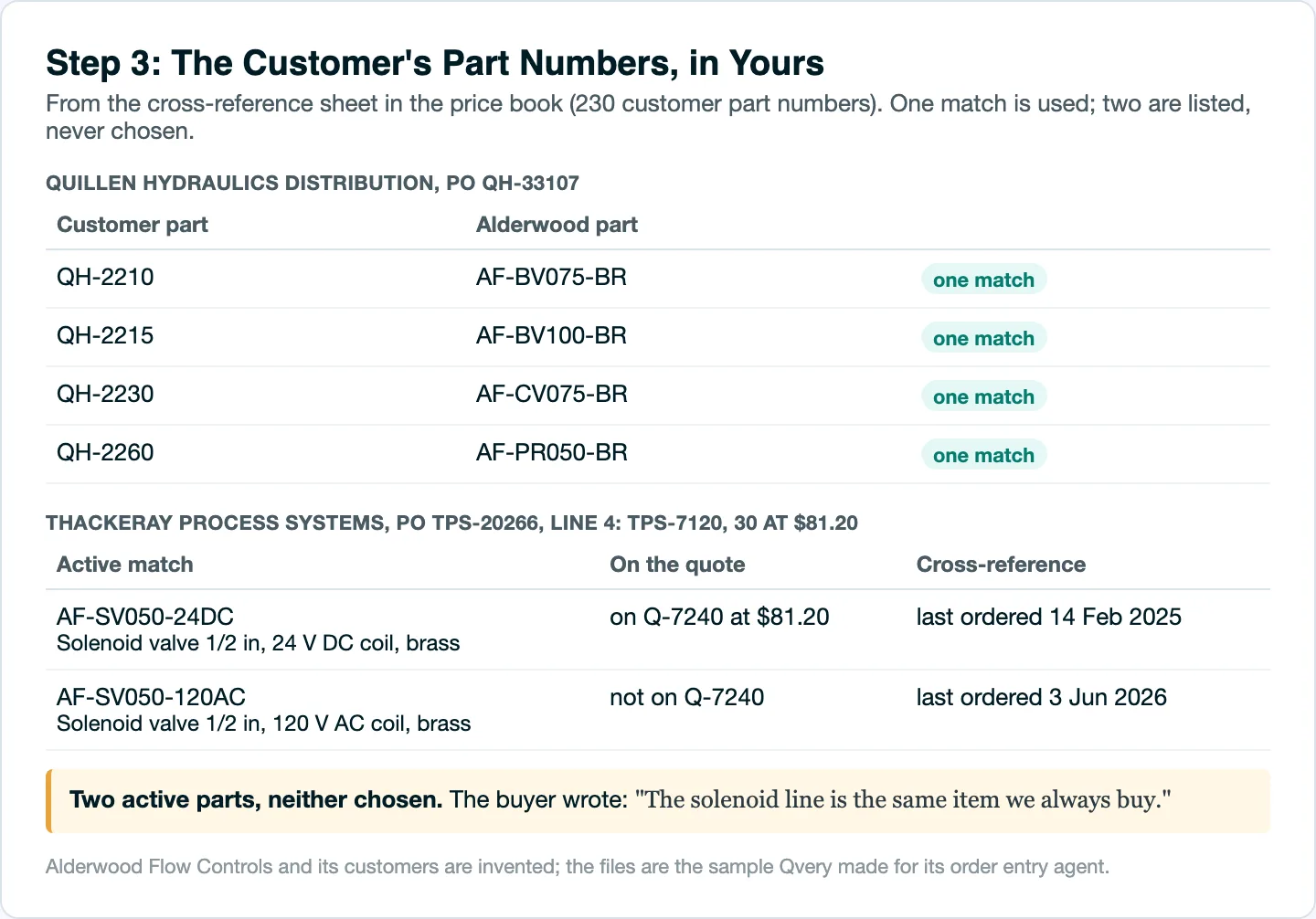
Thackeray's line 4, TPS-7120, matches two active parts: the 24 V DC solenoid valve and the 120 V AC one. The buyer wrote "The solenoid line is the same item we always buy."
The files disagree about which item that is. The quote lists the 24 V DC valve at $81.20, the price on the PO. The list of customer part numbers says Thackeray last ordered the 120 V AC valve, in June 2026, and the 24 V DC one in February 2025.
Either reading is reasonable, so the agents list both, with that evidence, and choose neither. The procedure already says the same: "A customer part number with more than one match is not entered until the right part is confirmed with the customer."
Four things in the week looked like problems and were not.
- Wexler's four lines match the quote on part, quantity and price. Only the date is old.
- Marchetti's two brass lines are the same on both revisions.
- Quillen's part numbers each map to one part, and every line matches its quote.
- The 28 October delivery question inside Stanhope's thread is about a different order.
Clear the Account and the Order Log Before Anyone Keys It
Two orders in the week are held on the customer's account, and one must not be entered at all. None of the three shows on the order itself.
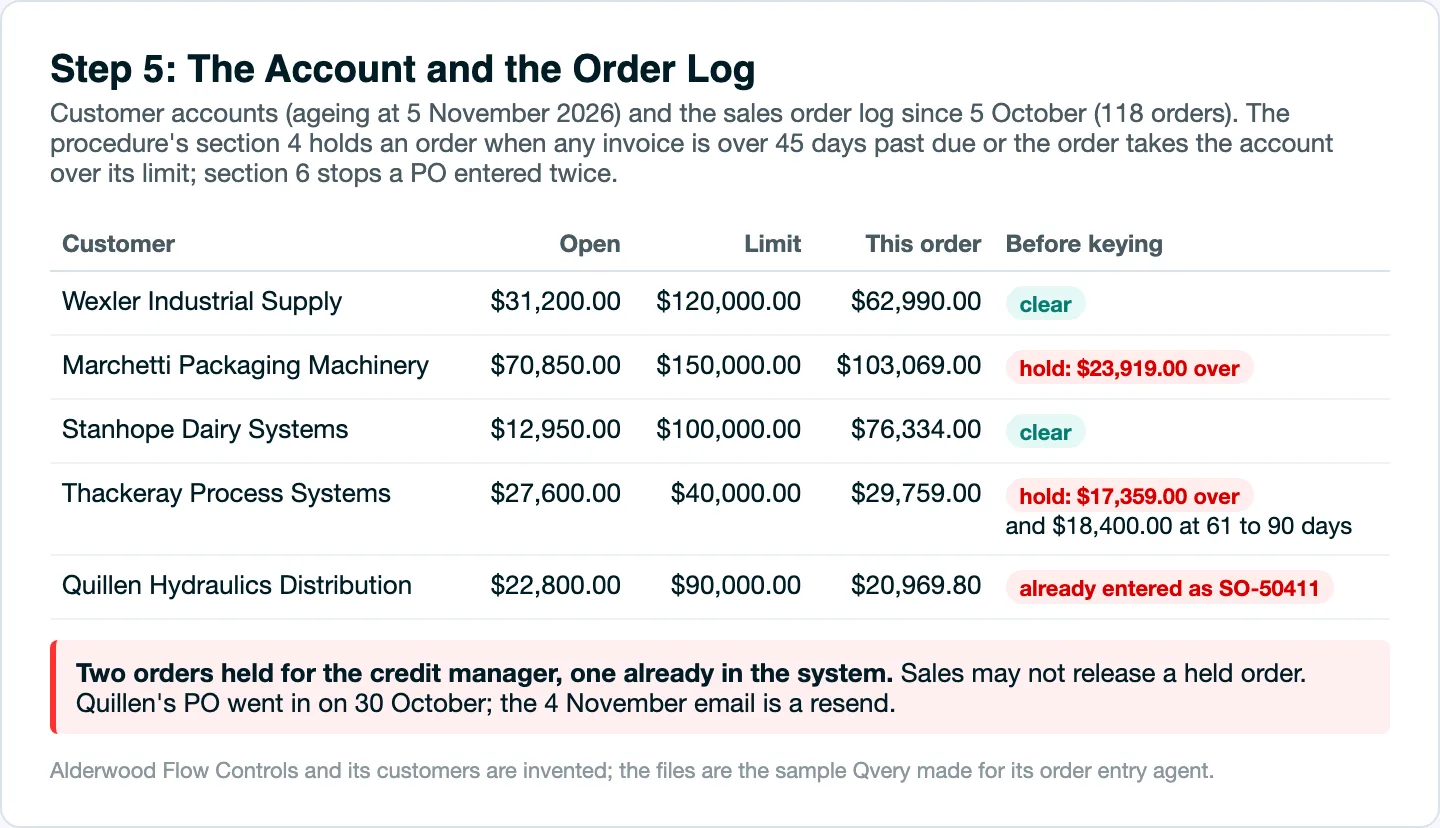
Thackeray's order is $29,759.00. The account already has $18,400.00 at 61 to 90 days past due and an open balance of $27,600.00 against a $40,000.00 limit, so the order would take it $17,359.00 over. Section 4 of the procedure holds that order for the credit manager, and "Sales may not release a held order."
Marchetti's order would take its account to $173,919.00 against a $150,000.00 limit, $23,919.00 over. That hold is not in the answer key we wrote before the run; the check found it because it runs on every order.
In the sample's own log it is the step that slipped: 21 of its 118 orders went in without a credit check.
Quillen's resend is the duplicate the procedure warns about. PO QH-33107 went in on 30 October as SO-50411, and entering the 4 November email would put the same order into production twice. The procedure's answer is a reply with the sales order number, and that is what the agents draft.
Hand the Desk a Held Draft With the Questions Written
What reaches the desk is one held draft per order: the differences first, then the lines, then the messages, each addressed to whoever must answer. Nothing has been entered and nothing has been sent.
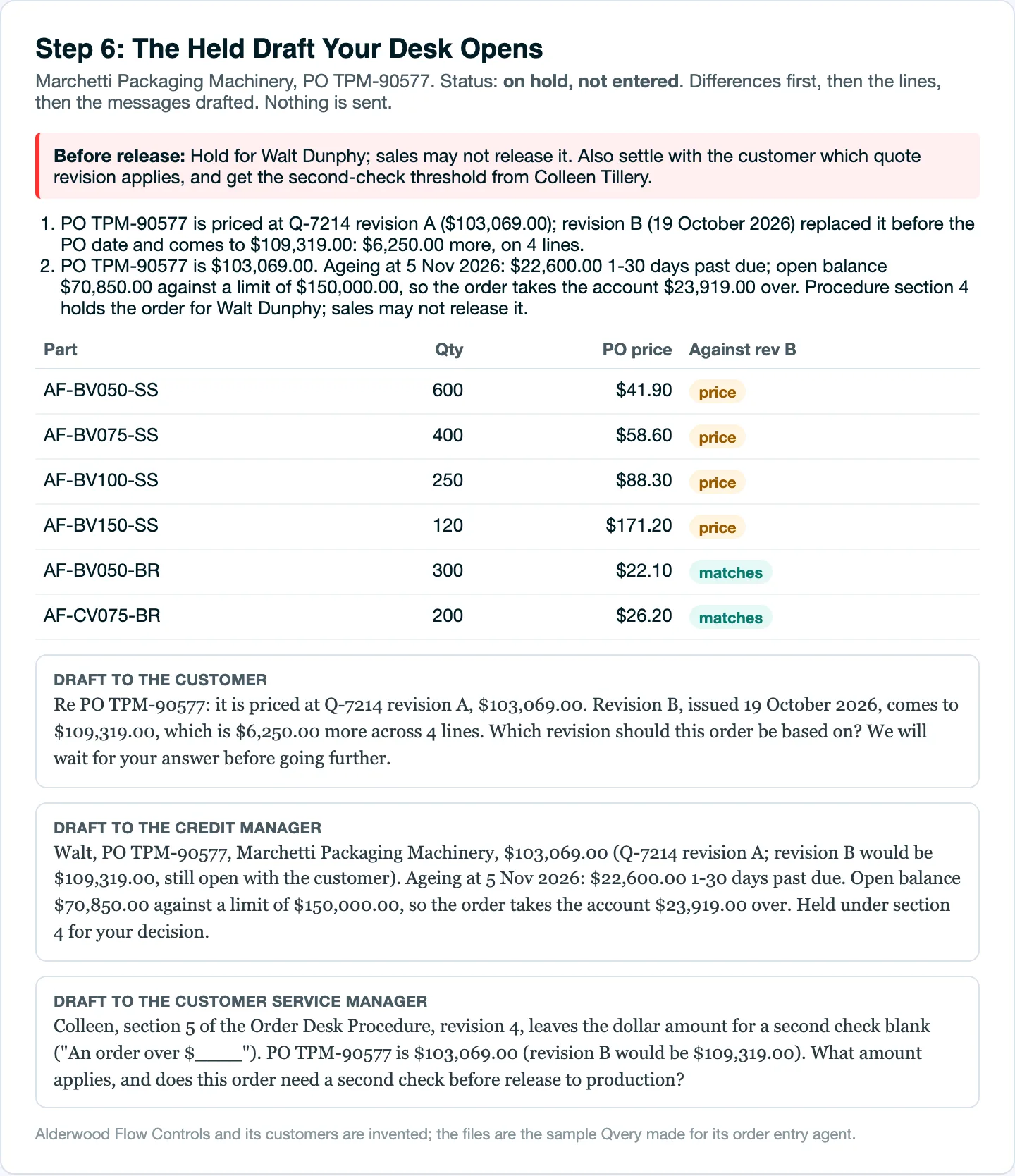
The messages follow the procedure. A credit hold goes to the credit manager with the figures and never to the customer. A duplicate is answered with the sales order number.
A gap in the procedure goes to the customer service manager who owns it, and Alderwood's has two: the dollar amount above which an order needs a second check is blank, and so is the name of whoever keeps the customer part number list.
Check before sending: two of the drafts to Stanhope spoke of "the PO" where no purchase order was attached. The figures were right and the wording was not; a person reads every message before it leaves.
The week took the agents under two minutes, the five threads read at once in 34.5 seconds. Every one of the five orders still needed a person, who now starts from the question instead of the inbox.
How Qvery's Agents Run Your Order Inbox
The agents we build for an order desk work as mail lands. They read each new message and its attachments, decide whether it places an order, and tie it to the quote and revision it answers.
Then they put every line into your part numbers and check it against the quote, and against the account and the orders already entered where your procedure asks for that.
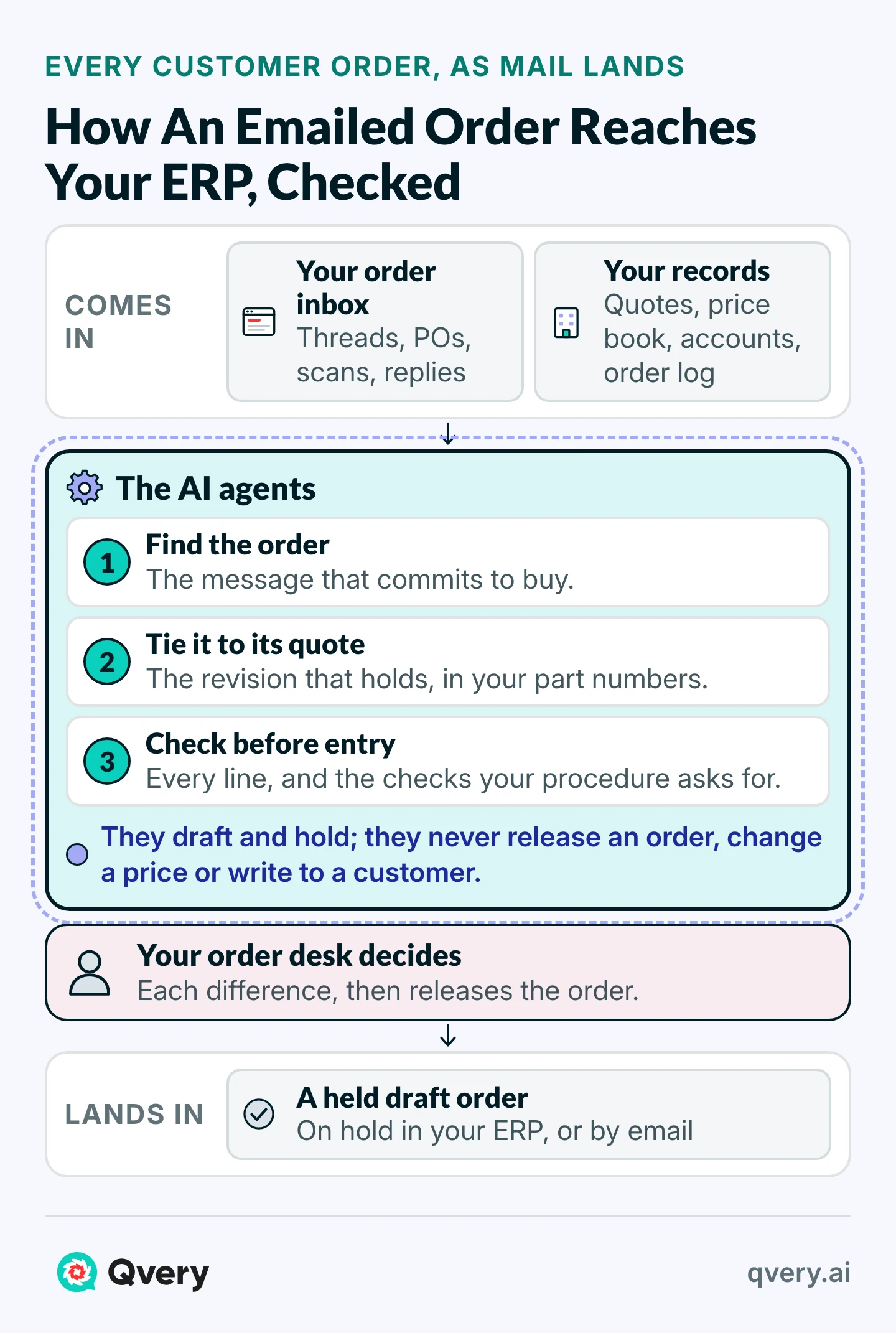
The result waits on hold. Where your ERP accepts sales orders through its API, the draft sits there unreleased; NetSuite, for one, takes a sales order in a Pending Approval status until someone approves it.
Where it does not, the draft arrives by email in the order your entry screen uses. Your desk releases every order and sends every message.
The return is what the calculator works out. Type your own orders, minutes and pay over the example.
Customer Order Entry ROI Calculator
What Each Customer Order Costs Your Desk, And With The Agents
Saved Per Year
$31,195
1,120 hours handed back, after $4,320 a year to run it
- Hours Handed Back
- 1,120 hours a year
- Agent Running Cost (Estimate)
- $360 a month
- Payback Per $10,000 Of Build
- 3.8 months
On these numbers, each order costs $4.07 instead of $10.57, the agent saves $31,195 a year after its own running cost, and every $10,000 of the build is earned back in 3.8 months.
On its example, 400 orders a month at 20 minutes by hand, each order costs $10.57 of an order clerk's time. The median order clerk earned $22.20 an hour in May 2025, and with benefits that comes to about $31.71 an hour for the employer.
With the agents, the example assumes 6 minutes an order to read the draft, settle what differs and release it: $4.07, including the $360 a month the agents cost to run.
That is 1,120 hours and $31,195 a year, so a build costing $10,000 pays for itself in 3.8 months of those savings.
The calculator leaves out the credit notes, re-entries and expedites a wrong price or quantity costs later, because no source prices them for a company like yours. In the sample's log, 18 of 118 orders were corrected after entry.
 Vlad ShvetsPartner @ Qvery
The hours are the smaller part of this. A price keyed from an old quote revision becomes a credit note weeks later, and a purchase order entered twice becomes parts nobody ordered. Neither shows up in your desk's hours; both show up in your margin. So when you weigh agents for your order desk, ask how many orders were corrected after entry last quarter, not only how long entry takes.
This job is one of three the Manufacturing Playbook works out in dollars for a company of about 200 people; the other two are supplier part approval packages and requests for quotes.
Those hours count most on a desk that is short-handed or growing: they are the hire you do not make, or the customer calls nobody had time to return.
What We Need From Your Order Desk
We start from orders your desk has already entered, so the agents are judged against your own people before they touch live mail.
| What we need | What it is for |
|---|---|
| Read access to the order inbox | Where the agents find each order |
| A few months of threads, with the sales orders entered from them | The first test: the agents redraft them and your desk compares |
| The quotes and their revisions, the price book and your customer part numbers | What every line is checked against |
| The customer accounts, or a daily export of limits and aging | The credit check on every order |
| Your order desk procedure, blanks included | The rules the agents follow, and the gaps they report |
The first week goes into how your customers write and how your quotes and drawings are numbered. In the second, the agents draft those past orders again, and your desk sets each draft beside what it entered.
By the end of the second week, with access in place, they are on your live inbox; the price for all of it is fixed before the work begins.
Once the agents run, we count two things every week: the hours your desk got back, and the wrong prices, duplicates and held accounts stopped before entry.
Frequently asked questions
Can AI enter sales orders into our ERP?
Yes, on hold. Where your ERP accepts sales orders through its API, the agents create each order there unreleased, for example in NetSuite's Pending Approval status, and your desk releases it. Where it has no API, the draft arrives by email laid out in the order of your entry screen, ready to key.
Our ERP vendor already sells AI order entry. What does this add?
The vendors' own pages describe reading the purchase order into the ERP and checking it against the customer and quote records there. Ask how yours handles a thread with no PO attached, a quote revised after the customer saw it, or a change three replies down. Those needed the most checking in the week above.
How is this different from OCR or RPA?
OCR, optical character recognition, reads the text on a scanned page. RPA, software robots that type into screens, keys what it is handed. Neither decides which message is the order, or whether its quote revision still holds. Here a model does the reading, and code does every check.
Do we need EDI or a new ERP first?
No. The agents work from the inbox, the files your desk already uses and the ERP you have, and nothing new is installed on anyone's computer. EDI suits customers who send orders system to system; it stays as it is, and the agents take the rest.
Do customers have to change how they order?
No. They keep writing the way they do today: a PDF purchase order, a reply to a quote, a marked-up drawing, a scan. Orders that already come through EDI or a customer portal stay as they are.
Can it read scanned or faxed purchase orders?
Yes. A purchase order sent as a scan or a phone photo is read like a typed one. Every figure read from it is still checked against the quote and the line totals before the desk sees it, so a misread digit shows up as a difference, not as an order.
What happens when a customer orders against an expired quote?
The draft says so, with the quote's date, the validity it printed and your own rule, and it keeps the old prices in view beside today's. Whether you honor the old price is your decision; the agents draft the question to the customer either way.
What if a customer part number matches more than one of ours?
Both matches are listed with what the files say about each: which one is on the quote, which one the customer bought last. Nothing is entered until someone confirms the part. Once confirmed, the pairing goes into your list of customer part numbers and is used on the next order.
How does it handle changes to an order already entered?
As an amendment to that order, never as a new one. A changed quantity or date is drafted against the sales order it changes, so a revised quantity is not keyed in as a second order.
What about requests for a quote and delivery questions?
They stay in the inbox for your team. Only a message that commits to buy becomes a draft: a purchase order, an accepted quote, a go-ahead. A delivery chase, an invoice question or a request for a price is labeled and left where it is.
Who sees our customers' prices and drawings?
The people named in our agreement, and nobody else. Before the agents read a single email, we agree in writing what they may read and where it is processed, and Qvery signs a data processing agreement. They open the order inbox only. Your quotes and customer threads are never used to train AI models.
What if the agents read an order wrong?
Your desk sees it before anything happens, because every line shows the customer's words beside the quoted figure. In the first weeks, we go through every correction with your desk, and a habit behind one, like a customer who writes the day before the month, becomes a rule the agents follow from then on.
Does it send the order acknowledgement?
It drafts it. The acknowledgement, the answer to a duplicate and every question about a difference are written for the desk to read, change if needed and send. Nothing goes to a customer until a person sends it.
What does it cost to run each month?
A few hundred dollars for a desk this size: model usage of about 15 cents an order, plus hosting, the log of every check and upkeep of your rules. On the calculator's 400 orders, about $360 a month. Building it is a fixed price, agreed before we start.
