On this page
- Set These Before Anyone Logs In
- Buying Seats Does Not Move Anyone Off a Personal Account
- Shared Projects and Plugins Are What the Seats Buy
- It Reads Long Documents, and a Person Still Signs
- Team Tasks Run on Their Own, and Someone Still Checks Every Run
- One Business Subscription Stops at 200 Seats
- Admins Praise the Price and Miss the Export
- Who Should Buy ChatGPT Business, and Who Should Not
- Qvery's Agents Take the Supplier Invoices Off Your Clerks
- Bring Us a Month of Supplier Invoices
- Frequently asked questions
ChatGPT Business is OpenAI's paid workspace for companies: one bill, an admin console, and company data kept out of the training of OpenAI's models. It is sold to the person who decides whether everyone at the company gets a seat.
If your people use ChatGPT today and the company has not bought it for them, they use personal accounts, often with your contracts, spreadsheets and client emails in them. The company pays nothing for that use and sees none of it.
At 150 people on Standard seats, that is $36,000 a year.
For that money, Business is a sound place for your people to ask questions, once you change a handful of settings first. It is not the company-wide rollout: one subscription stops at 200 seats, it leaves personal accounts where they are, and the documents that arrive every day still wait for a person.
At Qvery, we help companies spend less on the paperwork that arrives by email every day, with custom AI agents that read each document, check it against your records and enter it in your systems.
Setting up a team's AI tools is part of our work as well. OpenAI pays us nothing, and that is the only tie this review has.
Set These Before Anyone Logs In
The admin console is where a Business workspace is set up: who joins, how they sign in, which apps ChatGPT may connect to, and what members can share. OpenAI does not train its models on a Business workspace's data, and it encrypts that data in storage and in transit.
On a personal account, training is a switch each employee controls, called "Improve the model for everyone", shown off below. In a Business workspace there is no switch to forget: company data is excluded by default.
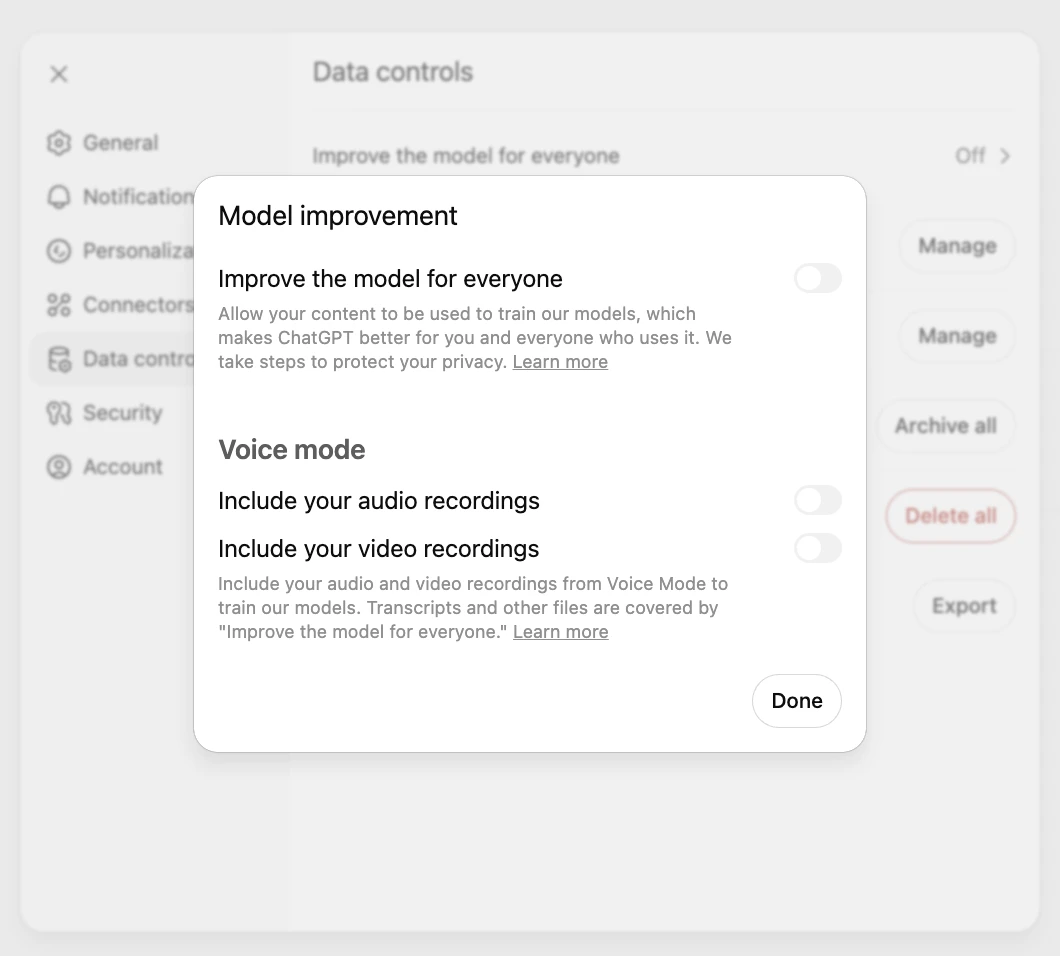
Four other defaults deserve an afternoon before the invitations go out. Apps start switched on in Business, so ChatGPT connects to whatever your people sign it into until you turn apps off. Any member can invite colleagues into spare seats, and OpenAI offers no way to switch that off.
Shared links cannot be disabled for the workspace either. And chats and files are kept indefinitely, with no retention period to set.
| Setting | What to choose | Why |
|---|---|---|
| Sign-in | Single sign-on (SSO, your company login) and a verified domain | Company email addresses land in the company workspace |
| Apps and plugins | Switch off every app you have not approved | Apps start on in Business |
| Seats | Buy only the seats you assign | Members can invite others into spare seats |
| Shared links | A written rule on what may be shared | Business has no switch to disable them |
| What goes in | A written rule on client files | Chats are kept indefinitely, with no retention setting |
The last row is the easiest to skip. OpenAI's terms cover how it handles the data you put in, not which client files your people decide to upload.
Buying Seats Does Not Move Anyone Off a Personal Account
On Business, each employee chooses whether to merge a personal workspace into the company's or keep the two apart, and OpenAI states plainly that admins cannot require a merge or a deletion.

A merge copies chats, projects, custom assistants, saved files and memories into the company workspace, and it has no undo. What moves in stays with the company: when the employee leaves, they lose access to it.
Keeping personal accounts off company devices is a separate job. OpenAI's control for it, Workspace Blocking, hides every workspace except yours, but it works through your company network: a filter that inspects traffic tags every request. The desktop and phone apps also need extra settings pushed to managed devices.
OpenAI documents Workspace Blocking for its Enterprise plan. Single sign-on alone catches company email addresses, not personal ones.
Shared Projects and Plugins Are What the Seats Buy
Projects hold a team's files and instructions, Space and Pages let a team work in one place, and plugins connect ChatGPT to Google Workspace, Microsoft 365, Slack, GitHub and a directory of business tools.
One question can then draw on the files and messages your team already keeps, which a stack of personal plans cannot do.
Writing back is where to slow down. Through HubSpot's own connector, ChatGPT can create and update customer records, ten at a time, and every change lands in HubSpot's audit log.
HubSpot also says the connector does not apply your custom validation rules, so a required field before a deal moves stage does not stop a change made through ChatGPT.
- Sites: small private pages for the workspace, built on your connected apps
- @ChatGPT in Slack and Microsoft Teams, once your administrator installs it
- Add-ins for Excel, Word, PowerPoint and Google Sheets
- Deep research, image generation and voice
- Locked chats, opened with a PIN and kept out of history and search
- Up to $500 a month of credits for OpenAI's developer platform, on eligible workspaces
It Reads Long Documents, and a Person Still Signs
A Business seat takes about 40 pages of text with the fast model and about 320 pages with the slower reasoning model, so a full contract with its schedules fits in one go. That covers the reading jobs: finding a clause, comparing two drafts, summarizing a deposition.
Reviewers who use it daily rate it highly for speed and mark it down on accuracy where the work gets complex or specialist.
Where the output leaves the building, a person checks it.
In June 2023, a federal court in New York fined two lawyers and their firm $5,000 for filing judicial opinions that did not exist, with fake quotes and citations created by ChatGPT. The New York City Bar's AI opinion cites the case and lists the duties it touches, competence and supervision among them.
Let it read everything: the contract, the deposition, the supplier's terms. Never make it the last pair of eyes on anything a client, a court or a supplier will see. That one rule covers most of what an AI policy for documents needs, and it costs nothing to enforce: whoever sends it has read it, and whoever signs it answers for it.
Team Tasks Run on Their Own, and Someone Still Checks Every Run
ChatGPT Work takes a goal, makes a plan and works through it, and it can run once, on a schedule or when something happens: a new email in Gmail, a message in a Slack channel. On a Premium seat, a dot is an always-on agent that keeps working between conversations.
Each of those works for one person. A member's email-triggered task runs with that member's own access, and only a dot's owner can direct it.
OpenAI's guidance on managing dots, written for its Enterprise plan, says even there admins do not see a member's dot activity, and removing someone's access does not confirm their scheduled work has stopped.
Team tasks, added on 29 September 2026, are the exception. They run in the cloud under a team's own service account, on a schedule or a trigger, through connections an admin approves, and teammates can review every past run. OpenAI's examples are a daily digest, a weekly project update and a meeting briefing.
Its instructions for them are worth reading twice: check whether each run did the work, check the destination too, and before rerunning a task that sends messages or changes files, check what the earlier run already did.
| Runs on its own | Still needs a person |
|---|---|
| Starts on a schedule or a new email | Confirming each run did the work |
| Reads the sources its connections reach | Checking the file or channel it wrote to |
| Writes a digest, an update or a briefing | Catching a run that repeated an earlier one |
| Posts to an approved Slack channel | Auditing what it did: Business keeps no compliance log |
For a weekly update, that checking takes a minute. For every supplier invoice that arrives in a day, the checking is the job.
One Business Subscription Stops at 200 Seats
Since 24 August 2026, a new Business subscription holds at most 200 paid seats, and OpenAI's support team cannot raise the limit. Past that, OpenAI points you to ChatGPT Enterprise, priced through its sales team. For a company of 300, the choice between the two plans is made for you.
| Plan | Billed annually | Billed monthly | What it adds |
|---|---|---|---|
| Business, Standard seat | $20 a seat a month | $25 a seat a month | Chat, ChatGPT Work and the Codex coding agent, with included usage |
| Business, Premium seat | $100 a seat a month | $125 a seat a month | Five times the usage, no five-hour limit, dots |
| Enterprise plan | Price on request | Price on request | Directory sync, role-based access, compliance logs, your own retention, data residency |
A workspace needs at least two paid seats, in any mix. Added seats are charged at once for the rest of the cycle, while cuts only take effect at the next one, and removing a person does not reduce the seats you pay for.
Self-serve Business takes cards only: no invoices, purchase orders or bank transfers. And from December, each seat's allowance is shared between ChatGPT and Codex and measured in tokens, the units its models read and write, so heavy agent use draws on the same pool as everyday chat.
Admins Praise the Price and Miss the Export
The record from Business owners and admins is mostly about two things: the price, which they like, and the account itself, which they wish they controlled more.
The knocks are the export that does not exist, personal logins nobody can stop from inside the workspace, and, for one business, a recurring workflow that changed under it when OpenAI changed the default model.
What Reddit says
Business owners, admins and users, in their own words
Login is handled by the website, you cannot restrict login - you can restrict access.
There is no "Export data" button in the Business workspace UI … As an admin, I can't export org-wide chat history either.
This is perfect for my team but OpenAI showing what customers they are pricing for.
It’s not the first time they’ve busted my workflows. Customers have been affected before an employee caught the change.
Reviewers on PeerSpot, which pools the Team, Business and Enterprise plans on one product page, rate it 4.3 out of 5 and say much the same: fast and affordable, and not to be trusted alone on hard questions.
Who Should Buy ChatGPT Business, and Who Should Not
Pros
- Keeps company data out of model training by default, with nothing for each person to switch off
- Reads a full contract with its schedules in one go, up to about 320 pages of text
- Projects, Space and plugins put a team's files and tools behind one question
- Team tasks run a team's digests and updates on a schedule, under a service account
- $20 a seat a month billed annually, with Premium only for the people who need it
Cons
- One new subscription stops at 200 paid seats, and support cannot raise it
- Admins cannot require a merge, and blocking personal logins is documented for the Enterprise plan
- No export for members or admins, and chats are kept indefinitely
- Plugin writes can skip the receiving system's own rules, as HubSpot's connector does
- OpenAI tells you to check every team task run, and Business keeps no compliance log
Buy it if your company is under 200 people, or will be for a year, and your people already use ChatGPT: the seats bring that use under the company's name, its sign-in and its data terms. Spend the afternoon on the settings first.
Pass on it, or go straight to Enterprise, if you are past 200, if a regulator will ask you for logs, or if client files must sit under a retention period you set.
ChatGPT Business helps the people who ask it questions. The invoices, orders and contracts that arrive tomorrow still need someone who never forgets to look.
Qvery's Agents Take the Supplier Invoices Off Your Clerks
The work that arrives every day, the same documents in the same inbox, is where ChatGPT Business stops and custom agents start. Take supplier invoices. A payables clerk opens each email, reads the invoice, checks the supplier, the order and past bills, then keys it into the accounting system.
A team task could watch that inbox too, but by OpenAI's own instructions someone still checks every run, and a run that repeats itself can enter the same invoice twice.
The agents we build for your payables desk read each invoice as it lands, check it against your supplier records, past bills and open orders, and prepare the draft bill in your accounting system.
An invoice with a missing order number, a new bank account or a total that does not match goes to your clerk with the reason attached.
A duplicate is stopped before it reaches the ledger, and every step the agents take is logged.
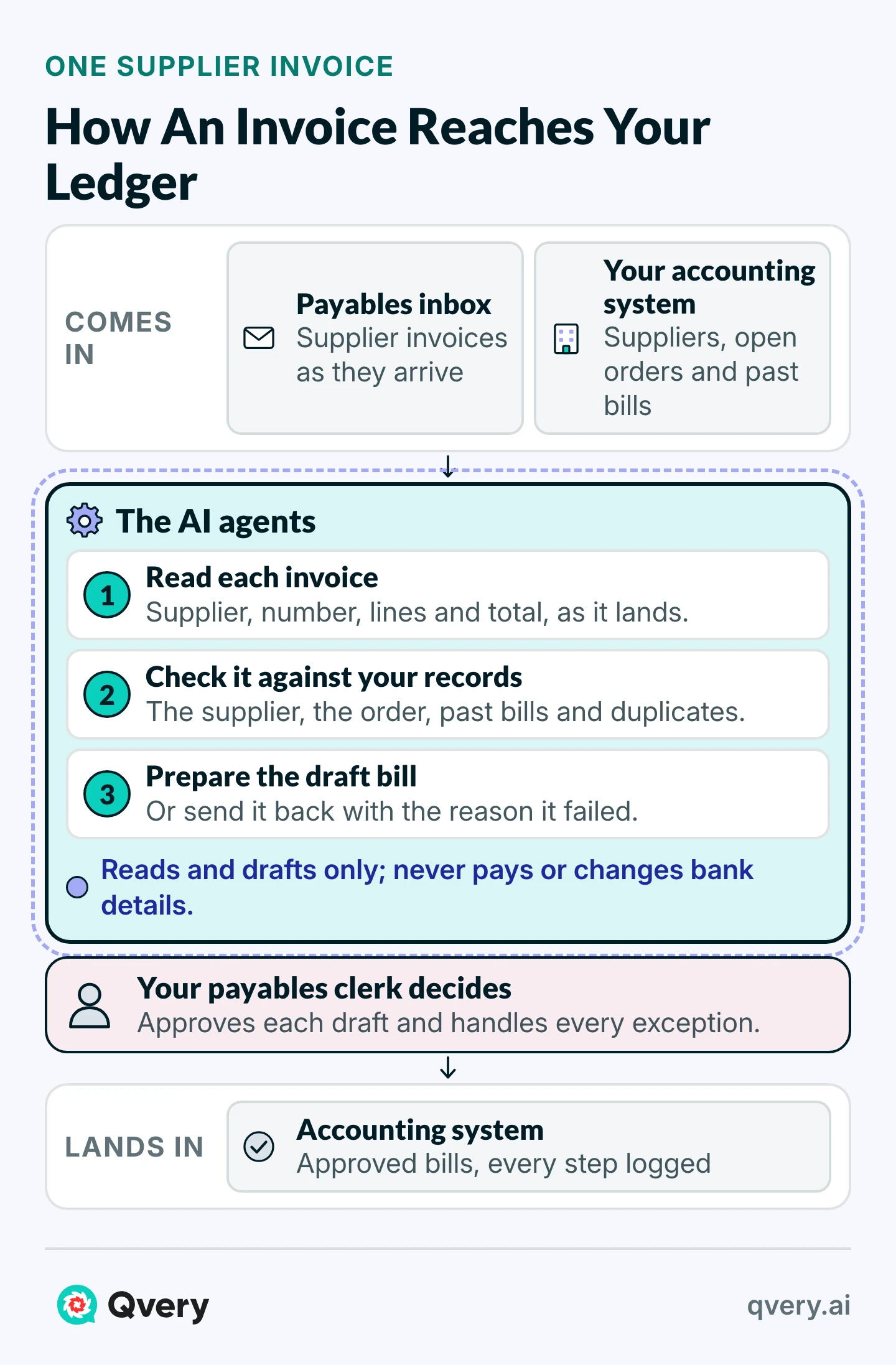
Take a typical company of this size: three payables clerks, each costing $76,500 a year with benefits, spend a quarter of their week on invoices, about ten hours each. That is $57,375 a year.
With our agents taking three quarters of that work, the job costs $17,944, including about $300 a month to run them. That gives $39,431 a year back, along with 1,170 hours of your clerks' time, and every $10,000 of the build pays for itself in about three months.
Invoice Entry ROI Calculator
What Reading, Checking And Entering Supplier Invoices Costs You, And What An Agent Saves
Saved Per Year
$39,431
1,170 hours handed back, after $3,600 a year to run it
- Hours Handed Back
- 1,170 hours a year
- Agent Running Cost (Estimate)
- $300 a month
- Payback Per $10,000 Of Build
- 3 months
On these numbers, the agent saves $39,431 a year after its own running cost, and every $10,000 of the build is earned back in 3 months.
Those hours are worth most when they go to work you would otherwise hire for: supplier calls, month-end, the exceptions that need judgment.
Before the agents touch anything, we agree in writing what they may read, what they may do and where the data is processed. They start with the least access the job needs and log every action.
At first, nothing reaches your ledger until your clerk has seen it, and you decide which steps they complete on their own.
Qvery AI is an EU company and signs a data processing agreement.
Bring Us a Month of Supplier Invoices
Working with us starts with the invoices your team handled last month and the checks they run in their heads. We learn how the work gets done today, connect the agents to your inbox and your accounting system, and run them on your own invoices. A first working result arrives within two weeks of access.
After that, we count every week the hours the agents hand back and the errors they stop, and the ChatGPT seats stay with the people who ask questions.
Frequently asked questions
Is ChatGPT Business worth it?
Under 200 people, usually yes. At $20 a seat a month billed annually, it brings the ChatGPT use your people already have under the company's sign-in and data terms. It helps the people who read, write and ask questions all day, and leaves the documents that arrive every day to someone else.
Is it the same as ChatGPT Team?
Yes. OpenAI renamed ChatGPT Team to ChatGPT Business on 29 August 2025, and existing Team workspaces became Business workspaces without a migration. Prices and seat options have changed since, including the Premium seat and the 200-seat limit.
What is the minimum number of seats?
Two paid seats, in any mix of Standard and Premium. Seats you add are charged at once for the rest of the billing cycle, while seats you remove only come off at the next one. Removing a person frees the seat but does not lower the bill.
How many seats can one workspace hold?
A Business subscription started on or after 24 August 2026 holds at most 200 paid seats, and OpenAI's support team cannot raise that limit. Older workspaces keep their previous limit. Past 200, OpenAI points you to Enterprise, which is priced through its sales team.
Does OpenAI train on our Business data?
No. OpenAI does not use a Business workspace's data to train its models by default, and it encrypts that data in storage and in transit. On a personal account, the same choice is a switch each person controls, called "Improve the model for everyone".
Can personal accounts move into Business?
Each employee can merge a personal workspace into the company's. The merge copies chats, projects, files and memories and cannot be undone. On Business, admins cannot require it, and people can keep both workspaces.
How do we stop personal accounts at work?
Not from inside Business. Workspace Blocking works through a company network filter that inspects traffic, and OpenAI documents it for Enterprise. Single sign-on catches company email addresses but not a personal account. Short of that, a written rule on which account to use for work is what remains.
Can we export our data from Business?
Not on your own. Members cannot export their Business chats, and admins have no export either. Ask people to export anything personal from their own accounts before they merge, since an export can take up to seven days to arrive.
Are ChatGPT Work and Codex included?
Yes. Standard and Premium seats both include ChatGPT, ChatGPT Work and the Codex coding agent. From December, each seat's allowance is shared between ChatGPT and Codex and measured in tokens, so heavy agent use draws on the same pool as everyday chat.
Can we pay by invoice?
Not on self-serve Business. It takes cards only: no invoices, purchase orders, bank transfers or net terms. A company that needs invoice billing buys a contracted plan, such as the Enterprise plan, through OpenAI's sales team.
Who should get a Premium seat?
The people who hand ChatGPT whole tasks rather than questions. Premium has five times the usage of Standard, no five-hour limit and access to dots, at $100 a seat a month billed annually against $20 for Standard.
Can it run a task every day on its own?
Yes. A team task runs on a schedule or when an email or Slack message arrives, under the team's own service account. OpenAI still asks you to check that each run did the work, and to check what an earlier run did before rerunning one.
Can it write to our accounting system?
Through a plugin, sometimes. HubSpot's connector, for example, creates and updates records ten at a time and logs each change, but it skips the custom validation rules you set in HubSpot. A system without a plugin needs one built.
Is it safe for confidential documents?
The data terms are sound: no training by default and encryption in storage and in transit. The gaps are elsewhere: chats are kept indefinitely, nothing can be exported, and there is no compliance log. Keep a person's check on anything that leaves the building.
Do dots replace a custom agent?
No. A dot works for the one person who created it, on that person's connected apps, and OpenAI's own guidance says admins do not see its activity. A custom agent works for the company: it reads from your systems, follows your rules and logs every action.