On this page
- Step 1: Write Down the Deal Before the Rate Con Arrives
- Step 2: Attach Three Files and Paste the Check
- Step 3: Read What the Truck Cannot Do Before the Money
- Step 4: Call the Number on File Before You Answer the Email
- Step 5: Send One Email, Then Check the Revision the Same Way
- Step 6: Save the Check and Count the First Month
- Qvery's Agent Reads Every Rate Con Before Your Desk Signs
- Run It on Last Week's Signed Rate Cons First
- Frequently asked questions
Every brokered load your dispatchers book ends with a PDF. The rate confirmation, the rate con, lands a few minutes after the call, and once it is signed it is the contract for the load.
One broker's published terms say so in as many words: VEXO Logistics' terms make "dispatch toward pickup" an acceptance, and add that no "oral promise" changes the accepted rate.
So the dispatcher reads it between calls, and what slips past costs money: a rate $100 under the deal, a delivery a day earlier than booked, a fine for every missed tracking ping on page two.
By hand, the check is the PDF beside the booking notes, line by line. An AI assistant does that reading in one pass now, against the deal you wrote down and the rules you sign by, and hands the dispatcher a table of what to send back.
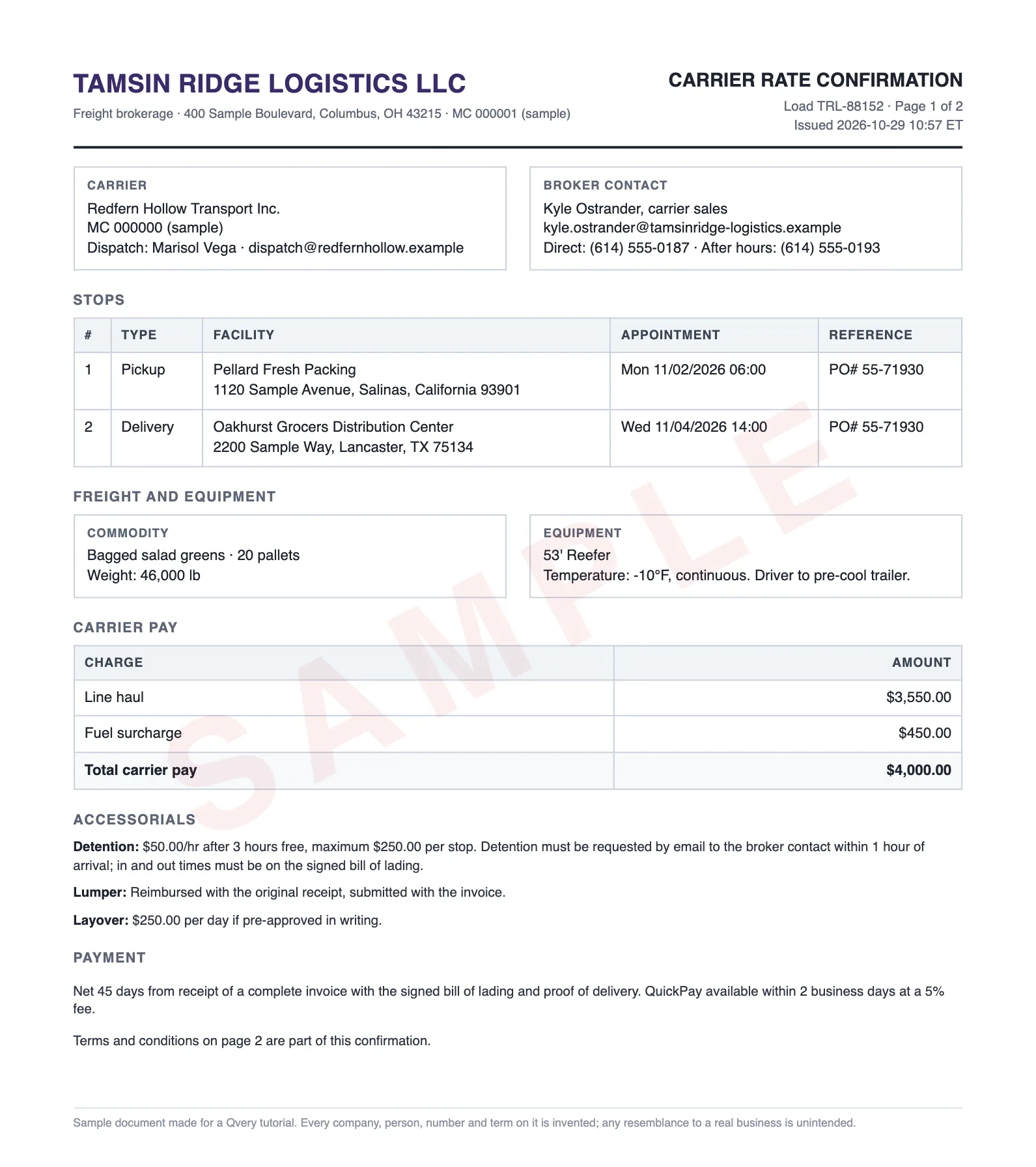
We tried it on an invented reefer load: bagged salad greens from Salinas, California to Lancaster, Texas, booked by an invented carrier with an invented broker.
Nothing in it is real: not the companies, the people or the numbers. We planted ten problems on its rate con and wrote down what a correct check should find before running any.
We ran the checks in developer tools that saw only the prompt and the files; the clicks in Claude's app below are from Anthropic's help pages. Six steps take you from the deal to a saved check. After step six: the agent Qvery builds to run it on every rate con as it lands.
This checks one load's rate con against the deal and your rules. It does not vet a broker's authority or credit, and it does not replace reading each broker's carrier agreement once.
Step 1: Write Down the Deal Before the Rate Con Arrives
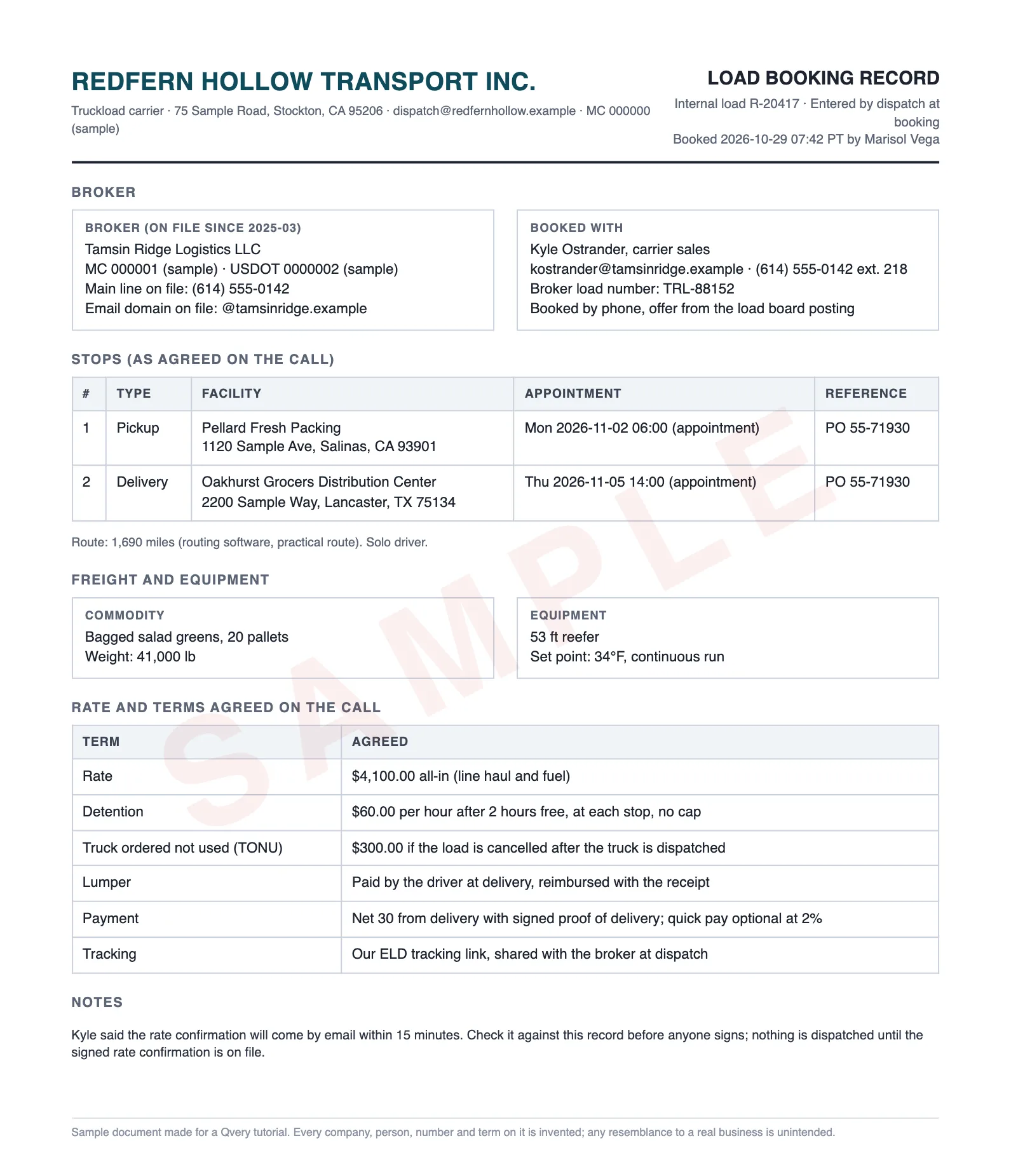
The check can only catch what you recorded. If the deal lives only in a dispatcher's head, there is nothing to hold the rate con against. At booking, while the broker is still on the phone, enter these in the TMS or a shared sheet:
- The rate, all-in, and how it splits if it splits
- Each stop: facility, address, appointment, reference number
- Equipment, set point and mode; commodity and weight
- Detention, TONU (truck ordered not used), layover and lumper terms
- Payment terms and quick pay
- Tracking, and the broker's MC number, main line and email domain from your broker file
Then write your signing rules once, on one page: the rate to the dollar, a transit pace, a payload limit, a detention floor, TONU always stated, payment terms, no fines without a manager's OK, contact details that match your file.
Two of them carry the law. Hours of service cap a solo driver at 11 hours of driving after 10 hours off, so the transit rule is a planning pace (ours: 550 miles a day). The payload limit is 80,000 pounds gross on the Interstate minus your tractor, trailer and fuel.
Check before step 2: if your booking record cannot answer "what did we agree for detention?", neither can the assistant.
Step 2: Attach Three Files and Paste the Check
Start a new chat in Claude. The + at the bottom left of the message box opens a menu: pick Add files or photos and select the rate con, the booking record and the rules page.
Claude reads the text and the images of a PDF up to 100 pages, so a scan works: ours scored the same as the clean PDF.
Paste this, and edit the list of standard clauses if your rules name others:
You are checking a broker's rate confirmation before my dispatcher signs it. Attached: the rate confirmation (every page), our booking record for this load (what we agreed on the call, and the broker on file), and our rules for signing a rate confirmation.

Read every page of the rate confirmation, including the terms and conditions. Then return one table with a row for each term: rate and how it is split, each stop (facility, address, appointment, reference), equipment and temperature, commodity and weight, each accessorial (detention, TONU, layover, lumper), payment terms and quick pay, tracking, every fine, deduction or penalty, and the broker's name, MC number, phone and email.

Columns: Term | Rate con says (page) | Booking record or rule | Status

Use exactly one status per row:
- MATCH: the same as the booking record and allowed by our rules (a different way of writing the same thing is a match)
- DIFFERS: not what we agreed, or breaks one of our rules (name the rule)
- NOT AGREED: on the rate confirmation but never in the booking record
- MISSING: in the booking record but not on the rate confirmation
- CAN'T RUN: the driver or the truck cannot do it as written (show the arithmetic)
- UNREADABLE: you cannot read it; never guess a value
- STANDARD: a normal clause our booking and rules do not cover (own authority, entire agreement, claims reporting, paperwork deadlines), with no fine or deduction attached; no change needed

After the table, two short lists:
1. Ask the broker to change: each DIFFERS, MISSING and CAN'T RUN row, as the change we need on a revised rate confirmation.
2. For a person to decide: each NOT AGREED row (never a STANDARD one), and any contact detail that does not match the broker on file (say to call the main line in our file, never a number on the rate confirmation).

Do not tell me whether to sign. Do not decide whether the sender is genuine.
The booking record does most of the work.
With the rate con alone and a one-line request, the assistant still knew a set point of minus 10 was "a frozen-food setting that would freeze and ruin the load".
But it called the early delivery "only workable for a solo driver with little slack", and it could not see the $100 or the email address, because neither is wrong on the page.
| Problem on the rate con | Rate con, booking and rules | Rate con alone |
|---|---|---|
| $100 under the agreed rate | Found | Not visible |
| Delivery a day early | Found: can't run | "Workable" |
| Set point of minus 10 on salad greens | Found | Found |
| 46,000 lb on a 43,500 lb payload | Found: can't run | "Confirm the weight" |
| Detention 3 hours free, capped | Found | Found |
| No TONU | Found | Found |
| Net 45, 5% quick pay | Found | Found |
| $150 fine per missed tracking update | Found | Found |
| $200 late fee "regardless of cause" | Found | Found |
| Contact details not on file | Found | Not visible |
Step 3: Read What the Truck Cannot Do Before the Money
The reply is one table, a row per term, with the page each value came from. These are the rows that need something, as returned (the column with the booking value or rule is cut here for width):
| Term | Status | Rate con says (page) |
|---|---|---|
| Rate, total | DIFFERS | Total carrier pay $4,000.00 (p1) |
| Rate, split | DIFFERS | Line haul $3,550.00 + fuel surcharge $450.00 = $4,000.00 (p1) |
| Stop 2 appointment | DIFFERS | Wed 11/04/2026 14:00 (p1) |
| Transit, pickup to delivery | CAN'T RUN | Pickup Mon 11/02 06:00, delivery Wed 11/04 14:00 (p1) |
| Temperature set point and mode | DIFFERS | -10 F, continuous; driver to pre-cool (p1; p2 cl. 5 says run at the page 1 temperature) |
| Weight, vs booking | DIFFERS | 46,000 lb (p1) |
| Weight, vs truck limit | CAN'T RUN | 46,000 lb (p1) |
| Detention | DIFFERS | $50/hr after 3 hours free, max $250 per stop (p1) |
| TONU | MISSING | Not stated anywhere. Clause 8 (p2): broker may cancel any time before pickup, with no pay attached. |
| Layover | NOT AGREED | $250.00 per day if pre-approved in writing (p1) |
| Payment terms | DIFFERS | Net 45 days from receipt of a complete invoice with signed BOL and POD (p1) |
| Quick pay | DIFFERS | Within 2 business days at a 5% fee (p1) |
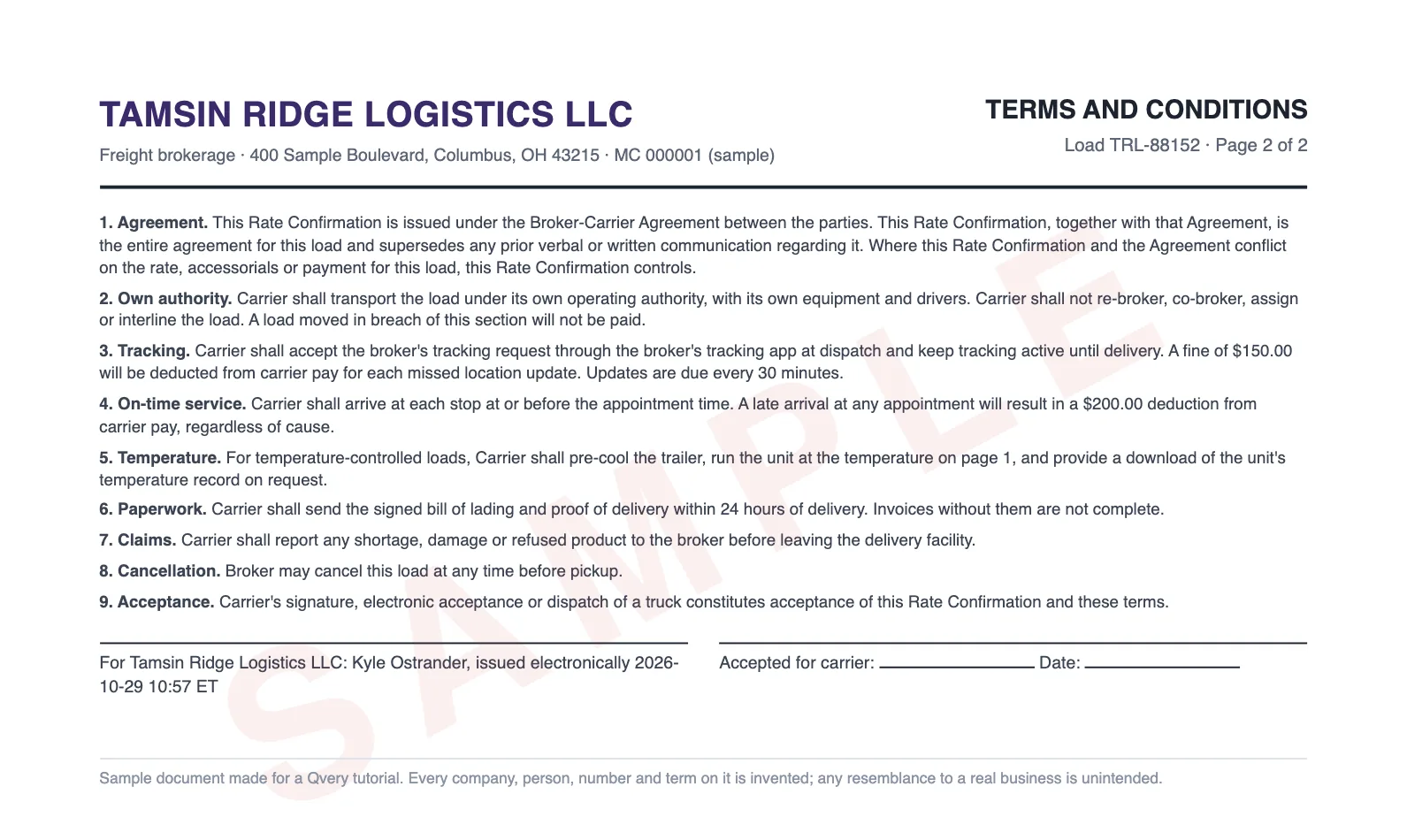
| Tracking method | DIFFERS | Broker's tracking app, accepted at dispatch, updates every 30 minutes (p2 cl. 3) |
| Fine: missed location update | DIFFERS | $150.00 deducted per missed update (p2 cl. 3) |
| Deduction: late arrival | DIFFERS | $200.00 deducted for a late arrival at any appointment, regardless of cause (p2 cl. 4) |
| Broker phone | DIFFERS | Direct (614) 555-0187; after hours (614) 555-0193 (p1) |
| Broker email | DIFFERS | kyle.ostrander@tamsinridge-logistics.example (p1) |
Differs is money: the split adds up to $4,000, detention starts after three hours and stops at $250, and Net 45 with a 5% quick pay fee replaces Net 30 and 2%.
Missing is the agreed TONU, next to a clause letting the broker cancel "at any time before pickup". A deadhead to a cancelled load would pay nothing.
Page two adds charges nobody agreed to: $150 for each missed tracking update, due every 30 minutes, and $200 for a late arrival "regardless of cause", already certain with a Wednesday appointment the truck cannot make.
Both read DIFFERS because your rules allow no fines without a manager's OK. The one NOT AGREED row is the layover term, which adds pay, so a person weighs it.
The flags that are fine matter as much. "1120 Sample Avenue, California" and "1120 Sample Ave, CA" are the same dock.
Own authority, the entire-agreement clause and claims reporting are standard, so the check marks them STANDARD. Our first prompt had no such status, and the dispatcher's list came back with six or seven standard clauses beside the two items that needed a decision.
Tips from Reddit
Carriers and a broker on page two and on revised rate cons
We once got a penalty for delivering early. Shipper nor reciever had a problem with early delivery....but broker saw an opportunity and deducted $350 off the RC. As team drivers we always check for that now.
RC says missed appt = $300 late fee charge. I almost never enforce it. Maybe I should start.
I have the opposite problem as I often have to remind brokers that they are due a revised r/c sometimes.
Do not sign the other rate con. You have a contract
Step 4: Call the Number on File Before You Answer the Email
The broker's email domain and phone numbers on our rate con do not match the broker file. The check says so and stops there, which is right: a document cannot tell you who sent it.
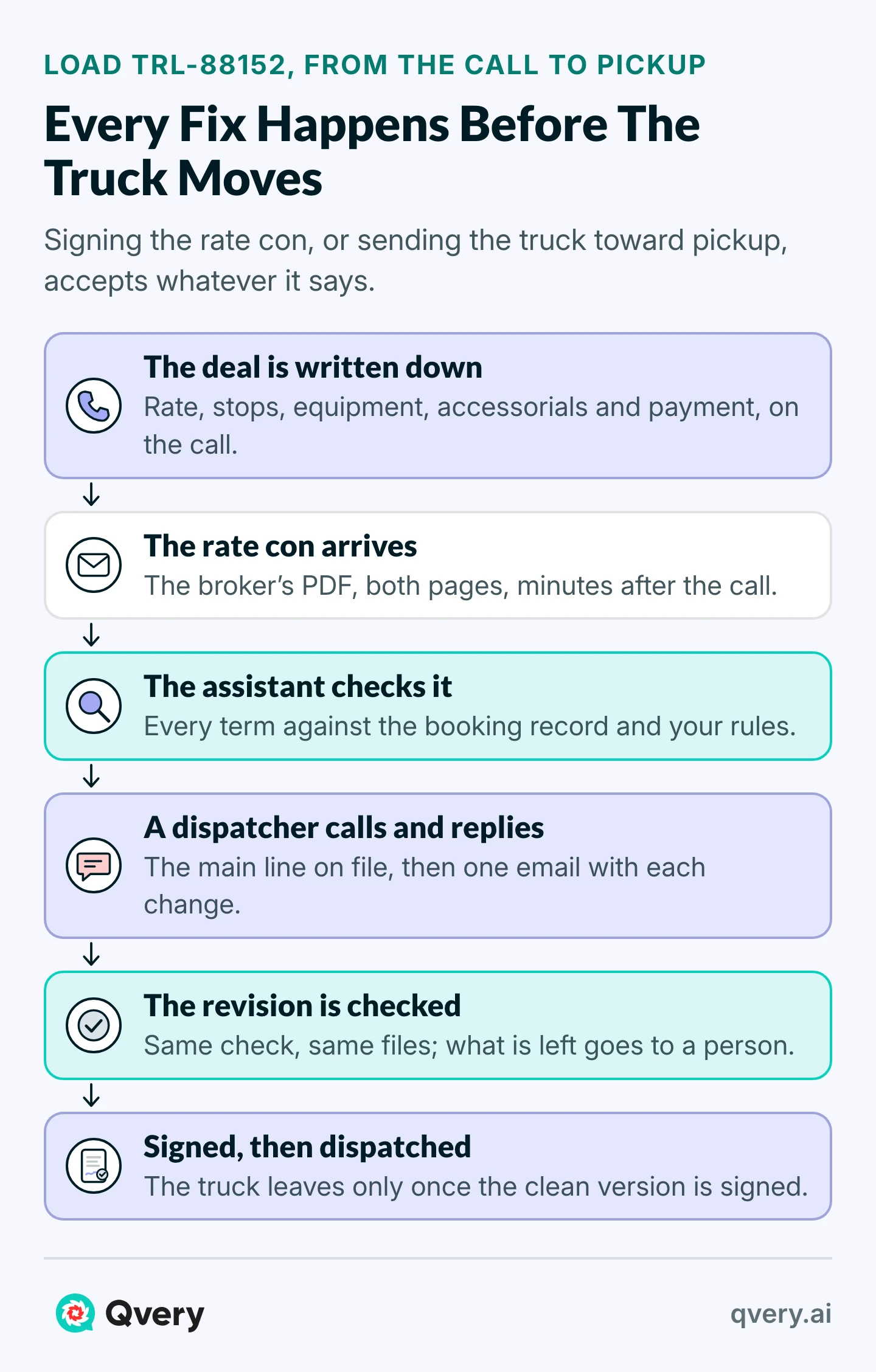
Step 5: Send One Email, Then Check the Revision the Same Way
Still in that chat, ask for an email to the broker contact in your file that lists each change with the value you need and says you will not sign until the revision arrives. Ours came back like this:
To: Kyle Ostrander <kostrander@tamsinridge.example>
Subject: Load TRL-88152 (our ref R-20417): revised rate confirmation needed

Kyle,

We have not signed the rate confirmation for load TRL-88152 and will not sign until a revised one arrives with these changes:

1. Total carrier pay $4,100.00 all-in; line haul plus fuel must add to that.
2. Delivery appointment Thu 11/05/2026 14:00, as booked.
3. Temperature 34°F, continuous.
4. Weight 41,000 lb.
5. Detention $60.00/hr after 2 hours free, each stop, no cap.
6. TONU $300.00 if cancelled after the truck is dispatched.
7. Payment Net 30 from delivery with signed POD; quick pay optional at 2%.
8. Tracking through our ELD link, with the $150.00 missed-update fine removed.
9. The $200.00 late-arrival deduction removed.
10. Your phone and email shown as on our file: (614) 555-0142 ext. 218, kostrander@tamsinridge.example.

Our rules do not allow per-incident fines, chargebacks or deductions, so please strike any others in the terms as well.

Please list each change on the revised confirmation.

Redfern Hollow Transport Inc., Dispatch
dispatch@redfernhollow.example
A dispatcher reads it and sends it. When the revision arrives, run the same check in a new chat with the same booking record and rules. Ours came back with two items: Net 45 with 5% quick pay, and the broker's tracking app with its $150 fine. Everything else read MATCH.
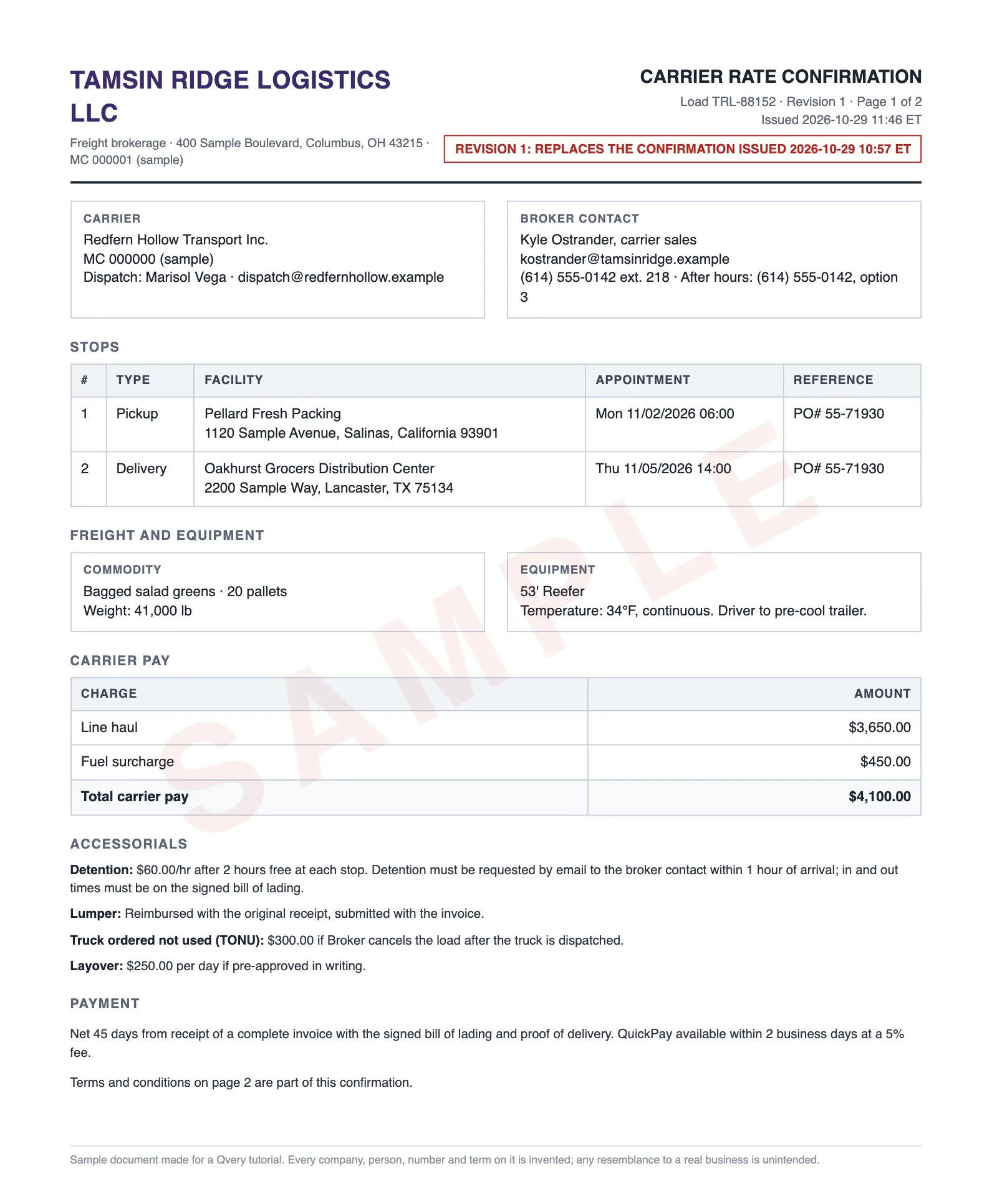
Taking slower pay or a fine-backed tracking app from this broker is the operations manager's call. The assistant reads and drafts; a person sends, signs and dispatches, in that order, because the truck leaving can be the signature.
Step 6: Save the Check and Count the First Month
When the check reads right on a few loads, make it the desk's. In Claude, go to Projects, click + New Project, then Set project instructions, and put the check there; the rules page goes in the project's knowledge.
Each load is then a new chat with two files, the rate con and its booking record; chats do not share context, so attach both every time. On Team and Enterprise plans, share the project with the desk as Can view, so one person owns the rules.
Then do the arithmetic for your own desk. Say your desk books 40 brokered loads a day and reads each rate con carefully in about 10 minutes: close to seven hours of reading a day.
The assistant took two to three and a half minutes a check; the dispatcher's part is deciding. Keep this tally for a month:
| Column | What goes in it | Load TRL-88152 |
|---|---|---|
| Date and load | When the rate con arrived, and the broker's load number | 2026-10-29, TRL-88152 |
| Broker | The broker, as named in your file | Tamsin Ridge (sample) |
| Problems found | By kind: rate, times, equipment and weight, accessorials, payment, fines, contact | Rate 1, times 1, equipment and weight 2, accessorials 2, payment 1, fines 2, contact 1 |
| Revision asked for | Yes or no | Yes |
| Sent to a person | What the dispatcher could not settle alone | 2: Net 45, the tracking fine |
| Minutes to signature | From the rate con's email to the signed version | Yours to count |
| Version signed | The one the truck left under | Not yet: two items with the operations manager |
Qvery's Agent Reads Every Rate Con Before Your Desk Signs
For a dispatch desk, we build an agent around that desk's own paperwork. It watches the inbox where rate cons arrive, reads each one as it lands, pulls the load's booking from your TMS and runs this check against your signing rules.
When something is off, it drafts the reply to the broker contact on file and keeps the load out of dispatch. When the rate con is clean, it puts it in front of a dispatcher to sign.
No one starts it by hand: the agent works the inbox on autopilot, all day, and a dispatcher still approves every signature.
The first two weeks go to learning how your desk books and signs, including the rules that were never written down, connecting the agent to the inbox and TMS you already use, and reaching a first working result on your own loads.
We train the dispatchers who approve, and the weekly report carries two numbers: dispatcher hours saved, and errors stopped before a signature, by kind.
Run It on Last Week's Signed Rate Cons First
Pull ten rate cons your desk signed last week, with their booking notes, and run the check on each. Whatever it finds that nobody caught is your error rate on rate cons, and the first number in your business case.
If rate cons are only one of the documents your desk re-reads by hand, our logistics playbook maps which ones an agent should take next.
Every broker you haul for gets the same check; only the booking record changes.
Frequently asked questions
Can AI catch rate confirmation errors before dispatch?
Yes, when it has something to compare against. In our runs, an assistant given the rate con, the booking record and the company's signing rules found all ten planted problems every time. Given the rate con alone, it missed the problems that only the deal reveals, like a rate $100 under what was agreed.
How accurate is it on scanned rate cons?
On our image-only scan it found everything the clean PDF run found, and said where the speckled scan made it read a value carefully. That is one invented document, not a measure of your paperwork. Run your worst scans first, and have the dispatcher check any value it flags as hard to read.
What should a dispatcher check on every rate con?
The rate and how it splits, each stop's address and appointment, equipment and temperature, weight, detention, TONU, layover and lumper terms, payment and quick pay, tracking, every fine or deduction on the terms page, and the broker's contact details against your file. On our sample, page two held both fines and the cancellation clause.
Can AI detect double brokering from a rate con?
No. It can flag contact details that do not match your broker file, but a clean document can come from a compromised inbox. FMCSA's advice is to call the number posted in the broker's SAFER record, never the one you were given.
Does dispatching the truck accept the rate con?
It can. VEXO Logistics' published terms, for one, count dispatch toward pickup as acceptance, the same as a signature, and our sample's terms said so too. That is why the check, the reply and the revision all have to finish before the truck leaves, not while it is rolling.
What if we do not keep a booking record?
Then start there, because the check has nothing to compare against. A few minutes at booking, entering the rate, appointments, equipment, accessorials and payment terms while the broker is on the phone, is what lets the assistant catch the errors that matter most. Without it, you get the generic findings.
Can we upload rate cons to an AI assistant safely?
Use a business plan. Anthropic's privacy page for its business products says inputs and outputs are not used for model training by default, and personal plans use chats for training only if you opt in. Check your company's data rules and your broker agreements before the first upload.
What does TONU mean, and why must it be on the rate con?
Truck ordered not used: pay for a load the broker cancels after your truck is dispatched. If it is agreed on the call but missing from the rate con, and the terms let the broker cancel any time before pickup, the deadhead miles are unpaid. Ask for it in writing before you sign.
Does this only work in Claude?
No. We ran the same check on Gemini and it found all ten problems too. Another assistant that reads PDFs can be given the same files and prompt; test it on a sample like ours first. The steps above use Claude because its projects keep one set of instructions for the whole desk.
Can the assistant sign the rate con for us?
It should not. Signing, or sending the truck, is accepting the terms, and that decision belongs to a dispatcher who can weigh the broker, the lane and the rest of the week. The assistant's job ends at the table and the draft email. Keep the signature with the person who owns the load.
What if the broker will not send a revised rate con?
Then the choice is the load as written or no load, and your rules say which terms are worth refusing over. Ask once more in writing, quoting the booking record. If the answer is still no, the operations manager decides, and the tally shows which brokers do this more than once.
How long does each check take?
In our runs, two to three and a half minutes per rate con, reading the files included. That is the assistant's time. The dispatcher's time is reading the findings, making the phone call when contact details differ, and sending the reply, which is the part that should stay with a person.