On this page
- Write the Firm's Positions Down Before Claude Reads an NDA
- Save the Playbook as a Skill Every Lawyer's Claude Applies
- Upload the NDA and Say Which Side You Act For
- Ask Without the Playbook and Claude Argues Its Own Positions
- Read the Table the Way the Reviewing Lawyer Would
- Have Claude Make the Approved Edits in the Word File
- When a Review Goes Wrong, Fix the Playbook
- How Qvery Builds the Agent That Reviews Every Incoming NDA
- Keep Client NDAs Where Your Counsel Has Read the Terms
- Frequently asked questions
Every transactional practice gets NDAs on the other side's paper, and each one waits in a reviewing lawyer's queue while the deal waits too. The review repeats: the same dozen clauses, each checked against what the firm asks for, what it will accept, and what goes to a partner, then a markup in Word.
Done by hand, that can take a lawyer over an hour per NDA, with the firm's checklist, or a partner's memory, open beside the draft.
The misses are the quiet ones: an exclusion the NDA simply leaves out, an exclusivity promise tucked into "General", a notice clause that puts the client in breach when a subpoena comes with a shorter deadline. Whatever a skim passes, the client signs.
Claude does that reading now. Give it the firm's positions in writing and it returns every clause quoted and marked against them, proposes the firm's own wording for each fix, and then hands back the Word file with the approved fixes as tracked changes.
We ran it on an NDA we wrote for the test: a software vendor's "mutual" NDA sent to a food manufacturer the firm represents, four pages, with nine problems planted in it.
Three sit where a quick read misses them: an exclusion that simply is not there, and two clauses tucked into the "General" section. The companies, the deal and the firm's playbook are invented, and we wrote the answer key before the first run.
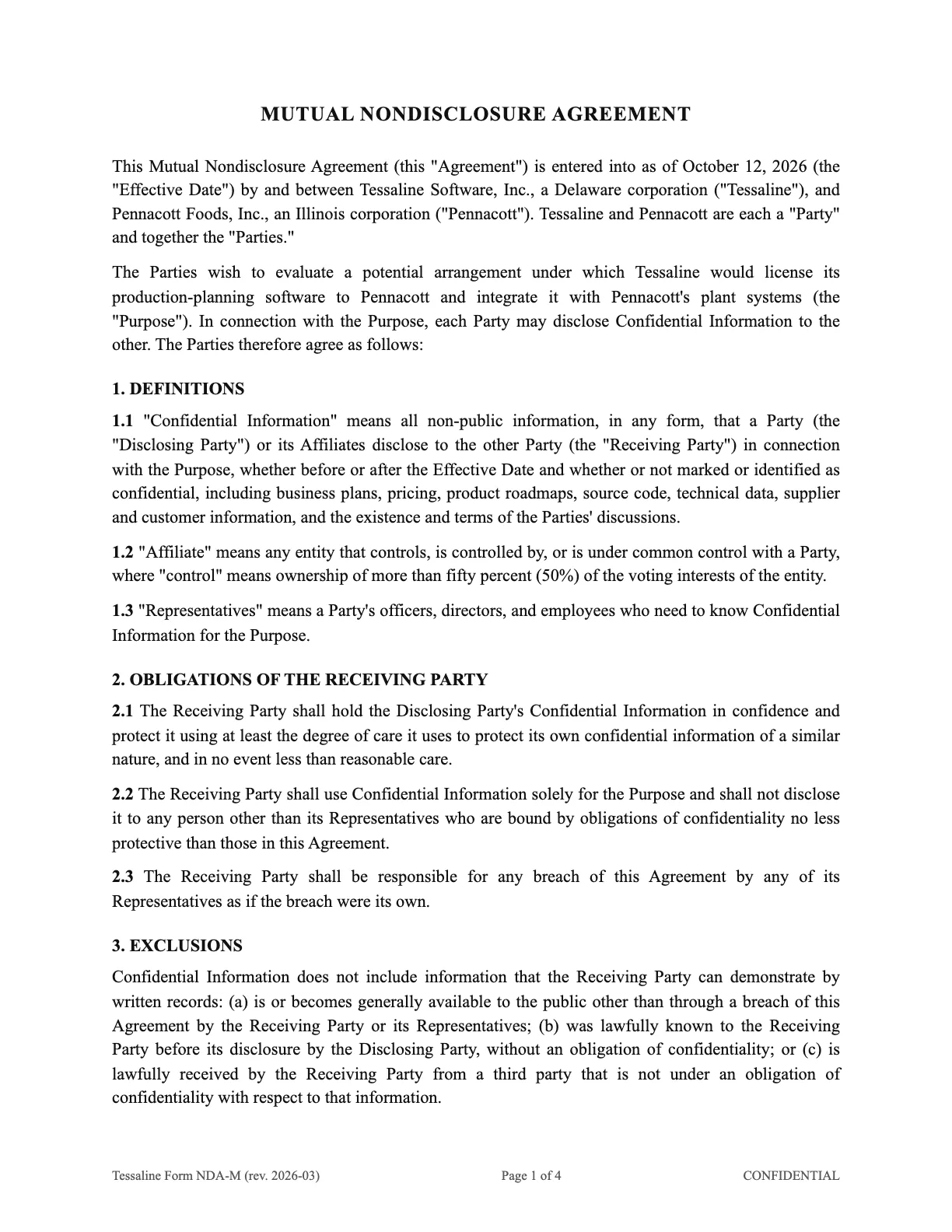
Those numbers show the method working on problems we planted, not its accuracy on your paper; the first month on your own NDAs is the real test.
This page walks one NDA end to end, from writing the playbook to the redline in Word, and then shows the agent that runs the same review on every NDA the firm receives.
Signing, other contract types and connecting Claude to a document management system are outside this page.
Write the Firm's Positions Down Before Claude Reads an NDA
Claude can only apply positions someone wrote down, so the first thing to build is a table, not a prompt: one row per clause, five decisions per row.
- Preferred: what the firm asks for. A clause that meets it passes.
- Fallback we accept: what the firm signs without asking anyone. If this column lives only in a partner's head, every clause short of perfect becomes a flag.
- Flag when: what the reviewing lawyer fixes without a partner.
- Escalate when: what goes to the partner before anyone proposes wording.
- Model wording: the exact text the firm proposes. Without it, the fix is Claude's prose, and the other side gets a sentence nobody at the firm wrote.
Here is the playbook we wrote for the test, for a client receiving the other side's NDA ahead of a business discussion.
| Clause | Preferred | Fallback we accept | Flag or escalate when |
|---|---|---|---|
| Structure | Mutual whenever both sides share information | One-way, protecting the other side, if our client discloses nothing | Escalate: one-way against our client when our client also discloses |
| Definition | Marked confidential, or confirmed in writing within 30 days of an oral disclosure | All non-public information disclosed for the purpose, marked or not | Escalate: information not disclosed for the purpose, or third parties' beyond affiliates |
| Representatives | Officers, directors, employees, affiliates, attorneys, accountants, financial advisors, financing sources | The same without financing sources | Flag: attorneys or accountants left out |
| Care and use | At least the care used for its own information; use only for the purpose; each side answers for its people | Escalate: security specifications, audit rights, wider liability | |
| Exclusions | All four: public, already known, from a third party, independently developed | None: all four are required | Flag: any one missing |
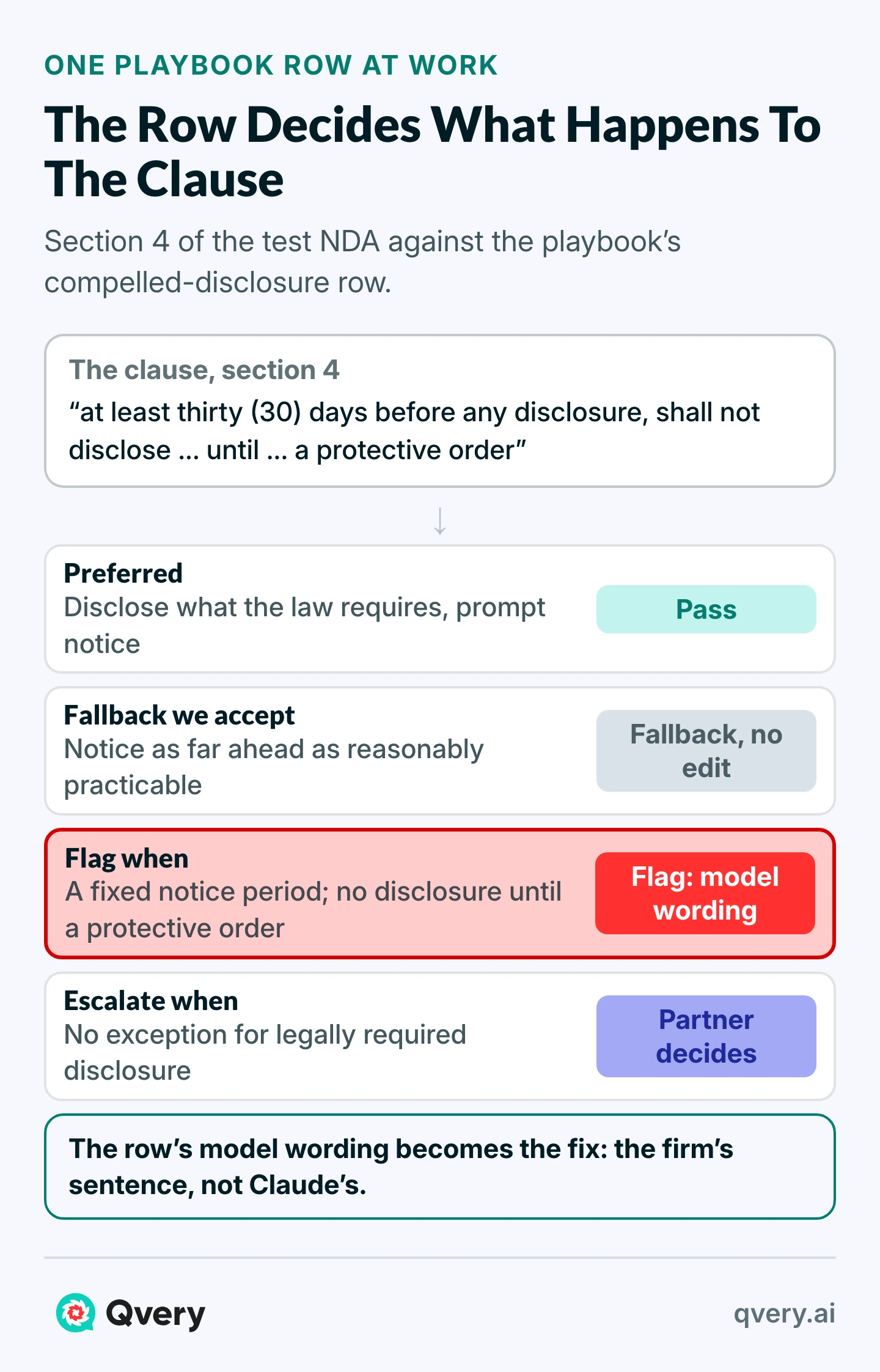
| Compelled disclosure | Disclose what the law requires, with prompt notice where legally permitted, cooperation at the other side's expense | Notice as far ahead as reasonably practicable | Flag: a fixed notice period, no disclosure until a protective order, our client pays. Escalate: no exception at all |
| Term and survival | Two years after the last disclosure | Up to five years; trade secrets while they remain trade secrets | Flag: perpetual, or over five years, for everything |
| Return or destruction | On request, confirmed by email | An officer's certificate; 30 days or more | Flag: no carve-out for backups and legally required copies, or under 10 business days |
| Residuals | None | Unaided memory only, no deliberate memorizing, trade secrets and patented or copyrighted material excluded, no license | Escalate: anything broader |
| Remedies | Either side may seek an injunction | Both sides waive bond | Escalate: indemnity, liquidated damages, fee-shifting, anything one-way |
| IP and feedback | No license, no feedback clause | The other side may use feedback our client volunteers, with no assignment | Escalate: any assignment or license from our client |
| Non-solicitation | None | Mutual, 12 months or less, employees met through the deal, job ads carved out | Flag: longer, one-way, or no carve-out. Escalate: any no-hire |
| Governing law and venue | Illinois law, Cook County courts | Delaware or New York law and courts | Escalate: arbitration, jury waiver, anywhere else |
| Assignment | Neither side assigns without consent, except to a successor of the business | Flag: one side may assign freely | |
| Boilerplate | Entire agreement, amendment, severability, notices, counterparts, no obligation to proceed, no warranty, both ways | Flag: any of them one-way | |
| Not in this playbook | Escalate: any clause that gives the other side a right or binds our client and that no row covers |
The model wording sits in the same file, one entry for each row that can be flagged:
Representatives: "Representatives" means a Party's and its Affiliates' directors, officers, employees, attorneys, accountants, and financial advisors who need to know Confidential Information for the Purpose.

Exclusions, (d): is independently developed by or for the Receiving Party without use of or reference to the Disclosing Party's Confidential Information.

Compelled disclosure: If the Receiving Party or its Representatives are required by law, regulation, or legal process to disclose Confidential Information, the Receiving Party shall, to the extent legally permitted, give the Disclosing Party prompt written notice and reasonable cooperation, at the Disclosing Party's request and expense, in seeking a protective order, and may disclose only that portion of the Confidential Information it is legally required to disclose.

Term and survival: The Receiving Party's obligations survive for three (3) years after expiration or termination of this Agreement, except that obligations with respect to any trade secret continue for as long as it remains a trade secret under applicable law.

Return or destruction: The Receiving Party may retain copies held in automatic electronic backup systems and copies it is required to keep by law, regulation, or its document-retention policies, provided those copies remain subject to this Agreement for as long as they are retained.

Non-solicitation: For twelve (12) months after the Effective Date, neither Party shall solicit for employment any employee of the other Party with whom it had contact in connection with the Purpose; this does not restrict general solicitations not targeted at those employees, or hiring anyone who responds to them.
Model wording is what the firm proposes when a clause is flagged, so it can sit at the fallback rather than the preferred position: the term entry asks for three years after the agreement ends, inside the five-year fallback, where the preferred position is two years after the last disclosure.
The last row of the table matters as much as the others. Anything no row covers goes to the partner, marked "Not in playbook", so a clause nobody anticipated gets seen instead of waved through.
In our NDA that was a promise, buried in "General", that the client would talk to no other software vendor for the life of the agreement.
Where the positions come from: the firm's own NDA form gives the preferred column, the NDAs it has signed suggest the fallbacks, each one approved by a partner before it goes in the table, and the partner who signs them off gives the escalation triggers.
Save the Playbook as a Skill Every Lawyer's Claude Applies
A skill is a folder of instructions that Claude loads on its own when a request matches what the folder says it is for. This one is two files: SKILL.md, which says how to review, and PLAYBOOK.md, the table and the model wording above.
Upload the folder once and share it, and every lawyer who switches it on gets the same positions; the same skill also works inside Word through the Claude for Word add-in.
Create a folder named nda-playbook-review and put both files in it. SKILL.md, in full:
---
name: nda-playbook-review
description: Review an incoming NDA clause by clause against our firm's NDA playbook (PLAYBOOK.md). Use when someone shares an NDA and asks for a review, a markup or redlines.
---

# NDA review against our playbook

You review an NDA the way our reviewing lawyer would on a first pass. A lawyer decides every outcome; your job is a review they can check line by line.

## How to review

1. Read the whole NDA first, then read PLAYBOOK.md in this folder.
2. Work through the playbook row by row. For each row, find the clause or clauses in the NDA that answer it.
   - Quote the clause word for word, with its section number exactly as the NDA prints it.
   - If the NDA has no clause for something the row requires, write "Not in the NDA" in the quote column. A missing required item is a Flag, unless the row's "Escalate when" names that absence; then it is Escalate.
3. Give each row exactly one status:
   - Pass: meets the Preferred position.
   - Fallback: misses Preferred but sits inside "Fallback we accept". No edit needed.
   - Flag: matches "Flag when", or is outside the fallback. Propose the row's model wording, changing only defined terms so it fits this NDA; if the row has no model wording, say in one line what to change.
   - Escalate: matches "Escalate when". The partner decides; you may suggest wording, labeled as a suggestion.
4. Then read every section of the NDA again and account for each one. A clause no row covers is Escalate, with "Not in playbook" as the reason, when it gives the other side a right or puts a duty or a restriction on our client. Definitions, recitals and dates are read with the row they serve and never escalated on their own; if one changes how a row comes out, say so on that row.
5. If you are unsure between two statuses, choose the stricter one and say why in one sentence.

## What to return

One table, one line per finding, in the NDA's own section order:

| Section | Clause (quoted) | Playbook row | Status | Proposed wording | Why |

Then two short lists:
- For the partner: every Escalate, one line each.
- Read these yourself: anything you could not read cleanly (a scanned page, a garbled clause, a cross-reference to a document you were not given).

## Rules

- Never mark a row Pass or Fallback without quoting the clause that earns it.
- Never invent a section number, a clause or a quote. If the text is unclear, say so.
- Apply this playbook, not general market practice. Where the playbook is silent, escalate.
- Do not change the NDA. Edits come later, once the lawyer has approved them.
The rule "Never mark a row Pass or Fallback without quoting the clause that earns it" is what lets a lawyer check the review by searching the NDA.
The rule "Apply this playbook, not general market practice" keeps Claude on the firm's positions, where without a playbook it argues its own, as the section after next shows.
Then put the skill in Claude, in three moves:
Zip the folder
Zip the folder so the ZIP holds the folder itself, not two loose files. Anthropic's instructions are strict about that structure.
Upload it
In Claude, open Customize > Skills, click +, choose Create skill, then Upload a skill, and pick the ZIP.
Switch it on and share it
Switch it on. On a Team plan, its menu lets you share it with the lawyers who review NDAs, or publish it to the firm; people you share it with get your updates automatically.
The skill now shows under Customize > Skills, switched on. The real check comes with the first review: the table names playbook rows. A review with no row names did not load the skill.
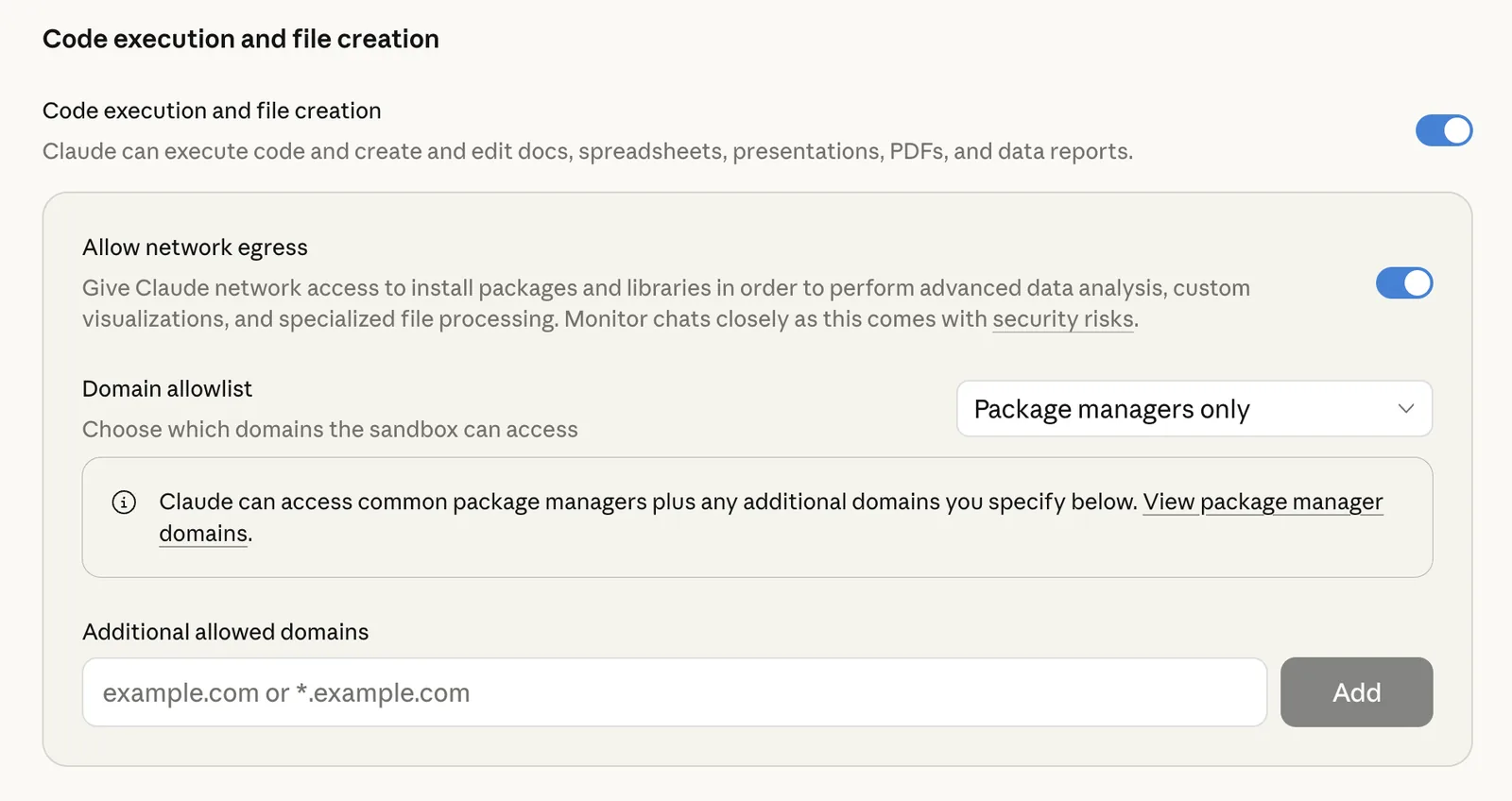
Before the first client NDA goes in, whoever owns the plan checks two settings under Organization settings.
The first is code execution and file creation, which skills and the Word file both run on. Anthropic's help pages say it is on by default for Team plans and advise starting with network access off, opening it only when a job needs it.
The second is Rate chats. Under Anthropic's privacy terms, a thumbs up or down on any answer stores the whole conversation for up to five years, the client's NDA included. Switch it off for the firm.

If the firm has skills turned off, the same two files work in a project: SKILL.md's text as the project instructions, PLAYBOOK.md as a project file. It stays inside that project and does not reach Word.
Upload the NDA and Say Which Side You Act For
Open a new chat, attach the NDA, and ask in one line for a review against the playbook, naming the client you act for and saying whether the client will share its own information too.
That last part changes the review. The playbook's first row asks whether the client discloses too: a one-way NDA is fine when the client only receives, and goes to a partner when the client also hands over its own information. Leave it out and Claude has to guess.
Here is part of what came back on our NDA, quotes trimmed:
| Section | Clause | Status | Proposed wording |
|---|---|---|---|
| 1.1 | "all non-public information ... whether or not marked or identified as confidential" | Fallback | None |
| 1.3 | "a Party's officers, directors, and employees who need to know" | Flag | Row 3's wording, adding attorneys, accountants, financial advisors and affiliates |
| 3 | Independently developed information: not in the NDA | Flag | Exclusion (d), with the "or" moved from (c) to (d) |
| 4 | "at least thirty (30) days before any disclosure ... a protective order" | Flag | Row 6's wording |
| 7 | "either Party may use for any purpose ... any Residuals" | Escalate | Suggestion only: delete section 7 |
| 12.7 | "Pennacott shall not enter into discussions with any third party" | Escalate | Not in playbook. Suggestion only: delete |
Before reading a single status, check the review itself:
- Every row answered. A missing row is a clause nobody looked at.
- Every section accounted for, including the boilerplate at the end, where problems like to sit.
- Two random quotes are in the NDA word for word when you search for them. In our eight playbook reviews, every quoted fragment was: 234 of 234.
Ask Without the Playbook and Claude Argues Its Own Positions
Now the same NDA, with the same sentence about the client and no skill: a plain request to review it and suggest any changes.
What came back was a capable review, written to positions the firm never took.
| With the playbook | Without it | |
|---|---|---|
| Planted problems raised | 9 of 9 | 7 of 9 |
| Firm positions argued the other way | 0 | 2 |
| Terms the firm accepts that it asked to change | 0 of 9 | 6 of 9 |
| New clauses proposed | 0 | 4 |
| Fixes in the firm's own wording | 5 of 5 | 0 of 5 |
Both reversals come from one piece of reasoning. The client would hand over more information than it received, so Claude wanted confidentiality to last forever and advised leaving out the independent-development exclusion, the one that protects the receiving side.
On some deals a partner might agree. But the firm settled both questions in its playbook, and an open review settles them again, its own way, every time. Every line of it has to be judged again by a lawyer.
With the playbook, the lawyer's judgment goes to the Flags and Escalates, and the rest is checked against positions the firm already set.
Read the Table the Way the Reviewing Lawyer Would
Each status asks the reviewing lawyer for a different decision.
The list at the bottom of each review, "Read these yourself", is for what Claude could not settle from the page. Ours caught something we did not plant: section 12.5 sends notices "to the addresses on the signature page", and the signature page has no addresses. Every review we ran noticed it.
We also gave the skill a scanned copy: four image-only pages, slightly skewed and speckled. It reached the same calls on every clause, said first that it was reading an image, and listed every date and number to check against the original.
Have Claude Make the Approved Edits in the Word File
Once the lawyer has approved the Flags and the partner has decided the Escalates, the edits go back into the NDA as tracked changes. In our test those decisions were:
| Section | Approved edit |
|---|---|
| 1.3 | Representatives: the model wording |
| 3 | Add exclusion (d); move "or" from before (c) to before (d) |
| 4 | Compelled disclosure: the model wording |
| 5.2 | Three years, trade secrets while they last: the model wording |
| 7 | Partner: delete residuals, leaving "[Reserved.]" |
| 8.2 | Partner: delete the one-way indemnity, leaving "[Reserved.]" |
| 9.2 | Partner: feedback the client volunteers may be used, nothing assigned |
| 12.6 | Non-solicitation: the model wording |
| 12.7 | Partner: delete exclusivity, leaving "[Reserved.]" |
"[Reserved.]" keeps the section numbers, and anything that points to them, where they were. In the same chat, attach the NDA as a .docx if you reviewed a PDF, paste the approved list, and send:
Apply exactly these approved edits to the attached NDA as tracked changes, with "<your name>" as the author, and change nothing else. Return the edited NDA as a .docx.Claude writes the file with its built-in Word skill, the one file creation uses, and returns it as a download. Our run took 117 seconds.
The edits came back word by word, the way the other side's lawyer expects: in 12.6 only "twenty-four (24)" became "twelve (12)", "Pennacott" became "neither Party", and the carve-out went in at the end.
Check the file, not Claude's description of it. Open it in Word, go to the Review tab, and read the changes, not the clean view.
Then run the two-copy test: Reject All Changes on one copy should give back the NDA exactly as received, and Accept All Changes on another should give exactly the approved wording.
What Claude does in this step is limited on purpose: it edits only what a person approved, and it sends nothing anywhere.
Firms on Microsoft 365 can do this inside Word itself: the Claude for Word add-in has a tracked changes mode that puts edits in Word's own review pane, and the skill above is available there by typing "/" in the sidebar. That route comes from Anthropic's documentation; we did not run it.
The same check runs on any contract a practice group has positions for, and it is one of the jobs our legal playbook maps for a law firm.
When a Review Goes Wrong, Fix the Playbook
Claude applied our first playbook exactly as written, including a rule we wrote badly: the one for clauses no row covers.
| Version one | Version two |
|---|---|
| Not in this playbook: any clause that no row covers is Escalate, marked "Not in playbook". It is never passed silently. | Not in this playbook: a clause that gives the other side a right, or puts a duty or a restriction on our client, and that no row covers (exclusivity, a standstill, a non-compete, any commercial term) is Escalate, marked "Not in playbook". It is never passed silently. Definitions, recitals, dates and how an exclusion must be proved are not escalated on their own: they are read with the row they serve. |
On version one, two reviews sent the partner the definition of "Affiliate", the deal's opening recital and effective date, the two-year disclosure window and a proof standard in the exclusions: four extra lines in one, three in the other. None was wrong to notice, and none needed a partner.
Four reviews on version two sent the partner only the four real items, and still found all nine problems.
That is how the method is maintained. When a review comes back wrong, find the cause first: the playbook, as in our case, or the reading, like a scan the review warned about.
If it was the playbook, change the playbook, then run the same NDA again and one you have already reviewed by hand, and see whether the change held.
For the first month, count what the review changes:
- Minutes per NDA, from arrival to approved redline, against what the same work took before
- Statuses the lawyer changed, by playbook row; a row changed twice is a row to rewrite
- "Not in playbook" items, and which of them became new rows
- Quotes checked: every one for the first weeks, then a few per review
Tips from Reddit
Lawyers on running contract review against a playbook
For testing, now try it with some past contracts that you already did that are different from the set you gave Claude, and run the skill on them. Iterate a bit until you're happy with it.
So, in practice, we give it a playbook, ask it to compare the contract against our positions, and have it use our standard explanations to justify rejecting deviations. It's helpful, but it's more of a hatchet than a scalpel.
For one reference point, Liberty Mutual's in-house legal team reported that a lawyer's review once took over an hour per NDA and came down to 15 to 20 minutes after it centralized the work, redesigned the process and added offshore support and earlier AI tools, across about 2,500 NDAs a year.
With the playbook, the lawyer checks a table against the NDA instead of reading the NDA cold.
Say your firm reviews 30 NDAs a month at 45 minutes each: 22.5 hours of a lawyer's time. If checking a table takes 15 minutes, that is 7.5. Both numbers in that sum are assumptions; month one replaces them with yours.
How Qvery Builds the Agent That Reviews Every Incoming NDA
Done by hand, the review still starts when a lawyer finds time to open the chat. For a firm that receives NDAs every week, we build an agent that removes that wait: it works from your playbook and your model wording, and nobody has to remember to run it.
Each NDA that reaches the intake inbox is reviewed on autopilot before a lawyer opens it. The table is waiting in the matter's folder in your document management system, every Escalate already on the partner's list; once the edits are approved, the Word file comes back with them as tracked changes. Nothing goes to the other side without a lawyer.
The first weeks go to how NDAs move through your firm, who reviews which ones and where the partner steps in; a first working version follows within two weeks, and the reviewing lawyers are trained on its tables.
What we report every week is what the firm cares about: minutes per NDA, from arrival to approved redline, and clauses caught before signing, from a missing exclusion to a promise buried in "General".
The playbook belongs to the partner who signs off your NDAs, so the build begins with them.
Keep Client NDAs Where Your Counsel Has Read the Terms
A client's NDA is client information, and the other side's file is input you did not write. Both shape the setup more than any prompt does.
- Business plans: Anthropic says it does not train on inputs or outputs from its commercial products by default. On Free, Pro and Max, chats are used to improve its models if the user allows it. Client documents belong on Team or Enterprise plans.
- Client consent: ABA Formal Opinion 512 says that before information relating to a representation goes into a generative AI tool that can learn from it, the client's informed consent is required, and boilerplate in an engagement letter does not count. It makes the risk a judgment about the client, the matter, the task and the tool. It interprets the ABA's Model Rules; each state adopts its own, and the opinion itself cites state bars' separate guidance.
- Word is its own route: Anthropic's documentation says Claude for Word deletes inputs and outputs within 30 days with some exceptions, does not inherit an organization's custom retention settings, and is not in the audit logs of Enterprise plans. Retention rules set for chat do not follow the document into Word.
- The other side's file: Anthropic warns that counterparty files can carry hidden instructions meant to steer Claude. Keep network access off, read every confirmation Claude asks for, and run the two-copy test on every redline, which also shows an edit nobody approved.
Counsel reads the current terms for the firm's plan; this page is not that reading.
Give the skill to the lawyer who reviews the most NDAs, ask them to change every status they disagree with for a month, and fold each change back into the playbook. The playbook they hand back is the firm's.
Frequently asked questions
How do I review an NDA in Claude against my firm's playbook?
Write the firm's positions as a table and save it as a skill, then upload the NDA and say which side you act for. Claude returns every clause quoted and marked against the playbook; once a lawyer decides, it returns the Word file with the approved edits as tracked changes.
What goes in an NDA playbook?
One row per clause the firm cares about, with five decisions: the preferred position, the fallback the firm signs without asking anyone, when the reviewing lawyer flags it, when it goes to a partner, and the exact wording the firm proposes. A last row sends any clause no row covers to the partner.
Where do the playbook's positions come from?
The firm's own NDA form gives the preferred column, and the NDAs it has signed suggest the fallbacks, each approved by a partner before it goes in. The partner who signs NDAs off gives the escalation triggers.
What should an NDA review prompt for Claude include?
Very little once the playbook is a skill: a request to review the NDA against it, the client you act for, and whether the client shares its own information too. The instructions that matter (quote every clause, one status per row, the firm's wording for each fix) live in the skill.
Why not ask Claude to review an NDA without a playbook?
Because it argues its own positions. On our test NDA, the open request raised seven of the nine planted problems, argued two of the firm's positions the other way, asked to change six terms the firm accepts and used none of the firm's wording.
How accurate is Claude at reviewing NDAs?
On our invented NDA with nine planted problems, all eight playbook reviews found all nine, on three Claude models and a scanned copy, and every quoted clause matched the NDA word for word. That shows the method working on known problems, not its accuracy on your paper.
Can Claude spot a clause that is missing from an NDA?
When the playbook requires it, yes. Our NDA left out the independent-development exclusion, the one that protects what the client builds on its own, and every playbook review reported it as "Not in the NDA".
What happens to a clause the playbook does not cover?
It goes to the partner, marked "Not in playbook", so an unexpected clause is seen rather than waved through. Our first rule also sent definitions and recitals up; the second limits it to clauses that give the other side a right or bind the client.
Can Claude make tracked changes in a Word document?
Yes. With code execution and file creation on, Claude returns the NDA as a .docx with the approved edits as tracked changes; ours held 30 changes under one author and nothing else. The Claude for Word add-in also has a tracked changes mode.
How do I check an AI redline before it goes to the other side?
Read the changes in Word's Review tab, not the clean view. Then reject all changes on one copy, which should give back the NDA as received, and accept all on another, which should give exactly the approved wording.
Which Claude plan should a law firm use for client NDAs?
A business plan, Team or Enterprise, whose terms the firm's counsel has read. Anthropic says it does not train on commercial customers' inputs by default; on Free, Pro and Max, chats are used to improve its models if the user allows it.
Which settings should a firm change before client NDAs go in?
Switch off Rate chats, because a thumbs up or down stores the whole conversation for up to five years. Keep code execution and file creation on for the skill and the Word file, with network access off until a job needs it.
Does a firm need client consent to put an NDA into an AI tool?
Under ABA Formal Opinion 512, client information needs the client's informed consent before it goes into a generative AI tool that can learn from it, and engagement-letter boilerplate does not count. Each state adopts its own rules, so counsel reads the local guidance.
Can the other side's NDA carry instructions aimed at Claude?
Anthropic warns that counterparty files can carry hidden instructions meant to steer Claude. Keep network access off, read every confirmation Claude asks for, and run the two-copy test on every redline, which shows any edit nobody approved.
How long does an NDA review take?
Liberty Mutual's in-house legal team reported over an hour of a lawyer's time per NDA before it redesigned the work, and 15 to 20 minutes after. On our four-page test NDA, Claude's reading took 168 to 377 seconds; the lawyer's check is the part to time on your own team.
What does Qvery build for NDA review?
One agent for one firm: it picks each NDA out of the intake inbox, reviews it against the firm's playbook on its own and puts the table in front of the reviewing lawyer. A first working version runs within two weeks, and we count lawyer minutes saved and clauses caught every week.