
On this page
- A Working Macro Gives the Same Answer Every Run, and an AI Model Doesn't Promise That
- Count What the Macro Already Saves Before Anyone Prices a Replacement
- How Qvery Builds the Agent That Reads What Your Macro Can't
- The Real Risk in a Macro Is That One Person Understands It
- But the AI Inside Excel Can Run the Whole Reconciliation Now
- Ask Which Number the Rebuild Improves, Then Spend the AI Budget Around the Macro
- Frequently asked questions
In a company of a few hundred people, the books usually close in spreadsheets built around the accounting system. Somewhere in finance, someone wrote the macros or Power Query steps that pull the bank file, match it against the ledger and lay out the month-end pack, and the close has leaned on them for years.
When the push to use AI in finance arrives, those files are the first thing people point at, because they look like the way the work used to be done.
Qvery builds AI agents, and I'd keep them away from the monthly run of a macro that already works.
If a macro does a fixed finance job correctly, keep it running that job. On the same kind of file it gives the same answer every time, and anyone who can read it can see how it got there.
An AI model asked to redo the same matching each month can answer differently on the same file, and it can't show you the rule it used.
Put AI to work around the macro instead: on the inputs it can't read, like PDF statements and remittances that arrive in an email, and on writing down and testing a macro that usually one person understands.
Models are good at writing and explaining fixed rules: a formula, a query, a short script. Let them write the rule, and let the rule do the arithmetic every month.
This stops holding when the macro breaks every close, nobody left can read it, or the volume has outgrown spreadsheets altogether. Then rebuild it, as something that still gives the same answer every run, with AI helping to write it.
A Working Macro Gives the Same Answer Every Run, and an AI Model Doesn't Promise That
A macro is a written rule. The same bank file goes in, the same matches come out, and the steps sit in the workbook where anyone who reads VBA or Power Query can follow them.
It can also be wrong without anyone noticing: Microsoft's own Excel team writes that many spreadsheet errors are silent.
But on the same kind of input it's wrong the same way every month, so a bad step, once found and fixed, stays fixed.
That's what "working" means here: a macro that has been checked against real closes, not one that has merely run.
A language model works differently. It predicts its answer, and the same request on the same data can come back different. There's a setting, the temperature, that's supposed to stop that when you turn it to zero, and in theory it does.
In practice, researchers at Thinking Machines gave one large open model the same prompt 1,000 times at temperature zero and got back 80 different answers. The most common one came up 78 times.
That test asked for a long written answer, where small differences pile up; a matching job drifts less, but the setting promises nothing.
The researchers did get all 1,000 to match, by changing how the model's arithmetic runs on the hardware, which is work for the people who run the model, not a switch your finance team can flip.
The companies that build these models say the same. Anthropic tells developers that "many applications require the deterministic reliability that only code can provide".
Microsoft's own page for Copilot in Excel puts it first on its list of limits, and names finance in the same breath.
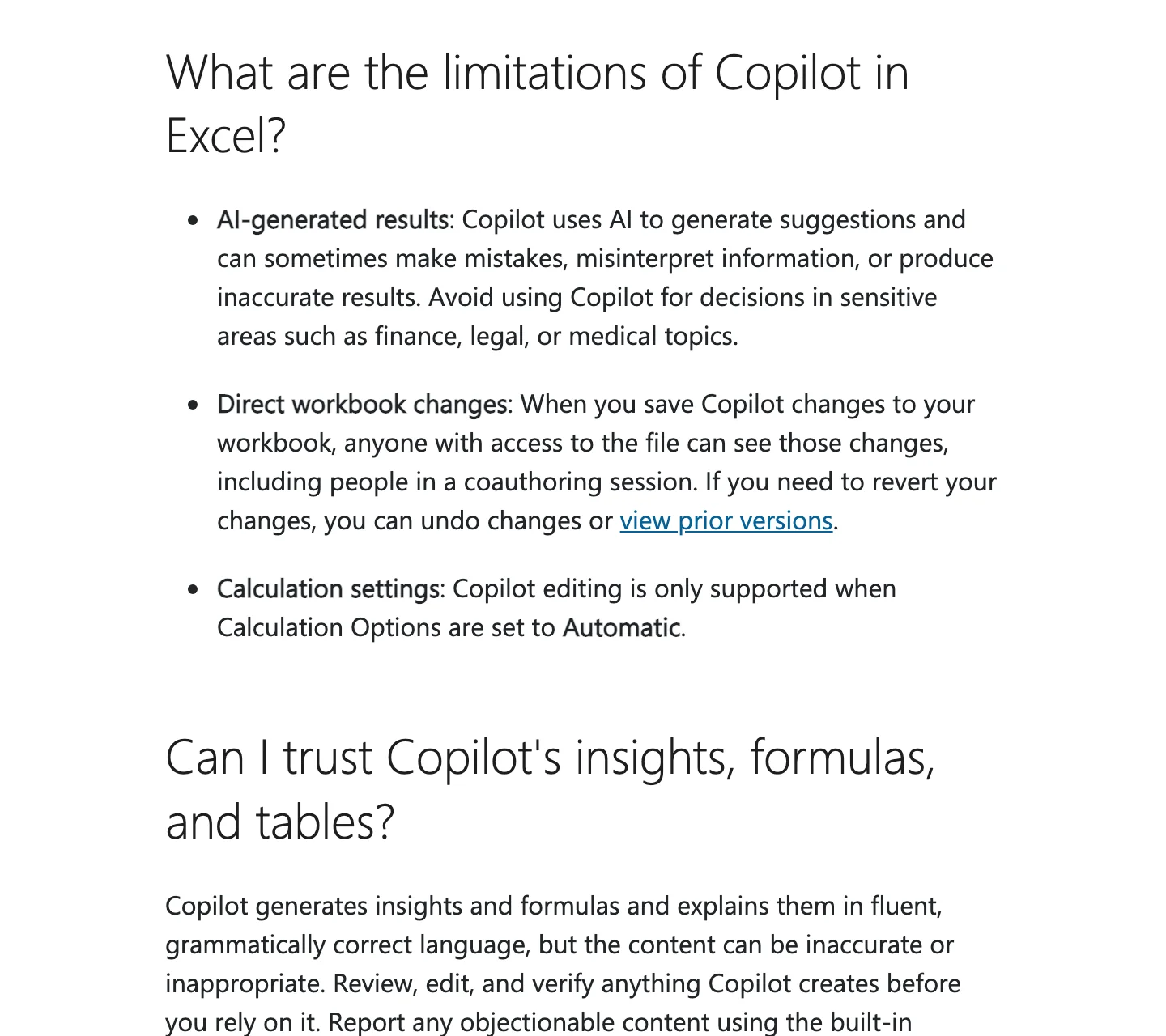
For a finance team, the difference decides how much checking the work needs.
KPMG's guide to AI in financial reporting puts it in control terms: fixed rules give "predictable and consistent outputs" a company can lean on, while AI that predicts needs more people reviewing what it produced.
A tested macro still gets reviewed, but the reviewer checks its exceptions and its totals, not every match.
A model that decides the matches afresh each month needs its matches checked too, because last month's correct answer says little about this month's, and checking AI work has a cost of its own.
Asking a model to redo a working reconciliation every month is like hiring a new accountant every month to redo it from scratch: quick, capable, and someone still has to check everything they touched.
 Vlad ShvetsPartner @ Qvery
If a job needs the same answer every month, it needs a rule. AI is a fine way to write that rule: it reads the old macro, explains each step and drafts the formula or the query. It is a poor way to be the rule, because a model that decides the matches again every close hands your team a fresh set of answers to check every month.
Count What the Macro Already Saves Before Anyone Prices a Replacement
Here's one account, from a senior accountant who built an Excel automation for their company's bank reconciliation. It cut the job from about a day and a half to around an hour and has been working very well. Then the company asked whether it could be recreated with an AI model.
Put numbers on it, as an illustration you'd swap for your own. Call a day and a half 12 working hours, run the job once a month, and price the time at the median U.S. accountant's wage: $40.23 an hour in May 2025.
The macro gives back about 11 hours a run. That's about $443 of an accountant's time each month, roughly $5,300 a year, from one file. Do the same count for every file your close runs on.
Now the rebuild. Counted in this job's own hours, the most an AI version of the matching can save is the hour that's left: about $40 of time a run.
Against that it adds the hours to build and test it, the model's fees on every run, and whatever review its matches need beyond what the macro's exceptions already get.
If that extra review takes an hour a month, it cancels the saving.
| The job | Hours a run | At the median accountant's wage |
|---|---|---|
| By hand (about a day and a half) | 12 | about $483 |
| With the macro | about 1 | about $40 |
| What the macro gives back | about 11 | about $443 |
| The most a rebuild of the matching can still save | about 1 | about $40 |
A rebuild can still be worth it, for reasons this arithmetic leaves out: speed the business needs, accuracy the macro doesn't have, files it can't read, or the risk that the person who built it leaves. Each is a real reason, and each comes with a number.
Ask for that number. If nobody can name one, the macro stays.
If there are hours left to find in a job like this, look around the macro, not in it: at the inputs someone reshapes by hand before it can run.
How Qvery Builds the Agent That Reads What Your Macro Can't
A macro breaks when its input stops looking like the table it was written for: a bank that sends a PDF statement instead of a CSV, a customer who pays three invoices with one transfer and says which ones in an email, a supplier that changes the layout of its export.
Then someone retypes or reshapes the input by hand before the macro can run, or the macro reads it wrong.
Reading is what AI models are good at, and it's where KPMG's guide puts them: pulling data out of "pdfs, scanned documents, or third-party records" and matching it across systems.
So the agent's job is to turn the mess into the table your macro already reads, and nothing more: rules for the steps that never change, a model for the reading.
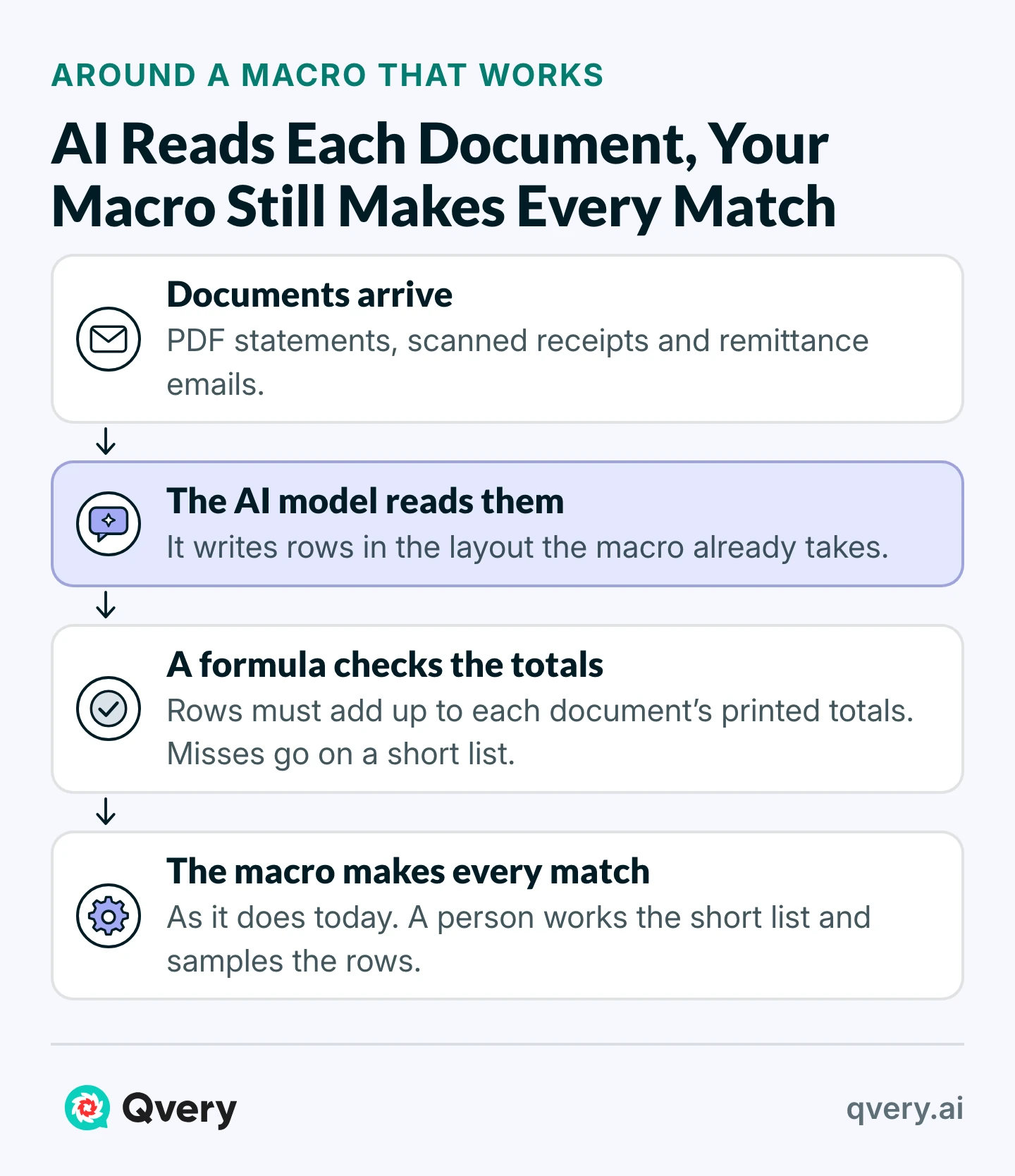
What it reads: each bank statement, remittance email or supplier file as it lands in the finance inbox or a shared folder. Nothing outside your own systems.
The rule it checks: the rows it writes must add up to the totals printed on the document. A statement's opening balance plus its transactions equals its closing balance; a remittance's lines add up to the payment. That check is arithmetic, so a formula runs it, not the model.
What it hands back: rows in exactly the layout the macro already takes, and a short list of the documents it couldn't tie out, with the reason for each.
What a person keeps: whoever runs the close works that list by hand, then runs the macro as before. The macro still makes every match.
How you count it: the minutes your team spends retyping or reshaping inputs before the macro can run, before and after, and the documents that fail the totals check.
What to set up first: one folder where the documents land, the macro's input layout written down, and last month's documents beside the rows your team typed in by hand, to test the agent against.
The totals check catches a missing or extra amount. It can't catch two errors that cancel out, or a right amount with a wrong invoice number or date.
A wrong invoice number with no open invoice behind it lands on the exception list your team already works. One that happens to fit a different open invoice is why someone samples each month's extracted rows against the documents, a far smaller review than checking every match.
That is the agent we build for finance teams, one company at a time. It runs on its own, on autopilot, every time a statement or a remittance lands, and hands your macro a clean table before anyone opens the file.
We learn how your close runs before we build it, connect the agent to the inbox, the shared folder and the accounting system you already use, and have a first working version on one input within two weeks.
Then we train whoever runs the close, and every month we count the hours of retyping it saves and the errors the totals check stops before the macro matches anything.
The Real Risk in a Macro Is That One Person Understands It
Accountants who build these automations say it themselves: one who cut a ledger task that took colleagues more than eight hours wrote that it was extremely complicated, and that nobody else could use it or fix it if something went wrong.
When that's true of a macro, the arithmetic isn't the risk. The knowledge sits in one head, and the month it breaks after that person has left, the close goes back to being done by hand.
That's the second job I'd give AI. A model is good at reading code and explaining it.
It can walk through a VBA module line by line, write down what each step does and why, build a test that compares the macro's output with last month's results, and rewrite a fragile macro as Power Query or a short script more people can maintain.
Documentation proves nothing until someone else uses it. So have a colleague who didn't write the macro run the next close from the write-up alone, and break one input on purpose to see whether they can find the fault.
Then two people can run it. Keep the file where every change is logged, which is also what an auditor will ask about.
Whatever AI rewrites, hold it to one test before it replaces anything: on last month's inputs, it has to reproduce last month's results exactly. That proves it does what the old macro did, mistakes included, so it's the minimum, not the whole test.
Writing it down is also how you find out whether a rebuild has a number behind it. A finance head at a residential builder inherited a month-end close spread across several workbooks, slow enough that he ran it quarterly.
He spent about 100 hours with AI documenting every step his team took, by his own account, and the better process it suggested cut about 75% of the time, by his estimate.
Vlad ShvetsPartner @ QveryBefore anyone rebuilds a macro, ask who else in the team can explain it. If the answer is nobody, the AI project is the write-up and the tests, not a new engine: let a model walk through the code, document every step and build the check against last month's close, then have a colleague run the next close from that write-up alone.
Documentation and the reading around the macro are two of the finance jobs we build agents for, and the finance playbook goes through the others an agent can take first.
But the AI Inside Excel Can Run the Whole Reconciliation Now
Part of that is right. The assistants built into spreadsheets now plan and carry out multi-step work inside a workbook. Microsoft describes Copilot in Excel as able to "plan, run, and verify results directly in your workbook", and says it's best for complex, multi-step tasks.
A skeptic would add that repeatability can be engineered, and the Thinking Machines result shows it can: their 1,000 answers did match in the end.
But look at how Microsoft built it. Its engineers write that "rather than hardcoding values, Agent Mode carries out all computations directly on the grid", so that users can "audit intermediate results, trace formulas, and verify correctness at every stage."
The vendor's design goal for its spreadsheet agent is to leave behind formulas a person can read. The agent writes the formulas, and the formulas do the arithmetic.
Judge any AI tool for the close by what it leaves in the file, not by what it does while you watch.
If the result is formulas, a query or a macro your team can rerun next month without the assistant, you've used AI to build the tool. If it decides the matches again every month, you're checking every run.
Engineered repeatability doesn't change that. A model that gives the same answer every month still can't show you the rule behind a match; its explanation is another output, not the rule it ran.
There's one more reason to keep the rule in the file. Microsoft's COPILOT function, a preview feature that put a model's answer straight into a cell, stopped working on September 14, 2026.
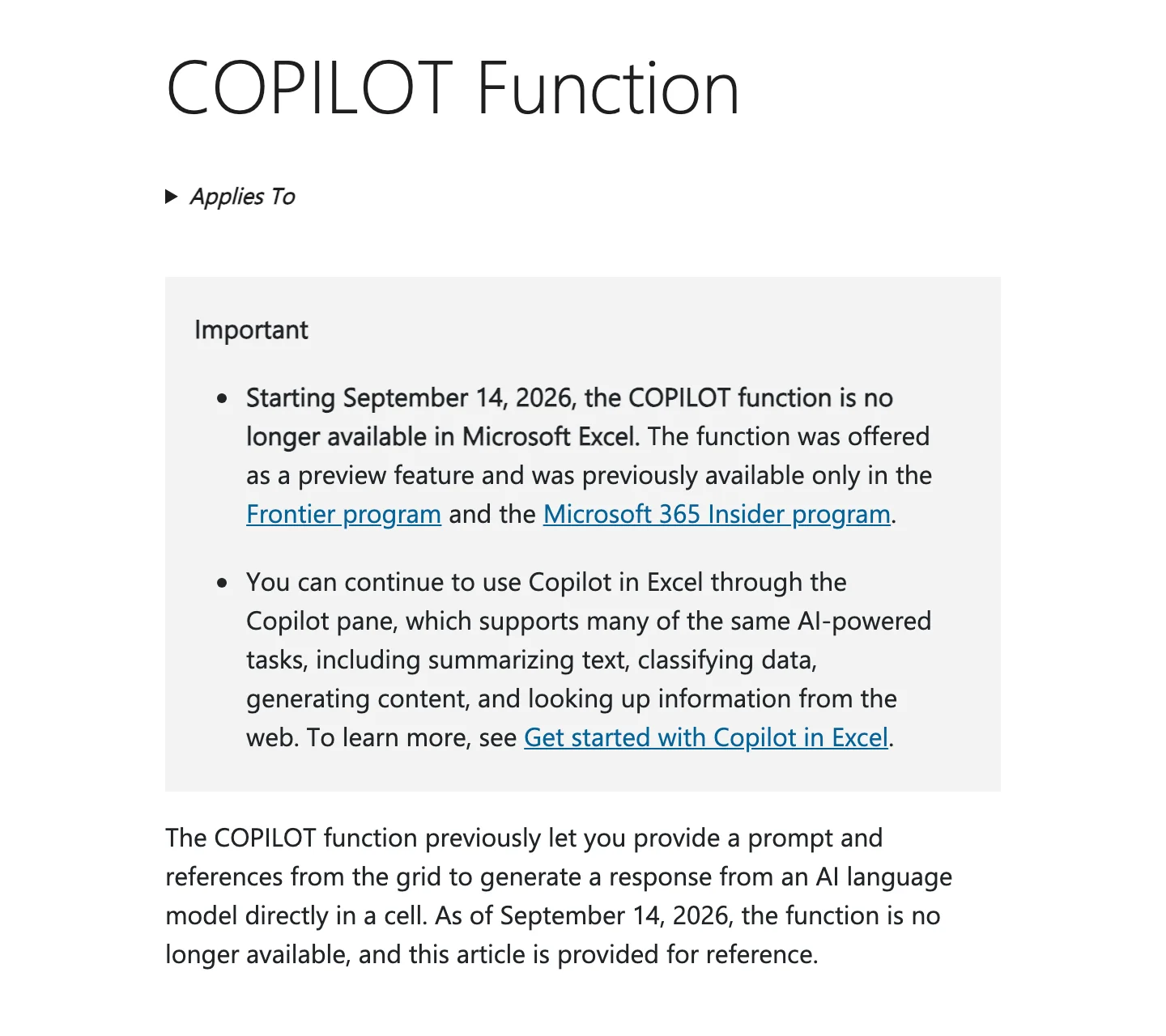
Excel and VBA are a vendor's products too. But logic the close depends on is safer in a formula in your own file than in a preview feature.
Ask Which Number the Rebuild Improves, Then Spend the AI Budget Around the Macro
When someone asks to rebuild a working automation in AI, bring three facts on one page: what the macro saves each close, what breaks it, and who can read it. The facts decide the project:
- Saves hours, runs clean: keep it, and say so with the number.
- Breaks on inputs: give AI the inputs, and let the macro keep the matching.
- One person understands it: give AI the write-up and the tests, then have someone else run it.
- Wrong, slow, or unreadable: rebuild it, as something that gives the same answer every run, with AI writing it, and put the number it improves on the page.
Put your agents where your team still reads and retypes by hand. A macro that already closes the books has earned its place.
Frequently asked questions
Should we replace our working Excel macros with AI agents?
Not the parts that already work. A macro that runs a fixed job correctly gives the same answer every month and can be tested; an AI model redoing it can answer differently on the same file and needs more checking. Use AI on the inputs the macro can't read, and to document and test it.
Are Excel macros still worth keeping?
Yes, when they run a fixed job correctly. A tested macro gives the same answer every month on the same kind of file, and anyone who reads VBA or Power Query can see how it got there; that is what keeps its review short.
Why does an AI model give different answers to the same request?
Because it predicts its answer rather than following a written rule. In one test, a large open model given the same prompt 1,000 times at temperature zero returned 80 different answers, and making them match took changes on the hardware side, not a setting a finance team controls.
How much does a working macro save?
Count it per file. A bank reconciliation that took a day and a half by hand and an hour with the macro gives back about 11 hours a run, roughly $5,300 a year at the median U.S. accountant's wage, from one file.
When is Power Query better than an AI agent?
When the input arrives in the same shape every time and the steps never change. Power Query repeats those steps exactly. An agent earns its place where the input varies and has to be read, such as PDF statements or emails. If your volume has outgrown spreadsheets, look at your accounting system's reconciliation tools first.
When should we rebuild a macro?
When it breaks every close, when nobody left can read it, or when the volume has outgrown spreadsheets. Then rebuild it as something that still gives the same answer every run, with AI helping to write it, and name the number the rebuild improves.
Can Copilot in Excel take over our macros?
For a job still done entirely by hand, it may be the fastest way to automate it. For a job a macro already runs, judge it by what it leaves in the file: formulas your team can rerun without the assistant are a tool, and answers decided again every month are a new review.
How do we check an AI reconciliation?
Don't let the AI decide the matches. Have it extract rows, check with a formula that they add up to each document's printed totals, leave the matching to a fixed rule, and sample the extracted rows each month. Before it goes live, run it on last month's inputs and compare with last month's close.
What should AI do in the month-end close?
The reading and the retyping: pulling transactions out of statements that don't arrive as clean files, reading which invoices a remittance email covers, and drafting variance notes for a person to approve. It can also document every macro the close runs on, so more than one person can maintain them.
What happens if one person built the macro?
The knowledge sits in one head, and the close goes back to manual the month it breaks after they leave. Have AI document the macro and build a test against last month's close, then have a colleague run the next close from the write-up alone.
What do we tell leadership when it wants AI on a process we already automated?
Ask which number the change improves, and bring three facts: what the automation saves each close, what breaks it, and who can read it. If the answer is a file the macro can't read or a macro one person understands, that's where AI goes. If nobody can name a number, the automation stays.
What does Qvery build around a close macro?
An agent that reads the statements, remittances and supplier files the macro cannot, checks the rows against each document's printed totals, and hands the macro a clean table. We measure it in hours of retyping saved and errors stopped before the match.