By
Vlad Shvets
Qvery Webinar #5: Using Qvery Assistant
Hey, Vlad here. In our fifth Qvery webinar, we're switching gears from strategy to product. The first four webinars covered the why and the how of AI engine visibility. This one is about the what — specifically, what Qvery Assistant is and how to use it to turn your raw citation data into actual decisions.
If you missed the foundational episodes: webinar one covered the three pillars of AI engine visibility, webinar two went deep on optimizing your own website, webinar three tackled third-party mentions, and webinar four covered UGC and Reddit.
This episode assumes you've watched at least one of those. If you haven't, the world will not end, but the product walk-through will make a lot more sense if you have.
Three Levels Of Questions
When we designed Qvery Assistant, we sorted the questions a marketer might ask into three buckets. This framing matters because it determines which Qvery feature you reach for.
Level 1: basic. Stuff you can figure out by glancing at the dashboard. "What's my visibility score this week?" "Who's the number one competitor in my industry ranking?" Easy. The dashboard already tells you.
Level 2: painful but possible. You can technically answer these as a human, but it requires clicking through three modules, comparing six numbers, and probably taking notes. Most marketing tools live in this zone — which is why most marketers feel like they have full-time relationships with their dashboards.
Level 3: basically impossible without AI. Things like: "Of the competitors whose visibility is growing this month, which topics are driving that growth, and which citations sit underneath those topics?" To answer that manually you need perfect cross-module recall, and you need to compare hundreds of data points without losing track. Humans can't do it. AI can, in seconds.
Qvery Assistant is built to handle all three. The two features that do most of the heavy lifting are Shortcuts and Templates.
Shortcuts: One-Click Answers
Shortcuts are the fastest way to get an answer out of your Qvery data. Type a forward slash "/" inside the Assistant chat, scroll the menu, pick the question. Behind the scenes, Qvery knows exactly which data to pull and how to format the answer.
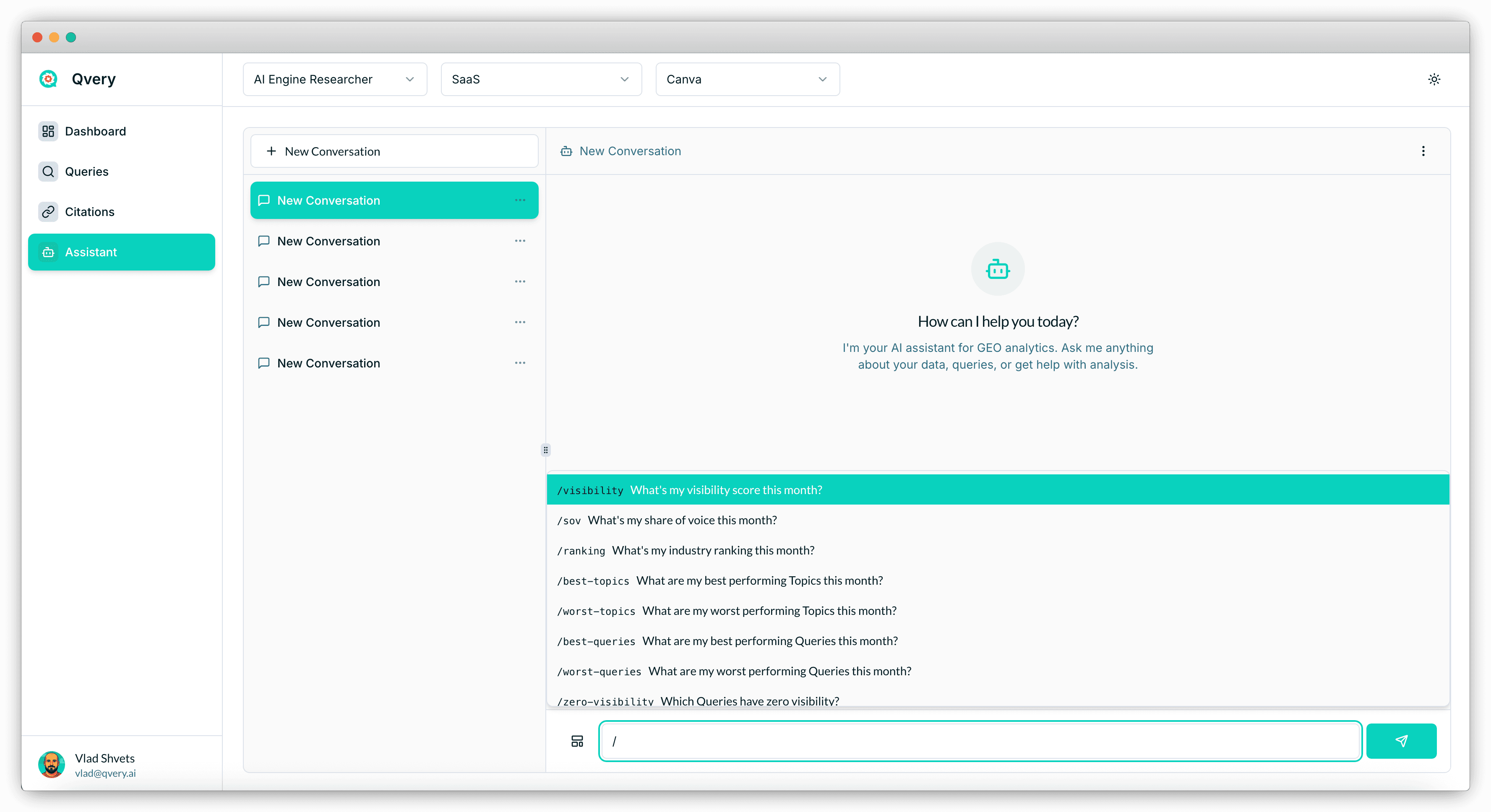
Concrete example from the webinar: "How do I compare versus my top competitor this month?". In the manual world, you'd open the Dashboard, eyeball your visibility score, find your top competitor, then dig into their queries and citations to see why they're ahead.
Or you click the Shortcut, and Qvery Assistant returns a structured comparison in two seconds — quantitative metrics, key insights, sentiment, and a top-level read of the competitive position.
Shortcuts are designed for level one and the easier end of level two. They're a single question, well answered. And because the answer comes back inside the Qvery Assistant chat, you can immediately follow up — "now show me which citations are driving that gap" — and drift naturally into deeper analysis.
Templates: Full Analytical Workflows
Templates are the heavier weapon. Where a Shortcut is one question, a Template is an entire workflow — multiple agents, multiple data passes, sometimes external scraping, all stitched into one report. We currently group Templates into four categories: content marketing, GEO, market research, and reporting. We ship new ones every week.
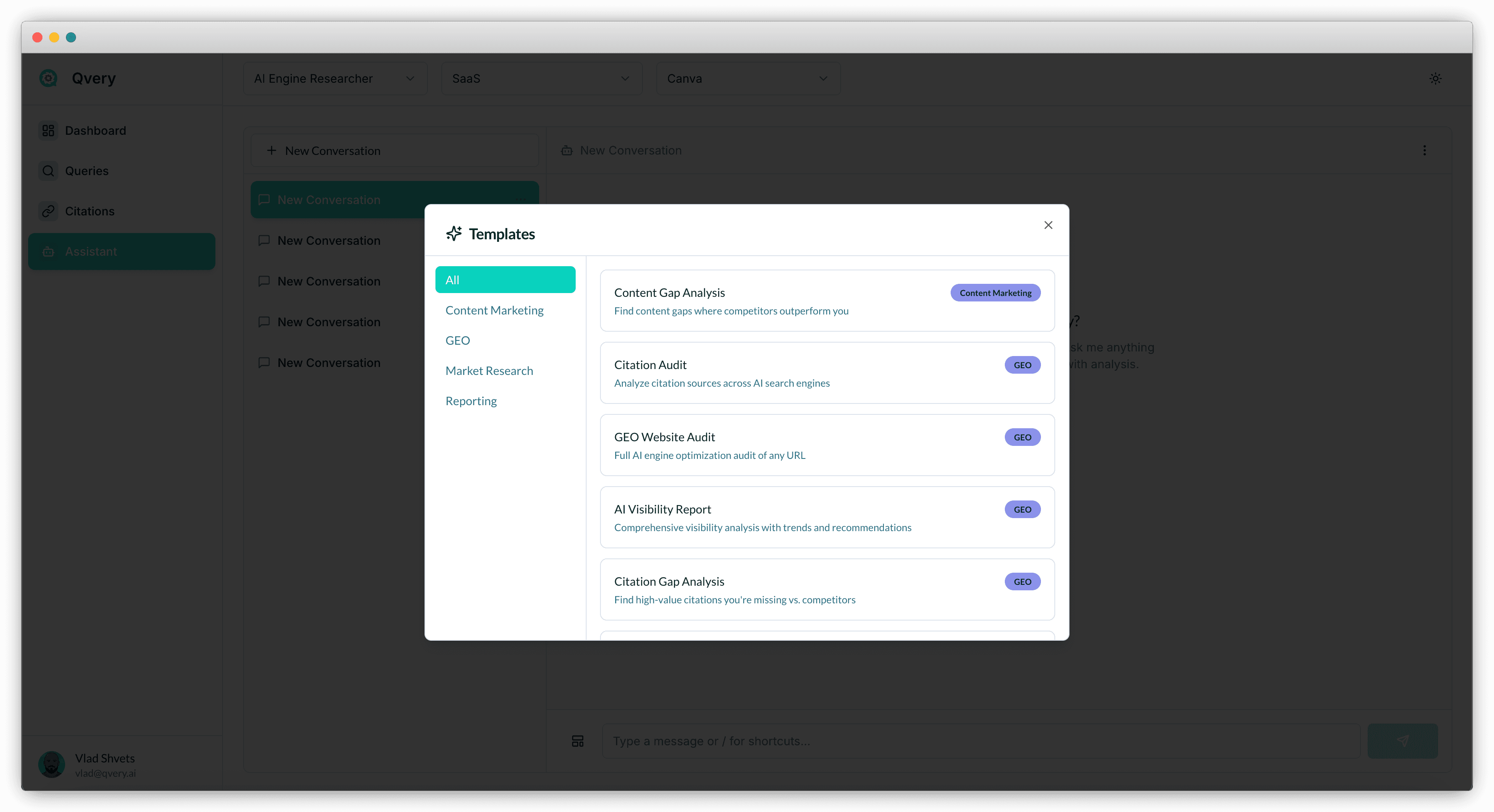
Two worth calling out:
Citation Gap Analysis
Cross-references the citation footprint of your brand against your top competitors, identifies the domains where they're being mentioned and you're not, and outputs a prioritized list.
Click the template, choose your defaults or specify competitors, and get an executive summary, a citation profile breakdown, a gap table by query, and a citation weight comparison. To do this manually you'd spend half a day in spreadsheets. The Template runs in under a minute.
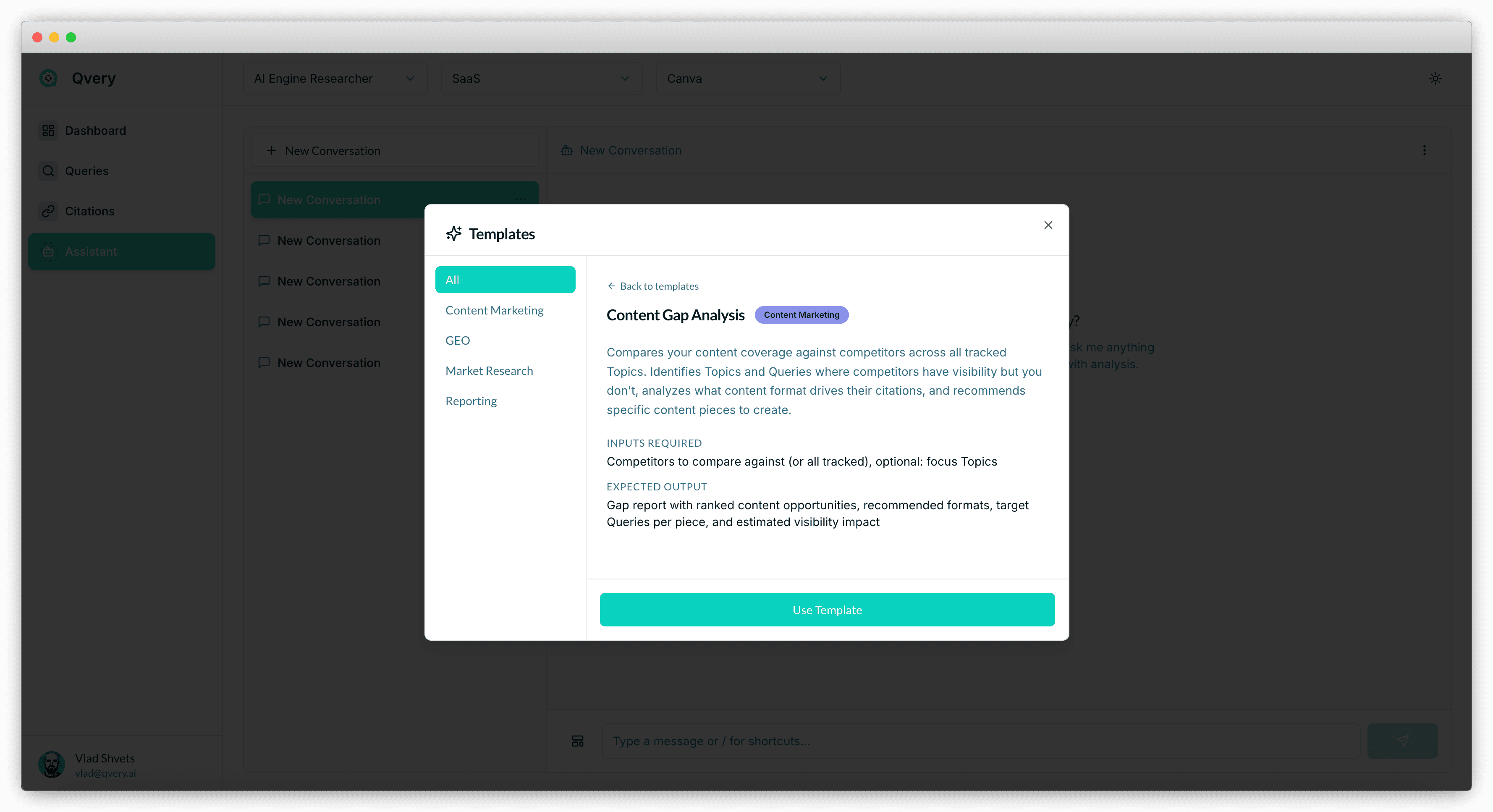
GEO Website Audit
This one goes outside Qvery. The agent crawls your actual website (we used canva.com in the webinar) and grades you across page-level metrics, schema markup, sitemap completeness, robots.txt, llms.txt, and the small structural things that determine whether AI engines can actually parse your content.
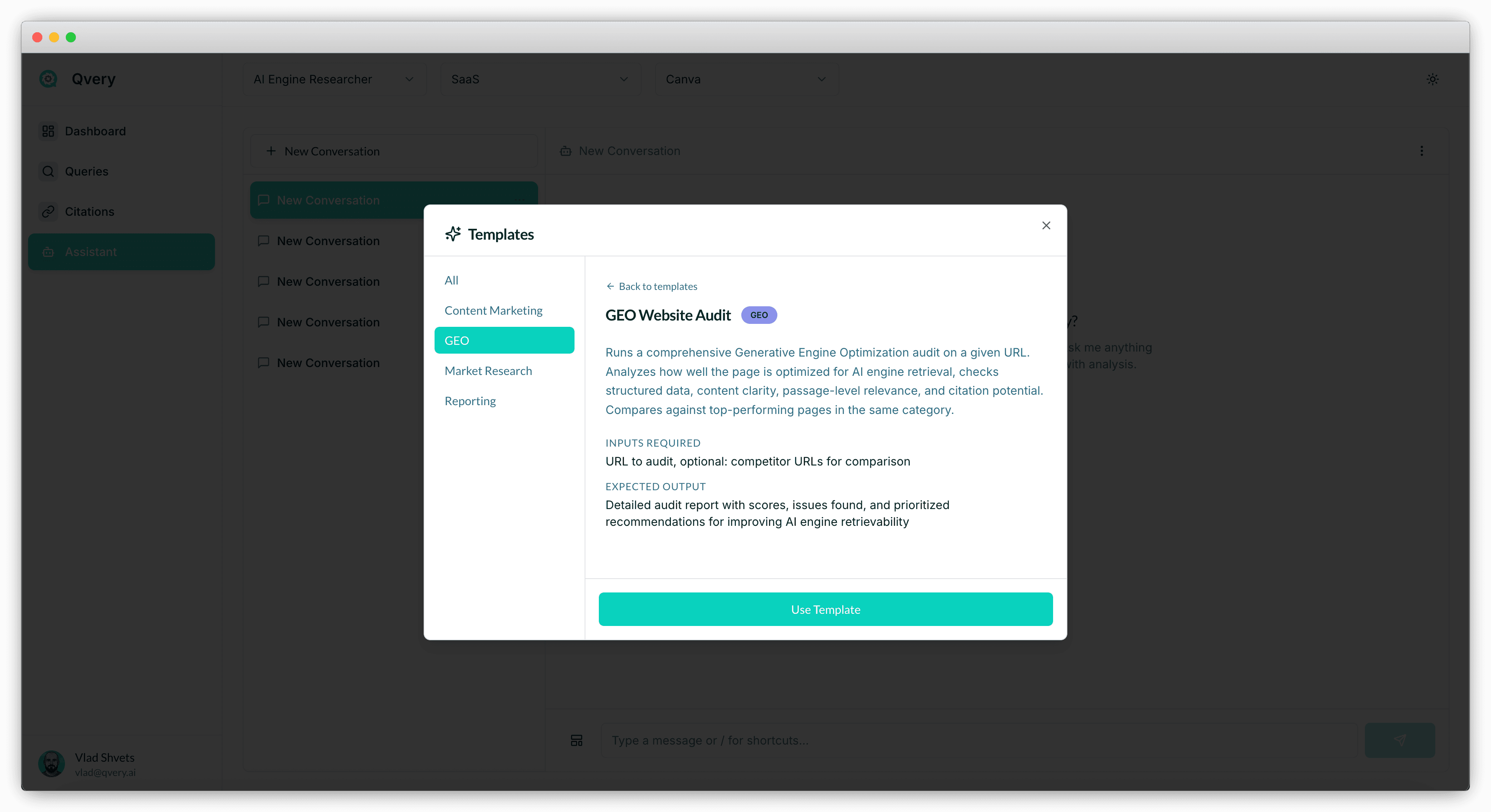
Templates are the right tool for level two and level three questions — the ones where a single answer isn't enough and you need a structured analytical pass.
From Data To Decisions
The reason we built Qvery Assistant is simple: dashboards don't change behavior. Decisions do.
Most analytics tools dump numbers on you and call it a day. That era is winding down. In the agentic web, data is cheap and decisions are expensive. The marketers who win are the ones who can take a citation gap, decide which five domains to target, draft an outreach plan, and ship, without spending a week in a spreadsheet first.
Tools track. Agents work. Qvery Assistant is where Qvery stops being a tool and starts being an agent that runs the workflow with you. Every Qvery plan includes unlimited seats, so you can pull your whole team into the same Assistant chat and run analyses together.
What We're Building At Qvery
The Assistant you see today is the foundation. The roadmap from here:
Mention Builder: turns citation gaps into outreach campaigns that actually land mentions on the right websites.
UGC Agent: finds the Reddit threads, niche forums, and TripAdvisor pages where your brand belongs, and drafts responses.
Content Optimizer: passage-level gap detection, telling you exactly which sentences to rewrite for AI retrievability.
Multi-agent orchestration inside Assistant: chain Templates together, ask follow-ups across them, and run full GTM workflows from one chat window.
The vision is one command center. Marketing and GTM teams shouldn't bounce between eight tools to do their jobs. Strategy lives in Qvery Assistant. Execution flows from it.
The Bottom Line
Qvery Assistant is the command center inside Qvery. It has access to every data point in your account and can search the web for context that numbers alone won't surface.
Three levels of questions. Level one you could answer from the dashboard. Level two takes manual effort. Level three is impossible without AI, and that's where Qvery Assistant earns its keep.
Shortcuts handle one-shot questions. Type a slash, pick the question, get a structured answer in seconds.
Templates run full workflows. Citation Gap Analysis, GEO Website Audit, and the rest are multi-agent pipelines that compress half-day analyses into one minute.
If you've got questions or want to compare notes on how you're using Qvery Assistant, email me at vlad@qvery.ai. See you on the next one!