By
Vlad Shvets
Qvery Webinar #8: How To Run A GEO Website Audit
In our eighth Qvery webinar, we ran a live GEO audit on Webflow's main page and walked through what AI search engines actually care about when they crawl your website.
Spoiler: it is not a hundred-item checklist. It is four specific things, and most companies are already 80 percent there without realizing it (which is great news, right up until you realize the remaining 20 percent is what is keeping them off ChatGPT's recommendation list entirely).
A real audit is short. You want to know whether an AI agent crawling your page can: parse your content, understand its hierarchy, get permission to look at it in the first place, and find the parts of your site that matter most. Webflow's main page scored 72 out of 100 in our demo — a solid B-minus, with one critical gap. We'll walk through the four fixes the audit actually checks for, and what to do about each one.
This post sits directly downstream of webinar two, where we covered the broader pillar of optimizing your own website. If that one was the strategy, this one is the wrench — the practical audit you run on a Tuesday to find what is broken.
The Four Fixes That Actually Matter
Qvery's GEO Website Audit is a template that lives inside Qvery Assistant.
You paste a URL, the agent crawls your site, and a few seconds later you get a structured report scored against the things AI search engines look for. It is not a clone of a traditional SEO audit. It does not care about your Core Web Vitals score or your meta keyword tags (no one cares about your meta keyword tags). It cares about whether an AI agent can actually parse, retrieve, and cite your pages.
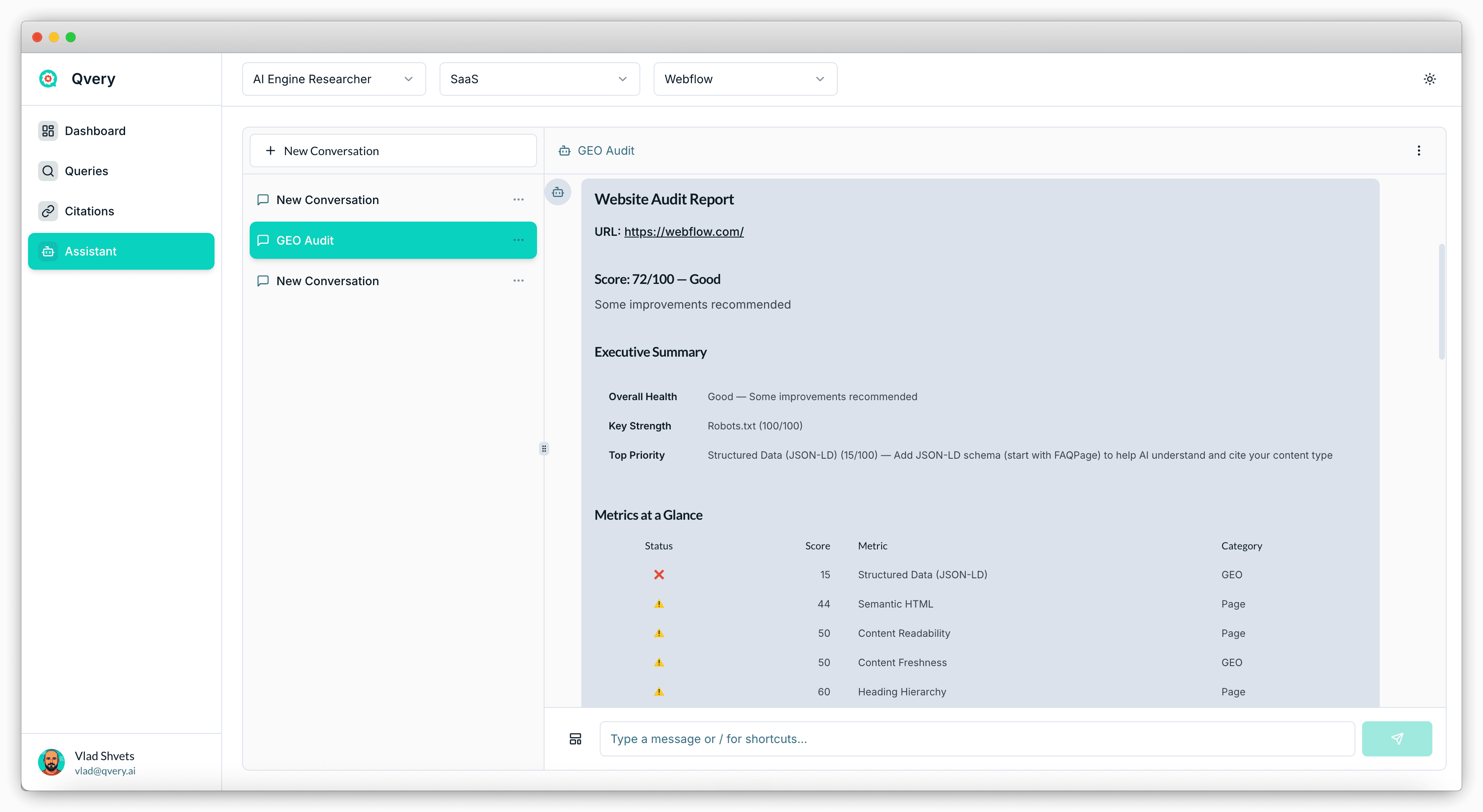
The report sorts into two categories: GEO metrics (the AI-search-specific stuff) and Page metrics (the traditional structural stuff that still matters because AI agents are still browsers, technically).
Across both, four fixes do most of the work:
Structured data — specifically FAQ schema
Semantic HTML and heading hierarchy
Robots.txt — the permissions layer
The llms.txt file — the AI-specific sitemap
Get these four right and your AI engine visibility ceiling rises sharply. Skip any one of them and you are throwing visibility away. Which, given how much time we spend optimizing everything else, would be a particularly stupid way to lose. Webflow nails one, partially hits two, and misses one entirely — which is roughly the distribution every real-world audit lands on.
Fix 1: Structured Data Without The Drama
Structured data is a JSON-LD snippet you drop into the head of your page that tells search engines, in machine-readable form, exactly what is on the page.
The most important type for AI engine visibility is FAQPage schema: a structured list of questions and answers, machine-parseable, served from the page head.
Why it matters: AI agents constantly trade off between depth of crawl and cost. When they can pull a structured FAQ from your page head in one parse, they treat your page as cheap to ingest and high in information density. Both signals push your page up the priority list for citation. Pages without structured data take longer to crawl, more tokens to summarize, and tend to lose out to pages that did the work.
FAQPage schema has a 5,000-character limit, which is plenty of room to cover the questions your readers actually ask. Add it once to your main page, add a smaller version to each product page, and you are done. Webflow's main page scored a 15 out of 100 on this metric — they have organization schema and review snippets, but no FAQ schema. That is the single biggest fix on their list.
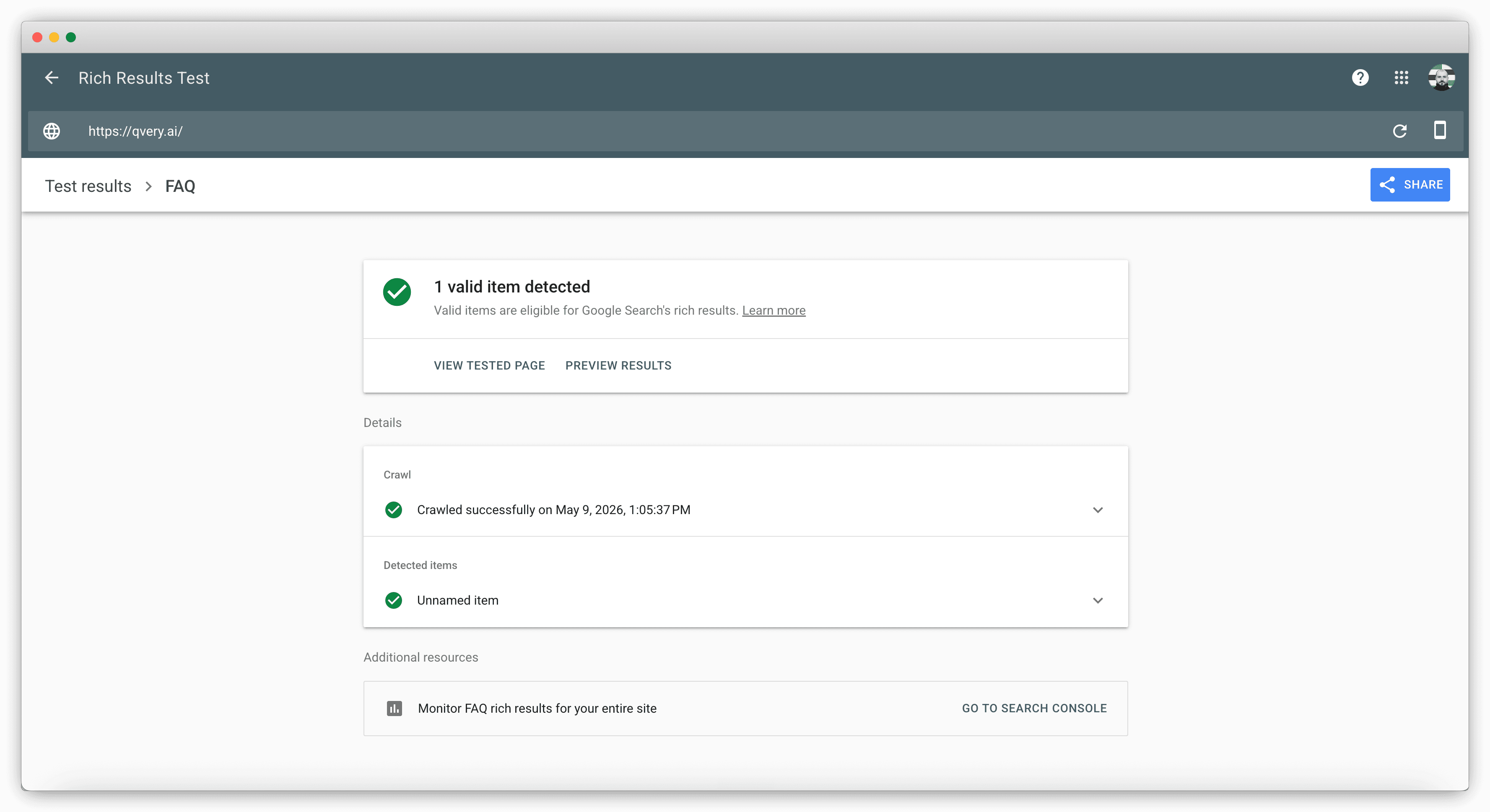
You can verify any page's structured data using Google's Rich Results Test (it is free, it is fast, and it tells you exactly which schema types are detected). Run your main page through it, see what comes back, and add what is missing.
Fix 2: Semantic HTML And Heading Hierarchy
Semantic HTML is the boring fix and the one most sites get wrong.
AI agents parse your page by reading HTML elements and inferring structure: an article tag means this is a piece of content, an H1 tag means this is the page's primary heading, a nav tag means this section is navigation rather than content. If your page is built entirely from div tags styled to look like headings, the AI cannot infer any structure at all. It reads a flat soup of text and has to guess what is important.
Webflow's main page scored 44 out of 100 on this metric. The most common gotcha: no H1 tag at all. Modern marketing pages often replace the H1 with a styled div or a logo image, which looks great visually and makes AI parsing significantly harder. The fix is mechanical: every page gets exactly one H1, the H1 contains the page's primary topic, and subheadings step down sequentially through H2, H3, H4. Skipping a level (H1 directly to H3) is treated as a structural break and degrades the AI's read of your hierarchy.
The audit also flags content readability and heading hierarchy as separate scores. Both are softer signals — opinionated, even — but worth checking on landing pages and product pages where the structure is fully under your control.
Fix 3: Robots.txt: Don't Accidentally Block ChatGPT
Robots.txt is the permissions file every website serves at /robots.txt. It is the AI agents' first stop on your site.
If your robots.txt blocks them, they leave. They cannot crawl your content, they cannot cite your pages, they cannot include you in any recommendation — no matter how good your schema is.
The worst-case scenario is the one where your robots.txt explicitly forbids ChatGPT's crawler (GPTBot), or blocks all bots wholesale because someone left a placeholder rule in there during a redesign. This is more common than it should be. CMS migrations sometimes ship with overly strict defaults, and a single line of developer caution turns into accidental invisibility.
Webflow scored 100 out of 100 here, which is the right outcome. The fix is binary: open your robots.txt, confirm it does not block GPTBot, Google-Extended, PerplexityBot, or any other AI crawler you care about, and confirm it points to your sitemap. If you find a "Disallow: /" rule in there, panic appropriately and remove it.
There is no clever tooling required for this one. It is the lowest-effort, highest-impact fix on the list, which is also why it is the easiest one to forget about.
Fix 4: The llms.txt File
The llms.txt file is the newest of the four fixes, and it lives at /llms.txt on your domain. It is a plain-text map of your most important pages, formatted for AI agents: section headers, page titles, short descriptions, and URLs. Think of it as a sitemap.xml that was rewritten for LLMs instead of search crawlers.
The honest disclosure: neither Google nor OpenAI has explicitly confirmed that their AI systems read llms.txt. The industry has not settled on whether it actually moves the needle. We have seen mixed studies.
The current consensus at Qvery is: it cannot hurt and might help. The cost is fifteen minutes of writing. The downside risk is zero. Add it.
If your website runs on Webflow, the CMS now ships native support for llms.txt — paste your content into the platform settings and it serves it correctly. For every other CMS, you write it as a plain text file and serve it from the root of your domain.
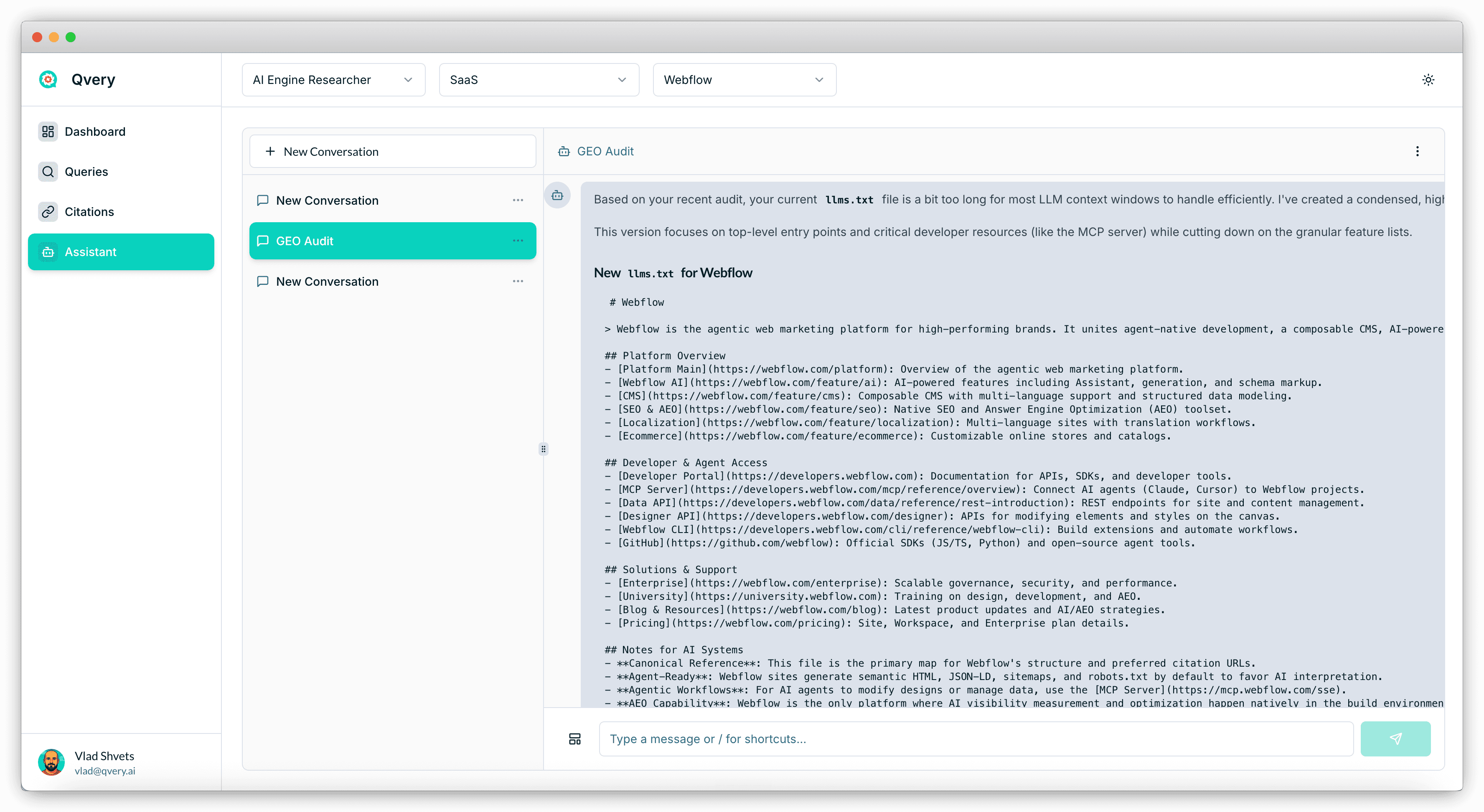
Qvery Assistant can write the file for you. Ask it directly inside any chat: "Generate a fresh llms.txt for [your domain]." It uses the site data it already has on your brand and outputs a structured file you can ship today. Re-generate it every quarter as your site evolves.
The Bottom Line
The four fixes are the whole game. Structured data, semantic HTML, robots.txt, and llms.txt. Get these right and you sit in the top 10 percent of sites for AI engine retrievability.
FAQ schema is the highest-leverage fix. A 5,000-character JSON-LD snippet in your page head makes your content cheaper to crawl and denser in information — both signals push you up the citation priority list.
Check your robots.txt today. The cost of accidentally blocking AI bots is total invisibility. It takes five minutes to verify and is the lowest-effort, highest-impact item on the list.
llms.txt is debated but worth shipping. Industry consensus has not landed, but the cost is fifteen minutes and the upside is non-zero. Add it, regenerate it quarterly.
If you found this useful, check out the other webinars at qvery.ai/webinars. And if you ran the GEO audit on your own site and want a second pair of eyes on the results, email me at vlad@qvery.ai.
See you on the next one.