By
Vlad Shvets
Qvery Beta Is Here: Qvery Assistant, Self-Service, And Conversational Onboarding
Qvery Beta is live. Self-service signup, conversational onboarding, the Qvery Assistant command center, shortcuts, templates, and unlimited seats on every plan.
Qvery Beta is live. Self-service signup, conversational onboarding, the Qvery Assistant command center, shortcuts, templates, and unlimited seats on every plan.
Qvery Beta is live. Self-service signup, conversational onboarding, the Qvery Assistant command center, shortcuts, templates, and unlimited seats on every plan.
Qvery Beta is here. Anyone can sign up, set up a project in a few minutes, and start measuring their brand's visibility on ChatGPT and Google AI Mode without booking a single call.
Self-service checkout, automated onboarding, the Qvery Assistant, shortcuts, templates, and unlimited seats on every plan. The whole package is live as of last week.
Quick recap. We launched Qvery Alpha at SaaStock Dublin in October last year. The five months since have been heads-down building, talking to customers, and prompting.
Five months later, here we are. Let me walk you through what shipped.
Self-Service: Sign Up Without A Sales Call
We love talking to our customers. Genuinely. Some of the best calls Piotr and I have every month are with the people using Qvery, and we'll continue doing that.
But here's the thing: most of you don't want to book a call before you can try a product. You want to sign up, poke at it, see if it's any good, and only talk to a human if something breaks or you have an actual question.
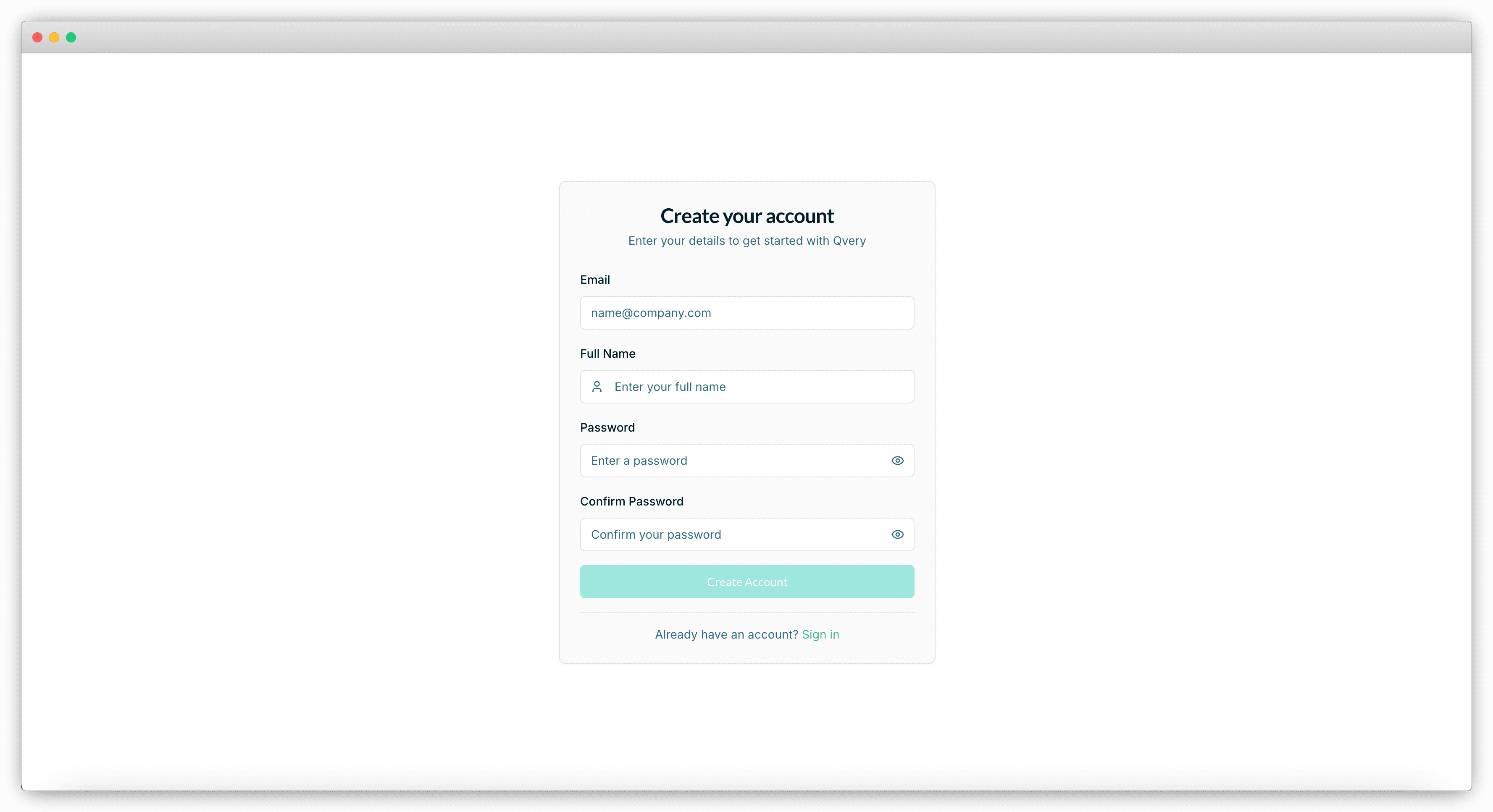
That's exactly how Qvery now works. Go to our website, sign up, run your project through the onboarding, and start measuring your AI engine visibility, all without ever talking to anyone on our team. Every paid plan comes with a free trial, so you can see real data on your own brand before paying for anything.
And if you ever do want to talk to us, the Intercom widget is right there in the bottom corner of the app and the website. Drop us a message and we'll get back to you fast. We still love talking. We just don't want to make you sit through it before you can try the product.
Onboarding: Just A Few Questions
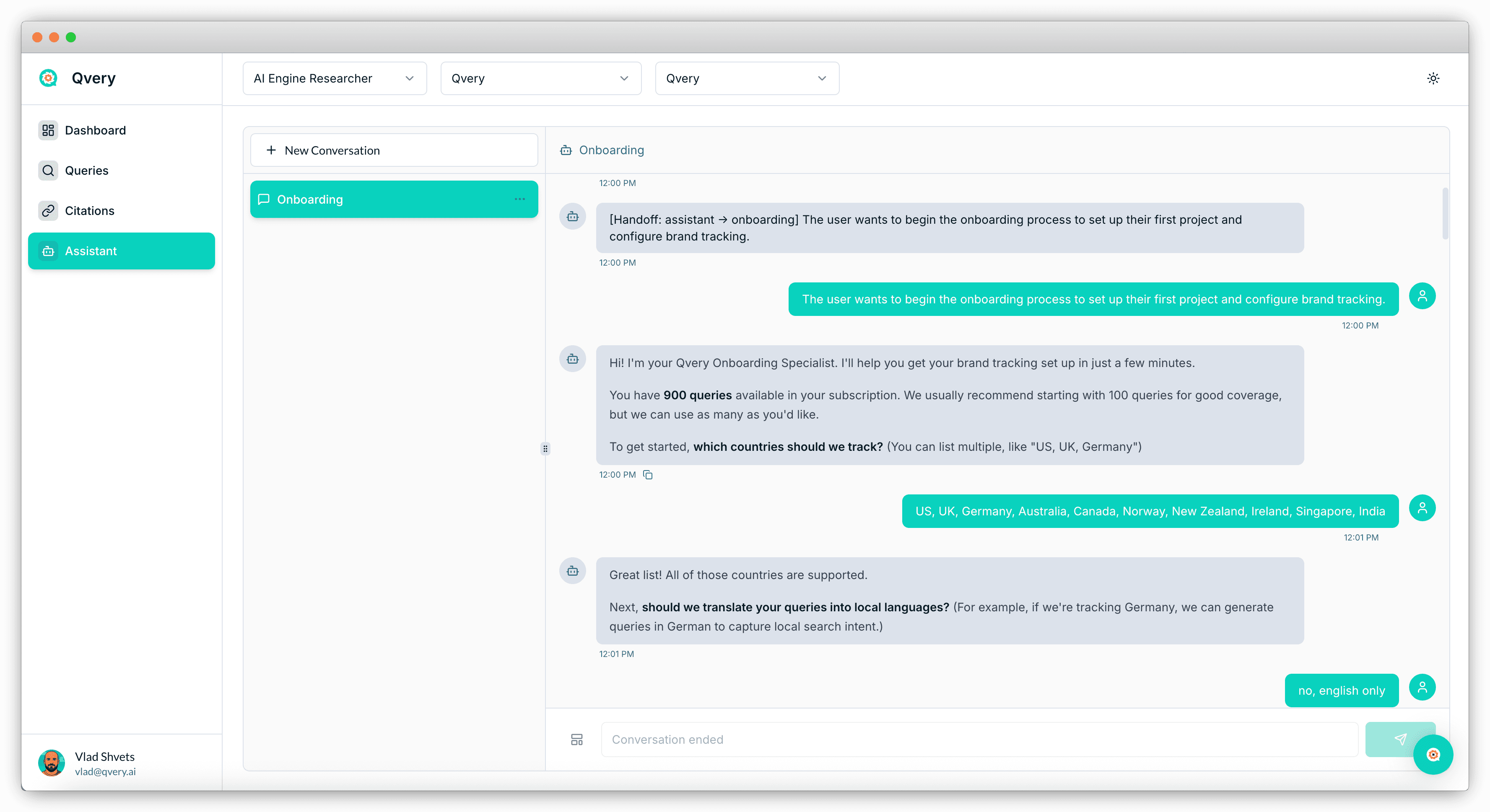
The new onboarding lives entirely inside the Qvery Assistant. Once you sign up, you land in the chat, and the Assistant asks you a few simple questions:
How many queries do you want to track?
Which countries do you want to track them in?
Do you want to localize the queries for each country?
That's the entire user input. Roughly two minutes of typing. Then the Assistant goes to work: it crawls your website, reads what your brand does, and produces a Brand Research Artifact.
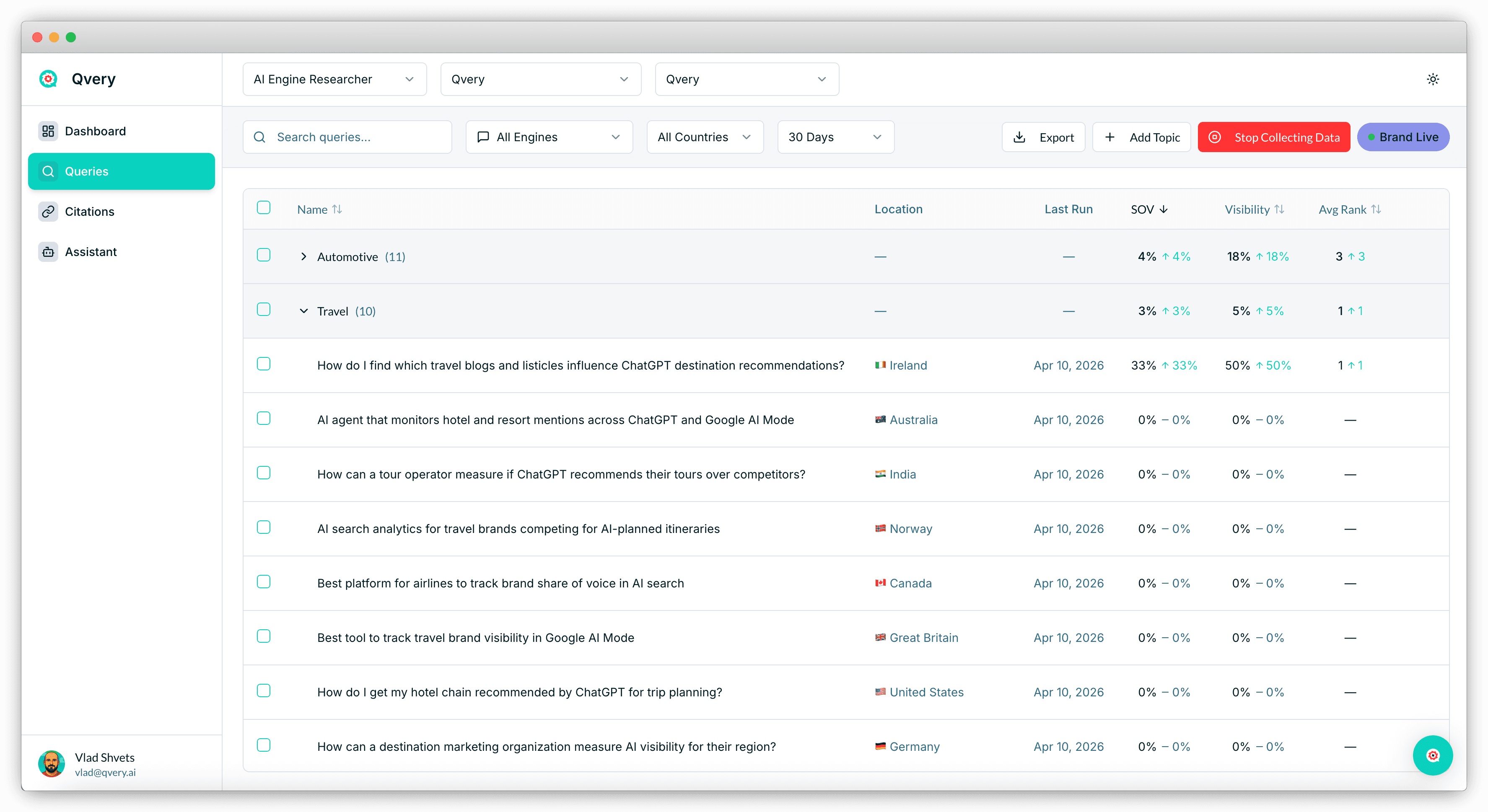
The artifact is a structured summary of your business, your category, your audience, your positioning, and your competitors. It becomes the foundation for everything Qvery does next.
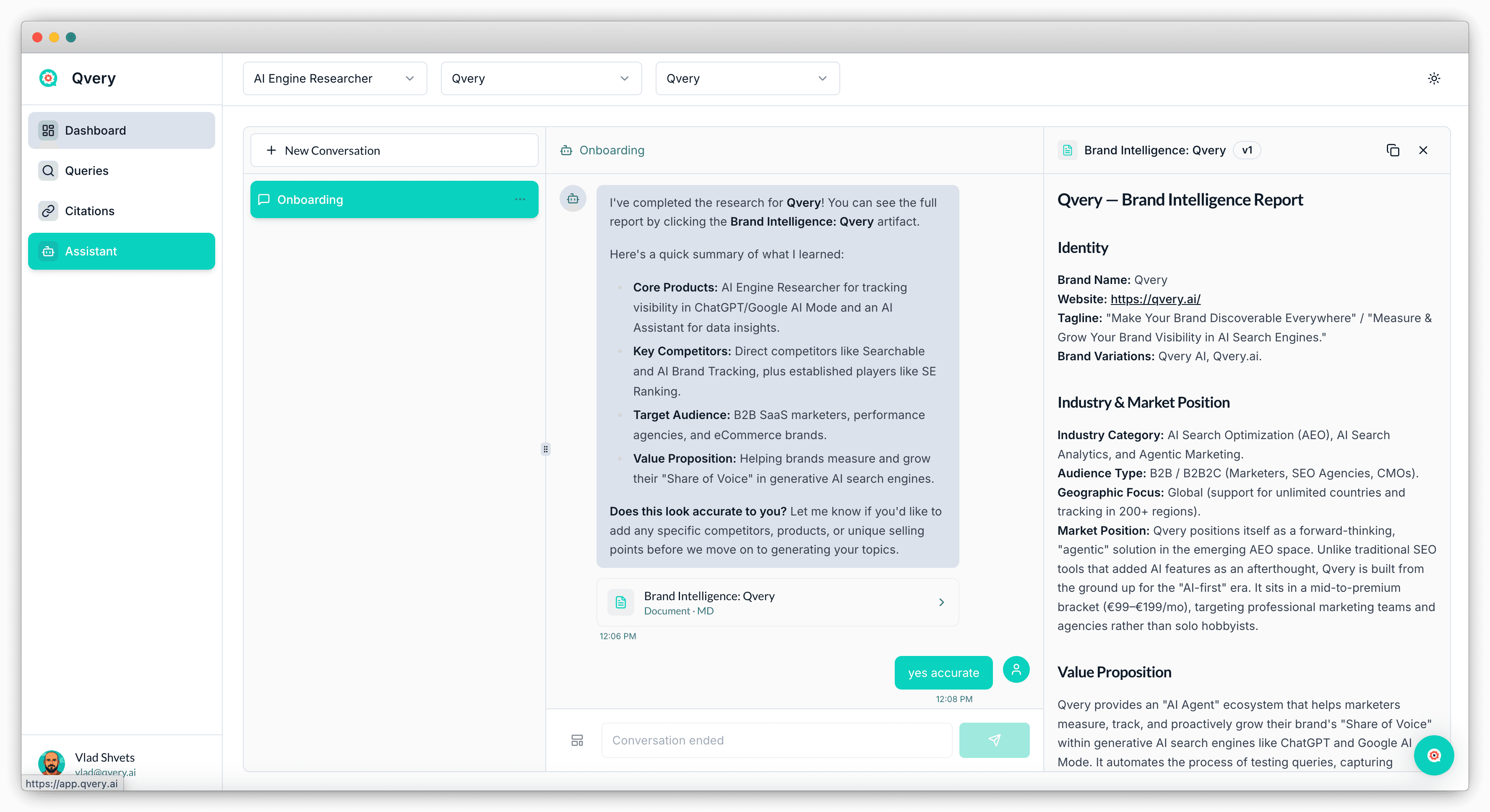
From that artifact, the Assistant suggests an initial set of Topics. You review them right inside the chat. Once the topics look right, the Assistant generates a unique batch of Queries under each one, written to match the way your real customers search in AI engines.
The whole loop from sign-up to starting to collect real AI visibility data runs in about five to ten minutes.
The thing worth emphasizing is what's not in that flow. There's no spreadsheets to upload, no manual query writing, and no "talk to your CS manager to configure tracking." We built our AI Qvery Assistant to do that work, because that's what marketers want.
Artifacts: Reusable Building Blocks Inside Your Project
The Brand Research Artifact is the first artifact you'll see in Qvery. It will not be the last.
Qvery Artifacts are reusable structured documents that live inside your project.
More artifact types are landing over the next few months: competitor profiles, content audits, citation maps, ICP definitions. Every one of these artifacts becomes a building block the Qvery agents can pull from without re-deriving it from scratch (the whole point of building agents instead of dashboards is so the work compounds).
Qvery Assistant Is Now Live On Every Project
Qvery Assistant is your command center. It's a conversational interface with full access to every piece of data in your account: visibility scores, share of voice, topics, queries, citations, competitors, trend lines. You can ask it anything that touches that data and get an answer in plain English (or any language).
Things like:
What's my visibility this month, and how does it compare to last month?
Which topics are my competitors beating me on right now?
Show me every Reddit thread that's citing my category but doesn't mention my brand.
Why did my visibility drop last Tuesday?
Answers come back in seconds, with the actual numbers from your account. No filter menus to click through. No CSV exports. No dashboard to babysit.
This is the moment Qvery becomes a system that works for you instead of a tool you have to operate.
Shortcuts: Slash Commands For The Questions You Ask Every Week
Most marketers ask Qvery the same handful of questions every Monday. Where did I gain visibility? Where did I lose? Who's catching up to me? What new citations showed up? What's my share of voice on ChatGPT versus Google AI Mode?
Typing those out every week is fine. Typing them faster is better.
Shortcuts are slash commands inside the Qvery Assistant.
Type a forward slash in the chat input, an autocomplete dropdown appears, pick a command, and the answer drops in instantly. We're shipping a few dozen at launch, including /visibility, /losing, /gaining, /top-sources, /competitor-pages, and /quick-wins.
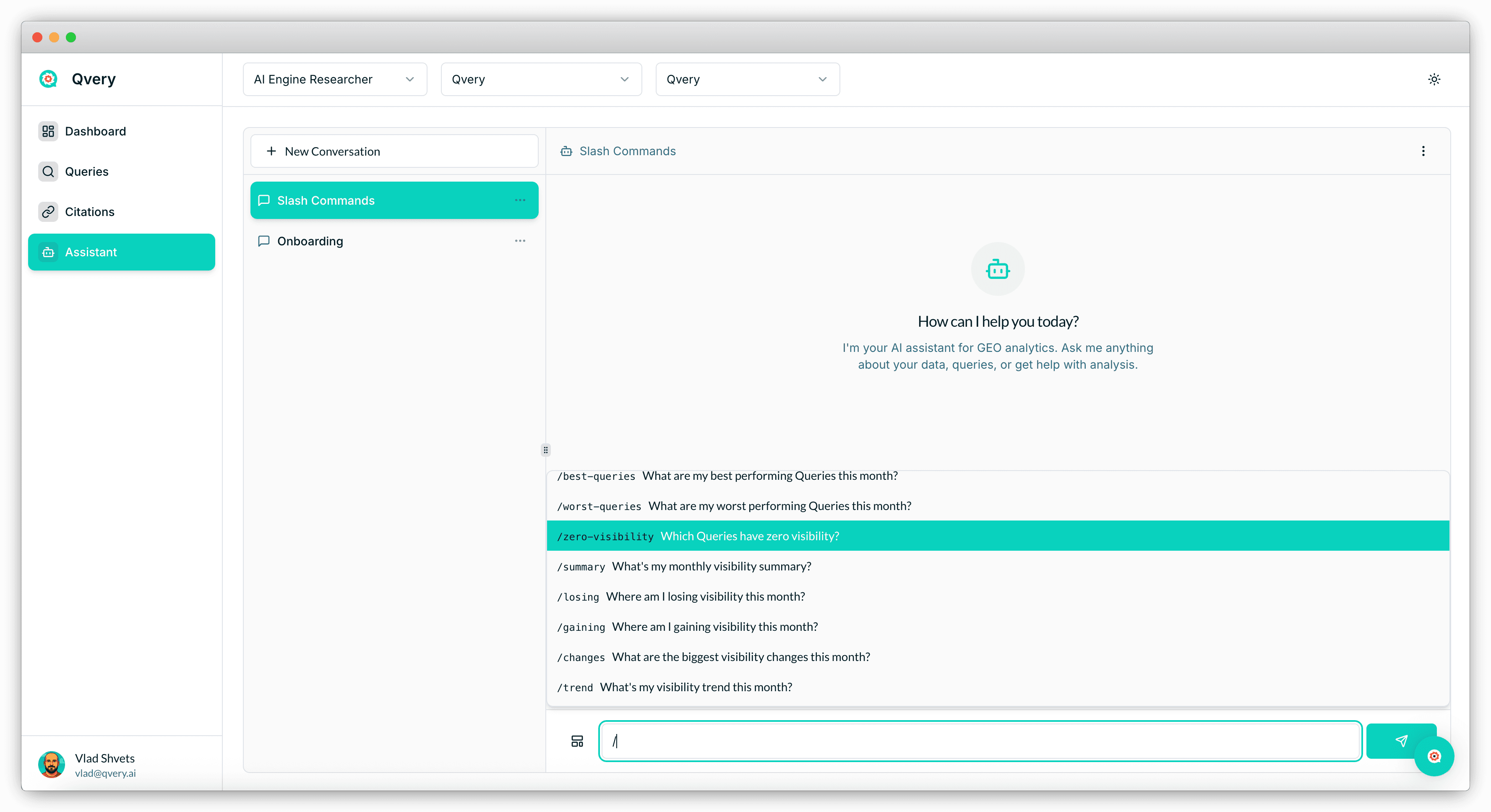
The full list will grow with the product. The rule of thumb is simple: if a question takes one sentence to ask and one answer to resolve, it's a shortcut. If it needs multiple inputs and multi-step work, it's the next thing on this list.
Templates: Full Workflows You Trigger With A Click
Templates are where Qvery Assistant earns the word "Agent".
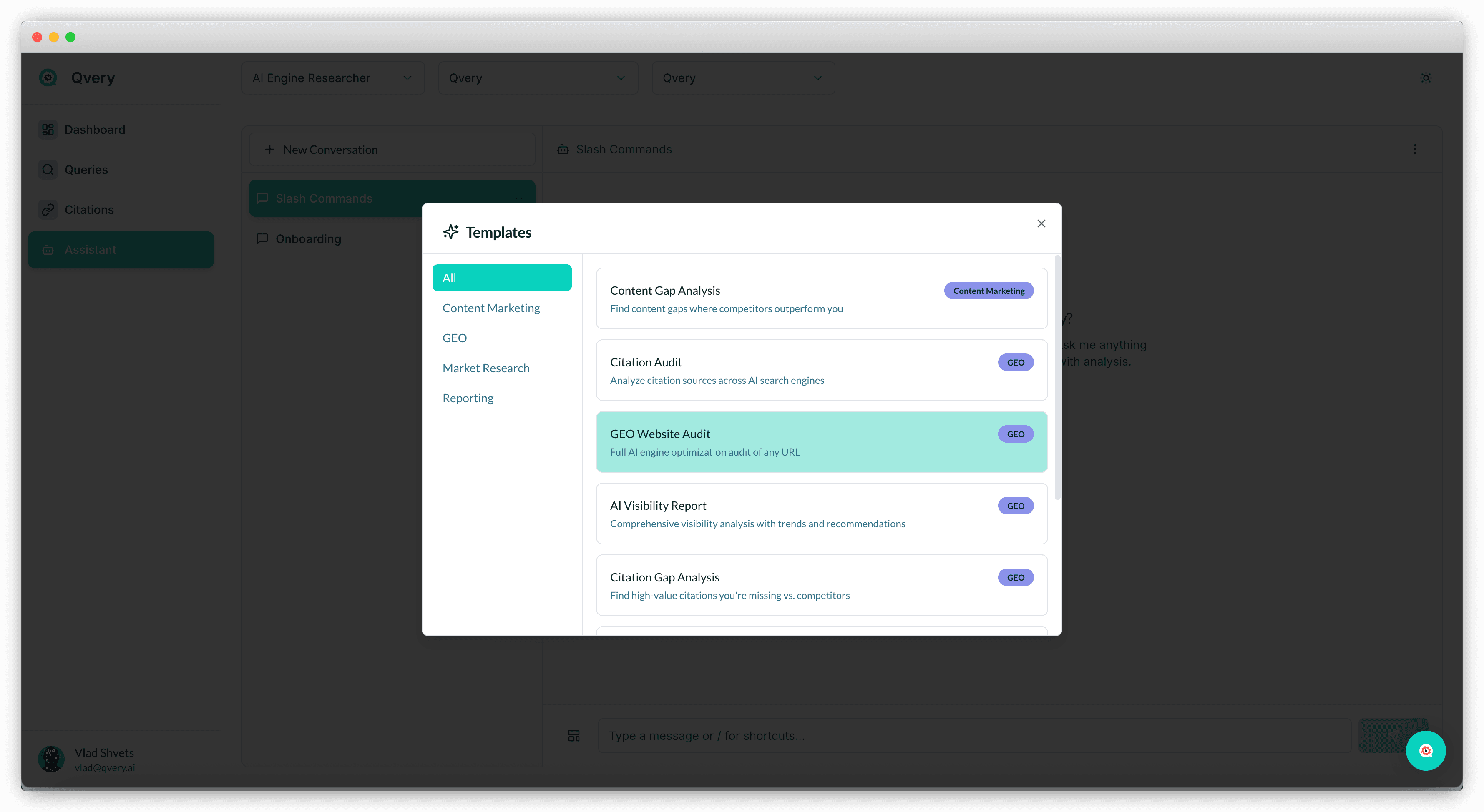
Each template is a multi-step workflow built into the system: complex prompts, deterministic logic, multiple data sources, and a structured deliverable at the end. You click "Use Template", and the Assistant runs the whole thing end-to-end while you go make coffee.
For example, one of our first templates is GEO Website Audit. It analyzes how well your website is set up for AI engine retrieval, checks the structured data, the semantic HTML, the content freshness, the llms.txt file, and the citation potential. Then it returns a scored report with prioritized recommendations and the exact things to fix first. What used to take a senior consultant two hours (or days?) runs in five minutes.
The full template library will land over the next few months across seven categories:
GEO
SEO
Content Marketing
Mention Building
UGC
Market Research
Reporting
Unlimited Seats, Unlimited Guests, Agency-Friendly By Default
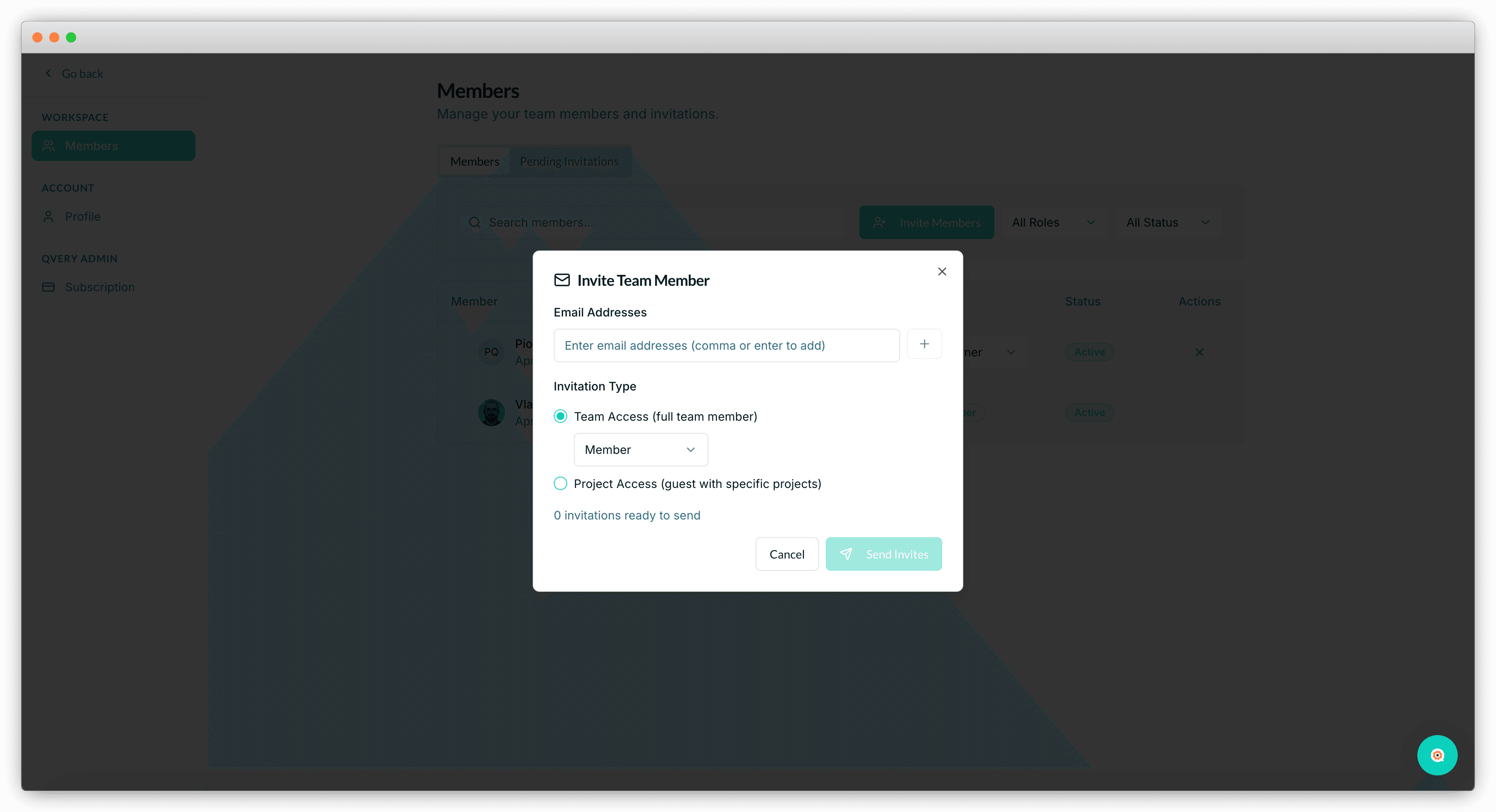
Every Qvery plan comes with unlimited seats and unlimited guests.
We built Qvery for easy team collaboration. Bring in your whole GTM team. Invite the freelancer who runs your content. Add your CEO so they can check the numbers themselves.
If you're an agency, the same logic applies at the project level. You can manage multiple brand projects under one account and invite each client in as a guest, either as an editor who can change topics and queries, or as a viewer who can see the data without touching it. No per-seat pricing games. No "talk to sales for team access" gates. It just works.
What's Next
April is going to be heavy on templates. We're shipping a lot more of them, and we're also putting together a bunch of educational content that shows exactly how to use templates to get real results out of Qvery. On top of that, we're adding more powerful commands inside the Assistant.
If you haven't signed up for Qvery yet, go do it. Run your brand through the onboarding, push the Assistant to its limits, and let us know what you think. Don't hesitate to reach out through the Intercom chat in our app. We're always around.
Qvery Beta is here. Anyone can sign up, set up a project in a few minutes, and start measuring their brand's visibility on ChatGPT and Google AI Mode without booking a single call.
Self-service checkout, automated onboarding, the Qvery Assistant, shortcuts, templates, and unlimited seats on every plan. The whole package is live as of last week.
Quick recap. We launched Qvery Alpha at SaaStock Dublin in October last year. The five months since have been heads-down building, talking to customers, and prompting.
Five months later, here we are. Let me walk you through what shipped.
Self-Service: Sign Up Without A Sales Call
We love talking to our customers. Genuinely. Some of the best calls Piotr and I have every month are with the people using Qvery, and we'll continue doing that.
But here's the thing: most of you don't want to book a call before you can try a product. You want to sign up, poke at it, see if it's any good, and only talk to a human if something breaks or you have an actual question.
That's exactly how Qvery now works. Go to our website, sign up, run your project through the onboarding, and start measuring your AI engine visibility, all without ever talking to anyone on our team. Every paid plan comes with a free trial, so you can see real data on your own brand before paying for anything.
And if you ever do want to talk to us, the Intercom widget is right there in the bottom corner of the app and the website. Drop us a message and we'll get back to you fast. We still love talking. We just don't want to make you sit through it before you can try the product.
Onboarding: Just A Few Questions
The new onboarding lives entirely inside the Qvery Assistant. Once you sign up, you land in the chat, and the Assistant asks you a few simple questions:
How many queries do you want to track?
Which countries do you want to track them in?
Do you want to localize the queries for each country?
That's the entire user input. Roughly two minutes of typing. Then the Assistant goes to work: it crawls your website, reads what your brand does, and produces a Brand Research Artifact.
The artifact is a structured summary of your business, your category, your audience, your positioning, and your competitors. It becomes the foundation for everything Qvery does next.
From that artifact, the Assistant suggests an initial set of Topics. You review them right inside the chat. Once the topics look right, the Assistant generates a unique batch of Queries under each one, written to match the way your real customers search in AI engines.
The whole loop from sign-up to starting to collect real AI visibility data runs in about five to ten minutes.
The thing worth emphasizing is what's not in that flow. There's no spreadsheets to upload, no manual query writing, and no "talk to your CS manager to configure tracking." We built our AI Qvery Assistant to do that work, because that's what marketers want.
Artifacts: Reusable Building Blocks Inside Your Project
The Brand Research Artifact is the first artifact you'll see in Qvery. It will not be the last.
Qvery Artifacts are reusable structured documents that live inside your project.
More artifact types are landing over the next few months: competitor profiles, content audits, citation maps, ICP definitions. Every one of these artifacts becomes a building block the Qvery agents can pull from without re-deriving it from scratch (the whole point of building agents instead of dashboards is so the work compounds).
Qvery Assistant Is Now Live On Every Project
Qvery Assistant is your command center. It's a conversational interface with full access to every piece of data in your account: visibility scores, share of voice, topics, queries, citations, competitors, trend lines. You can ask it anything that touches that data and get an answer in plain English (or any language).
Things like:
What's my visibility this month, and how does it compare to last month?
Which topics are my competitors beating me on right now?
Show me every Reddit thread that's citing my category but doesn't mention my brand.
Why did my visibility drop last Tuesday?
Answers come back in seconds, with the actual numbers from your account. No filter menus to click through. No CSV exports. No dashboard to babysit.
This is the moment Qvery becomes a system that works for you instead of a tool you have to operate.
Shortcuts: Slash Commands For The Questions You Ask Every Week
Most marketers ask Qvery the same handful of questions every Monday. Where did I gain visibility? Where did I lose? Who's catching up to me? What new citations showed up? What's my share of voice on ChatGPT versus Google AI Mode?
Typing those out every week is fine. Typing them faster is better.
Shortcuts are slash commands inside the Qvery Assistant.
Type a forward slash in the chat input, an autocomplete dropdown appears, pick a command, and the answer drops in instantly. We're shipping a few dozen at launch, including /visibility, /losing, /gaining, /top-sources, /competitor-pages, and /quick-wins.
The full list will grow with the product. The rule of thumb is simple: if a question takes one sentence to ask and one answer to resolve, it's a shortcut. If it needs multiple inputs and multi-step work, it's the next thing on this list.
Templates: Full Workflows You Trigger With A Click
Templates are where Qvery Assistant earns the word "Agent".
Each template is a multi-step workflow built into the system: complex prompts, deterministic logic, multiple data sources, and a structured deliverable at the end. You click "Use Template", and the Assistant runs the whole thing end-to-end while you go make coffee.
For example, one of our first templates is GEO Website Audit. It analyzes how well your website is set up for AI engine retrieval, checks the structured data, the semantic HTML, the content freshness, the llms.txt file, and the citation potential. Then it returns a scored report with prioritized recommendations and the exact things to fix first. What used to take a senior consultant two hours (or days?) runs in five minutes.
The full template library will land over the next few months across seven categories:
GEO
SEO
Content Marketing
Mention Building
UGC
Market Research
Reporting
Unlimited Seats, Unlimited Guests, Agency-Friendly By Default
Every Qvery plan comes with unlimited seats and unlimited guests.
We built Qvery for easy team collaboration. Bring in your whole GTM team. Invite the freelancer who runs your content. Add your CEO so they can check the numbers themselves.
If you're an agency, the same logic applies at the project level. You can manage multiple brand projects under one account and invite each client in as a guest, either as an editor who can change topics and queries, or as a viewer who can see the data without touching it. No per-seat pricing games. No "talk to sales for team access" gates. It just works.
What's Next
April is going to be heavy on templates. We're shipping a lot more of them, and we're also putting together a bunch of educational content that shows exactly how to use templates to get real results out of Qvery. On top of that, we're adding more powerful commands inside the Assistant.
If you haven't signed up for Qvery yet, go do it. Run your brand through the onboarding, push the Assistant to its limits, and let us know what you think. Don't hesitate to reach out through the Intercom chat in our app. We're always around.
Qvery Beta is here. Anyone can sign up, set up a project in a few minutes, and start measuring their brand's visibility on ChatGPT and Google AI Mode without booking a single call.
Self-service checkout, automated onboarding, the Qvery Assistant, shortcuts, templates, and unlimited seats on every plan. The whole package is live as of last week.
Quick recap. We launched Qvery Alpha at SaaStock Dublin in October last year. The five months since have been heads-down building, talking to customers, and prompting.
Five months later, here we are. Let me walk you through what shipped.
Self-Service: Sign Up Without A Sales Call
We love talking to our customers. Genuinely. Some of the best calls Piotr and I have every month are with the people using Qvery, and we'll continue doing that.
But here's the thing: most of you don't want to book a call before you can try a product. You want to sign up, poke at it, see if it's any good, and only talk to a human if something breaks or you have an actual question.
That's exactly how Qvery now works. Go to our website, sign up, run your project through the onboarding, and start measuring your AI engine visibility, all without ever talking to anyone on our team. Every paid plan comes with a free trial, so you can see real data on your own brand before paying for anything.
And if you ever do want to talk to us, the Intercom widget is right there in the bottom corner of the app and the website. Drop us a message and we'll get back to you fast. We still love talking. We just don't want to make you sit through it before you can try the product.
Onboarding: Just A Few Questions
The new onboarding lives entirely inside the Qvery Assistant. Once you sign up, you land in the chat, and the Assistant asks you a few simple questions:
How many queries do you want to track?
Which countries do you want to track them in?
Do you want to localize the queries for each country?
That's the entire user input. Roughly two minutes of typing. Then the Assistant goes to work: it crawls your website, reads what your brand does, and produces a Brand Research Artifact.
The artifact is a structured summary of your business, your category, your audience, your positioning, and your competitors. It becomes the foundation for everything Qvery does next.
From that artifact, the Assistant suggests an initial set of Topics. You review them right inside the chat. Once the topics look right, the Assistant generates a unique batch of Queries under each one, written to match the way your real customers search in AI engines.
The whole loop from sign-up to starting to collect real AI visibility data runs in about five to ten minutes.
The thing worth emphasizing is what's not in that flow. There's no spreadsheets to upload, no manual query writing, and no "talk to your CS manager to configure tracking." We built our AI Qvery Assistant to do that work, because that's what marketers want.
Artifacts: Reusable Building Blocks Inside Your Project
The Brand Research Artifact is the first artifact you'll see in Qvery. It will not be the last.
Qvery Artifacts are reusable structured documents that live inside your project.
More artifact types are landing over the next few months: competitor profiles, content audits, citation maps, ICP definitions. Every one of these artifacts becomes a building block the Qvery agents can pull from without re-deriving it from scratch (the whole point of building agents instead of dashboards is so the work compounds).
Qvery Assistant Is Now Live On Every Project
Qvery Assistant is your command center. It's a conversational interface with full access to every piece of data in your account: visibility scores, share of voice, topics, queries, citations, competitors, trend lines. You can ask it anything that touches that data and get an answer in plain English (or any language).
Things like:
What's my visibility this month, and how does it compare to last month?
Which topics are my competitors beating me on right now?
Show me every Reddit thread that's citing my category but doesn't mention my brand.
Why did my visibility drop last Tuesday?
Answers come back in seconds, with the actual numbers from your account. No filter menus to click through. No CSV exports. No dashboard to babysit.
This is the moment Qvery becomes a system that works for you instead of a tool you have to operate.
Shortcuts: Slash Commands For The Questions You Ask Every Week
Most marketers ask Qvery the same handful of questions every Monday. Where did I gain visibility? Where did I lose? Who's catching up to me? What new citations showed up? What's my share of voice on ChatGPT versus Google AI Mode?
Typing those out every week is fine. Typing them faster is better.
Shortcuts are slash commands inside the Qvery Assistant.
Type a forward slash in the chat input, an autocomplete dropdown appears, pick a command, and the answer drops in instantly. We're shipping a few dozen at launch, including /visibility, /losing, /gaining, /top-sources, /competitor-pages, and /quick-wins.
The full list will grow with the product. The rule of thumb is simple: if a question takes one sentence to ask and one answer to resolve, it's a shortcut. If it needs multiple inputs and multi-step work, it's the next thing on this list.
Templates: Full Workflows You Trigger With A Click
Templates are where Qvery Assistant earns the word "Agent".
Each template is a multi-step workflow built into the system: complex prompts, deterministic logic, multiple data sources, and a structured deliverable at the end. You click "Use Template", and the Assistant runs the whole thing end-to-end while you go make coffee.
For example, one of our first templates is GEO Website Audit. It analyzes how well your website is set up for AI engine retrieval, checks the structured data, the semantic HTML, the content freshness, the llms.txt file, and the citation potential. Then it returns a scored report with prioritized recommendations and the exact things to fix first. What used to take a senior consultant two hours (or days?) runs in five minutes.
The full template library will land over the next few months across seven categories:
GEO
SEO
Content Marketing
Mention Building
UGC
Market Research
Reporting
Unlimited Seats, Unlimited Guests, Agency-Friendly By Default
Every Qvery plan comes with unlimited seats and unlimited guests.
We built Qvery for easy team collaboration. Bring in your whole GTM team. Invite the freelancer who runs your content. Add your CEO so they can check the numbers themselves.
If you're an agency, the same logic applies at the project level. You can manage multiple brand projects under one account and invite each client in as a guest, either as an editor who can change topics and queries, or as a viewer who can see the data without touching it. No per-seat pricing games. No "talk to sales for team access" gates. It just works.
What's Next
April is going to be heavy on templates. We're shipping a lot more of them, and we're also putting together a bunch of educational content that shows exactly how to use templates to get real results out of Qvery. On top of that, we're adding more powerful commands inside the Assistant.
If you haven't signed up for Qvery yet, go do it. Run your brand through the onboarding, push the Assistant to its limits, and let us know what you think. Don't hesitate to reach out through the Intercom chat in our app. We're always around.
Qvery Beta is here. Anyone can sign up, set up a project in a few minutes, and start measuring their brand's visibility on ChatGPT and Google AI Mode without booking a single call.
Self-service checkout, automated onboarding, the Qvery Assistant, shortcuts, templates, and unlimited seats on every plan. The whole package is live as of last week.
Quick recap. We launched Qvery Alpha at SaaStock Dublin in October last year. The five months since have been heads-down building, talking to customers, and prompting.
Five months later, here we are. Let me walk you through what shipped.
Self-Service: Sign Up Without A Sales Call
We love talking to our customers. Genuinely. Some of the best calls Piotr and I have every month are with the people using Qvery, and we'll continue doing that.
But here's the thing: most of you don't want to book a call before you can try a product. You want to sign up, poke at it, see if it's any good, and only talk to a human if something breaks or you have an actual question.
That's exactly how Qvery now works. Go to our website, sign up, run your project through the onboarding, and start measuring your AI engine visibility, all without ever talking to anyone on our team. Every paid plan comes with a free trial, so you can see real data on your own brand before paying for anything.
And if you ever do want to talk to us, the Intercom widget is right there in the bottom corner of the app and the website. Drop us a message and we'll get back to you fast. We still love talking. We just don't want to make you sit through it before you can try the product.
Onboarding: Just A Few Questions
The new onboarding lives entirely inside the Qvery Assistant. Once you sign up, you land in the chat, and the Assistant asks you a few simple questions:
How many queries do you want to track?
Which countries do you want to track them in?
Do you want to localize the queries for each country?
That's the entire user input. Roughly two minutes of typing. Then the Assistant goes to work: it crawls your website, reads what your brand does, and produces a Brand Research Artifact.
The artifact is a structured summary of your business, your category, your audience, your positioning, and your competitors. It becomes the foundation for everything Qvery does next.
From that artifact, the Assistant suggests an initial set of Topics. You review them right inside the chat. Once the topics look right, the Assistant generates a unique batch of Queries under each one, written to match the way your real customers search in AI engines.
The whole loop from sign-up to starting to collect real AI visibility data runs in about five to ten minutes.
The thing worth emphasizing is what's not in that flow. There's no spreadsheets to upload, no manual query writing, and no "talk to your CS manager to configure tracking." We built our AI Qvery Assistant to do that work, because that's what marketers want.
Artifacts: Reusable Building Blocks Inside Your Project
The Brand Research Artifact is the first artifact you'll see in Qvery. It will not be the last.
Qvery Artifacts are reusable structured documents that live inside your project.
More artifact types are landing over the next few months: competitor profiles, content audits, citation maps, ICP definitions. Every one of these artifacts becomes a building block the Qvery agents can pull from without re-deriving it from scratch (the whole point of building agents instead of dashboards is so the work compounds).
Qvery Assistant Is Now Live On Every Project
Qvery Assistant is your command center. It's a conversational interface with full access to every piece of data in your account: visibility scores, share of voice, topics, queries, citations, competitors, trend lines. You can ask it anything that touches that data and get an answer in plain English (or any language).
Things like:
What's my visibility this month, and how does it compare to last month?
Which topics are my competitors beating me on right now?
Show me every Reddit thread that's citing my category but doesn't mention my brand.
Why did my visibility drop last Tuesday?
Answers come back in seconds, with the actual numbers from your account. No filter menus to click through. No CSV exports. No dashboard to babysit.
This is the moment Qvery becomes a system that works for you instead of a tool you have to operate.
Shortcuts: Slash Commands For The Questions You Ask Every Week
Most marketers ask Qvery the same handful of questions every Monday. Where did I gain visibility? Where did I lose? Who's catching up to me? What new citations showed up? What's my share of voice on ChatGPT versus Google AI Mode?
Typing those out every week is fine. Typing them faster is better.
Shortcuts are slash commands inside the Qvery Assistant.
Type a forward slash in the chat input, an autocomplete dropdown appears, pick a command, and the answer drops in instantly. We're shipping a few dozen at launch, including /visibility, /losing, /gaining, /top-sources, /competitor-pages, and /quick-wins.
The full list will grow with the product. The rule of thumb is simple: if a question takes one sentence to ask and one answer to resolve, it's a shortcut. If it needs multiple inputs and multi-step work, it's the next thing on this list.
Templates: Full Workflows You Trigger With A Click
Templates are where Qvery Assistant earns the word "Agent".
Each template is a multi-step workflow built into the system: complex prompts, deterministic logic, multiple data sources, and a structured deliverable at the end. You click "Use Template", and the Assistant runs the whole thing end-to-end while you go make coffee.
For example, one of our first templates is GEO Website Audit. It analyzes how well your website is set up for AI engine retrieval, checks the structured data, the semantic HTML, the content freshness, the llms.txt file, and the citation potential. Then it returns a scored report with prioritized recommendations and the exact things to fix first. What used to take a senior consultant two hours (or days?) runs in five minutes.
The full template library will land over the next few months across seven categories:
GEO
SEO
Content Marketing
Mention Building
UGC
Market Research
Reporting
Unlimited Seats, Unlimited Guests, Agency-Friendly By Default
Every Qvery plan comes with unlimited seats and unlimited guests.
We built Qvery for easy team collaboration. Bring in your whole GTM team. Invite the freelancer who runs your content. Add your CEO so they can check the numbers themselves.
If you're an agency, the same logic applies at the project level. You can manage multiple brand projects under one account and invite each client in as a guest, either as an editor who can change topics and queries, or as a viewer who can see the data without touching it. No per-seat pricing games. No "talk to sales for team access" gates. It just works.
What's Next
April is going to be heavy on templates. We're shipping a lot more of them, and we're also putting together a bunch of educational content that shows exactly how to use templates to get real results out of Qvery. On top of that, we're adding more powerful commands inside the Assistant.
If you haven't signed up for Qvery yet, go do it. Run your brand through the onboarding, push the Assistant to its limits, and let us know what you think. Don't hesitate to reach out through the Intercom chat in our app. We're always around.

© 2026 Qvery AI OÜ